Use FBDI to Upload Lead Time Variability Measures
You can now use the Supply Chain Planning Measures file-based data import (FBDI) template to upload the externally calculated coefficient of variation (CoV) and number of days related to manufacturing, procurement, and in-transit lead time variability measures. These measures quantify lead time variability and the time horizon used for assessment, which enables more accurate inventory planning. Uploading these key statistical values improves planning analysis by making variability data available in planning reports. The CoV represents the ratio of standard deviation to mean lead time, while number of days indicates the period over which variability is assessed. Validation ensures number of days isn't negative, but CoV values are accepted as provided without cross validation.
With this update, you can better set safety stock and manage demand and supply fluctuations by incorporating consistent, externally computed variability inputs across items and organizations in the planning horizon for inventory optimization plans.
Inventory optimization planning is crucial for maintaining an optimal amount of safety stock because it helps businesses manage fluctuations in demand and supply. This helps mitigate demand variability by anticipating demand and adjusting safety stock levels to prevent shortages, reduce the risk of stockouts, optimize inventory holding costs, and improve demand fulfillment.
It relies on demand variability inputs such as Mean Absolute Percentage Error (MAPE) or Mean Absolute Deviation (MAD) and lead time variability inputs expressed as Coefficients of Variation or Number of Days. Variability inputs are provided via the following measures:
Forecast Accuracy Measures
- Shipments Forecast MAPE
- Shipments Forecast MAD
Lead Time Variability Measures
- Manufacturing Lead Time Variability
- Transit Lead Time Variability
- Procurement Lead Time Variability
Of the preceding measures, the lead time variability measures can be uploaded using the file-based data import (FBDI) Measures template (ScpMeasuresImportTemplate.xlsm). This is a generic measures template that can be used to load any measure, including the lead time variability measures named here. The demand variability measures are always included from the demand plan that’s used as the demand schedule in the Forecast Accuracy Measures section of the Plan Options.
Getting the Data Ready and Uploading the FBDI File
You can now define the lead time variability in the FBDI Measures template for the three different measures. Provide the following data for the respective variability measures: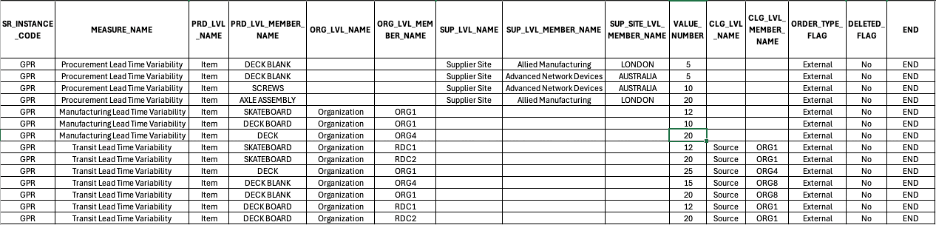
Illustration of the CSV File with the Required Fields
Column Descriptions
Column Descriptions
| Column Name in Measures Template | Column Name in Generated CSV File | Description of the Column | Required For: |
|---|---|---|---|
| Source System Code | SR_INSTANCE_CODE | Identifies the source instance from which planning data originates. For Oracle E-Business Suite source systems or legacy sources, use the instance code defined during collections setup. | All variability measures. Example: OPS |
| Measure Name | MEASURE_NAME | The internal name of the planning measure being loaded. | All variability measures. Example: Manufacturing Lead Time Variability, Procurement Lead Time Variability, Transit Lead Time Variability. |
| Product Level Name | PRD_LVL_NAME | The product hierarchy level at which data is loaded. You can load data at the level the measure is stored at or at an aggregate level. | All variability measures. Example: Item |
| Product Level Member Name | PRD_LVL_MEMBER_NAME | The specific product member value for the level in PRD_LVL_NAME. | All variability measures. Example: AS54888 |
| Organization Level Name | ORG_LVL_NAME | The organization hierarchy level. | All variability measures. Example: Organization (base level) or Business Unit (aggregate) |
| Organization Level Member Name | ORG_LVL_MEMBER_NAME | The specific organization member. For the Transit Time Variability measure, this represents the destination organization. | Manufacturing and Transit Time Variability. Example: Seattle Mfg |
| Supplier Level Name | SUP_LVL_NAME | The supplier hierarchy level name. Used when the measure includes a Supplier dimension. Typically, Supplier. | Procurement Lead Time Variability. Example: Supplier Site |
| Supplier Level Member Name | SUP_LVL_MEMBER_NAME | The specific supplier (or source organization for transfers). Must exist in the planning data repository. | Procurement Lead Time Variability. Example: Allied Manufacturing |
| Supplier Site Level Member Name |
SUP_SITE_LVL_MEMBER_NAME |
The specific supplier site or source organization site. Used for measures dimensioned at the supplier site level. | Procurement Lead Time Variability. Example: Chicago |
| Value Name | VALUE_NUMBER | The numeric measure value for the dimension combination being loaded. | All Variability Measures. Example: 20 which would represent 20% CoV percentage or Number of Days, depending on the set Profile Option. |
| Configurable Level Name * | CLG_LVL_NAME | The name of the level for which data is being loaded. For the Transit Lead Time Variability measure, this defines the Source Organization or the Supplier Site for the transit. | Transit Lead Time Variability. Example: Source or Supplier Site |
| Configurable Level Member Name * | CLG_LVL_MEMBER_NAME | The name of the level member for which the data is being loaded. For the Transit Lead Time Variability measure, this is the member name of the source level. | Transit Lead Time Variability. Example: Org1 or Acme Corp - Chicago |
| Order Type | ORDER_TYPE_FLAG | Indicates the order type associated with the measure. | All Variability measures. Example: EXTERNAL |
| Delete Indicator | DELETED_FLAG | Set to Yes to delete existing measure data for the given combination. | All Variability measures. Example: No |
Note: The Configurable Level is a special column that can be used to define the Transit Lead Time Variability between either a Supplier Site or a Source Organization.
Example: Transit Lead Time Variability loaded by Source Organization and by a Supplier Site for item AS54888 at Denver Distribution Center is replenished via internal transfers from two source organizations:
• Seattle Mfg (as a primary source)
• Acme Corp - Chicago (as a secondary source)
In this case, the measure data would be defined as follows:
Example: Configurable Level Name
| SOURCE Type | CLG_LVL_NAME | CLG_LVL_MEMBER_NAME (Source Organization/Supplier) | ORG_LVL_MEMBER_NAME (Destination Organization |
|---|---|---|---|
| External Supplier | Supplier Site | Acme Corp – Chicago | M1 |
| Internal Transfer Org | Organization | Seattle Mfg | M1 |
Load Planning Data from Flat Files
To load planning data using CSV files:
1. Create the CSV files using the predefined FBDI template with the steps mentioned in Create CSV Files to Load Planning Data.
2. Navigate to File Import and Export and create a new import. Set the account to scm/planningDataLoader/Import to import the CSV files.
3. Submit the Load Planning Data from Files scheduled process to load the data into the planning repository.
You can now launch the Load Planning Data from Files process directly in the Redwood Oracle Fusion Supply Chain Planning work area, as follows:
1. Select View More and then select Load Planning Data from Files from the Actions list.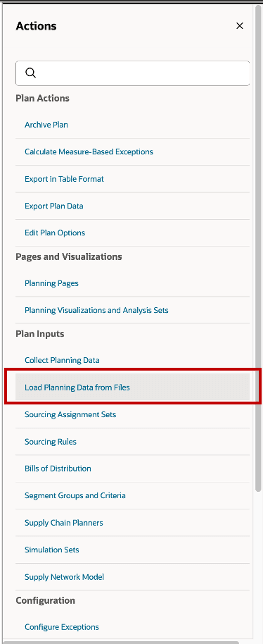
Load Planning Data from Files Action
The Load Planning Data from Files drawer opens.
After running the File Import and Export process for the specified data files, the files will appear in the Load Planning Data from Files drawer in the Data File drop-down list. The recently imported Measures files will be displayed here.
2. Select the file name from the Data File drop-down list.
3. Select the appropriate option from the Source System drop-down list.
4. Select Submit.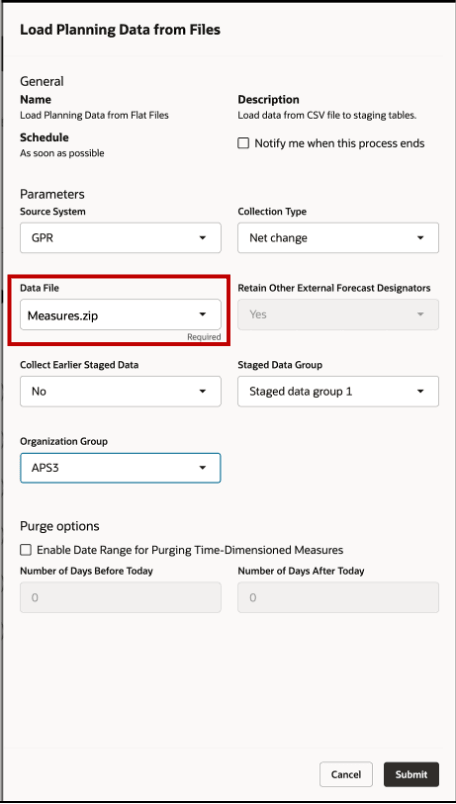
Load Planning Data from Files Drawer
New Profile Option: Unit of Measure for Lead Time Variability
A new profile option controls whether Manufacturing, Transit, and Procurement lead time variability input provided by FBDI is interpreted as Coefficient of Variation (CoV) or Number of Days during planning.
Profile Option
| Short Name | ORA_MSC_LT_VARIABILITY_UOM_REDWOOD_ENABLED |
|---|---|
| Display Name | Unit of Measure for Lead Time Variability |
| Description | Specify whether the lead time variability measure is Coefficient of Variation or Number of Days. |
| Default Value | Coefficient of Variation (CoV) |
Valid Values
Valid values for the profile option:
| Meaning | Code |
|---|---|
| Coefficient of Variation | 1 |
| Days | 2 |
The system reads this profile option at the start of the plan run and applies the following logic based on the configured value:
- If set to Coefficient of Variation (CoV): The system interprets the loaded FBDI value as a Coefficient of Variation. No additional validation is applied.
- If set to Days: The system interprets the loaded FBDI value as Number of Days. The FBDI load validates that the value is nonnegative.
Steps to enable and configure
You don't need to do anything to enable this feature.
Tips and considerations
• The entities for which data is being loaded must already exist in the planning data repository prior to initiating the upload.
• Provide values for both Source System and Data File before submitting the Load Planning Data from Files process.
Access requirements
Users who are assigned a configured job role that contains this privilege can access this feature:
• Submit Load Planning Data from Flat Files (MSP_PERFORM_ORDER_ORCHESTRATION_AND_PLANNING_DATA_LOAD_PRIV)
This privilege existed prior to this update.