Access Cart Details Directly During Requisition Creation
You can now access shopping cart details directly while creating a requisition, which improves visibility and makes navigation easier during the request creation process.
While using the Create Request, Create Noncatalog Request, or Enter Requisition Line flows, you can:
- View the current cart item count.
- Navigate directly to the shopping cart.
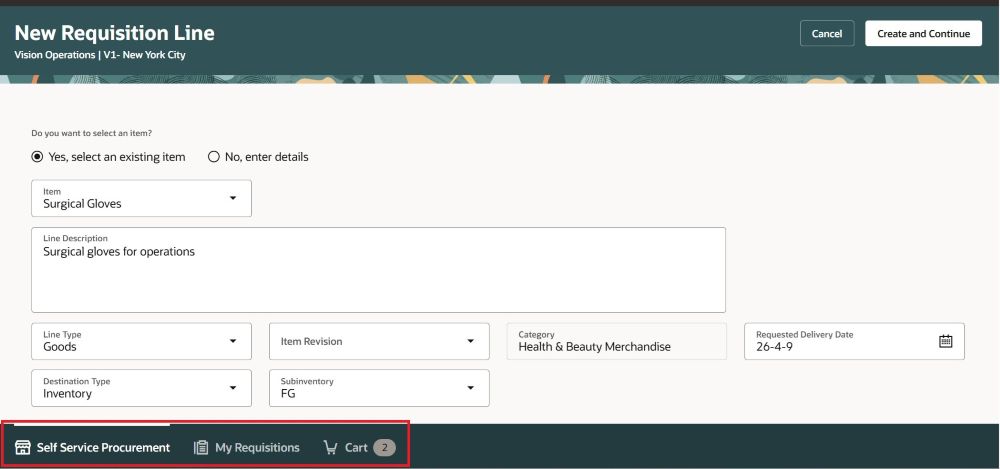
In App Navigation Displayed at the Botton While Creating Requisition
Steps to enable and configure
You don't need to do anything to enable this feature.
Tips and considerations
- If you navigate away using the in app navigation while adding a line, any unsaved data will be lost.
- Approvers can also view the in app navigation while adding a new line to the requisition during the approver edit flow.
- Extensibility
- You can hide the in app navigation using the Show Navigation on Create Requisition Pages constant.
- By default, this constant is set to True.
Key resources
- To know how to provide the required privileges to your requesters to use your own configured role instead of the Requisition Self Service User role, refer to the Privileges Required for a Predefined Role for a Requisition Self Service User topic.
- For information about using Oracle Visual Builder Studio to extend your Redwood application pages, see Oracle Fusion Cloud HCM and SCM: Extending Redwood Applications for HCM and SCM Using Visual Builder Studio.