View and capture additional lot attributes using a mobile device
In industries where lot-controlled goods are widely used, timely and accurate entry of lot-level information is critical for maintaining product quality, ensuring compliance, and supporting informed decision-making. If you're unable to capture key lot attributes, such as expiration date, material status, or maturity date at the time of the transaction, this slows down operations and increases the risk of errors, inconsistent data entry, and fragmented information. Now, you have the ability to view and update lot attributes when transacting using a mobile device.
This feature provides these capabilities:
- When you scan or select an existing lot, you can view all lot attributes for the selected lot.
- When you scan or enter a new lot, you can capture all lot attributes for that lot.
- For qualified items, the list of values displays the parent lot and lot expiration date.
These lot attributes are available as part of this feature:
- Parent Lot
- Lot Material Status
- Grade
- Lot Origination Type
- Lot Origination Date
- Lot Expiration Date
- Lot Expiration Action Date
- Lot Expiration Action
- Lot Maturity Date
- Lot Hold Until Date
- Lot Retest Date
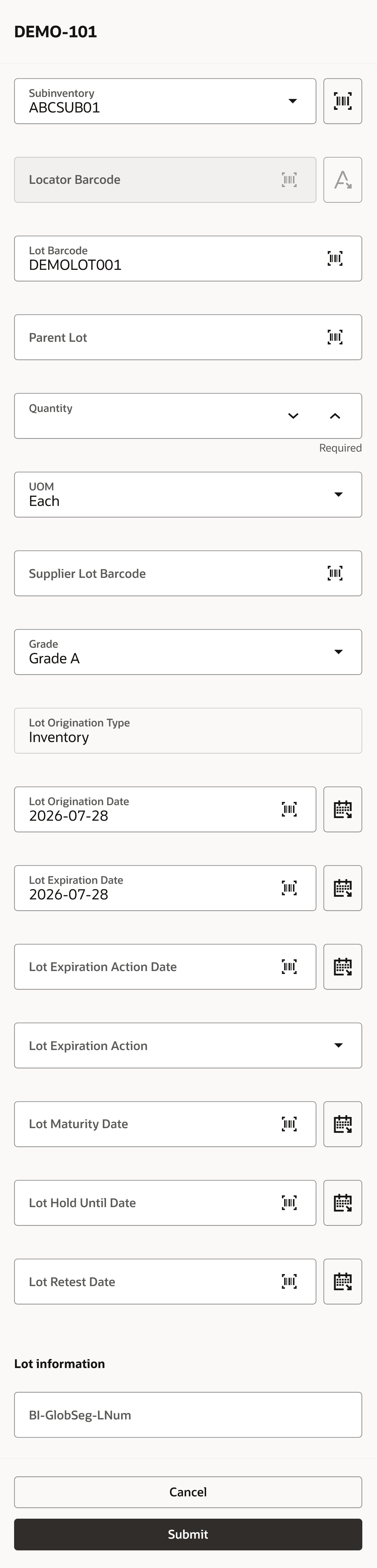
Capture lot attributes during miscellaneous receipt
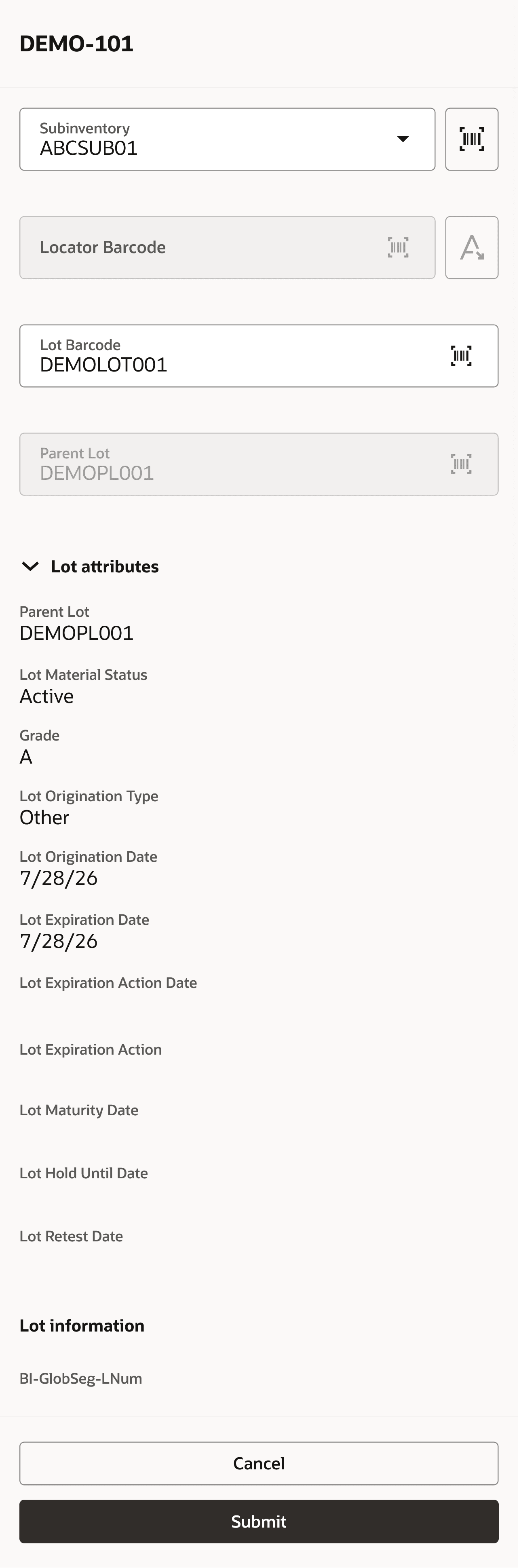
View lot attributes during miscellaneous receipt
You can view or edit lot attributes on these Redwood pages, accessed through the Inventory Execution work area:
- Confirm Pick
- Inspect Goods
- Interorganization Transfer
- Lot Transactions
- Miscellaneous Transactions
- Put Away Goods
- Receive Goods
- Subinventory Transfer
- Repack LPN
This feature allows you to make necessary updates in real time, without disrupting your workflow, resulting in improved efficiency, more consistent data capture, and stronger support for traceability and regulatory compliance.
Steps to enable and configure
Leverage the Visual Builder Studio to expose your applications. To learn more about extending your application using Visual Builder, visit Oracle Help Center > your apps service area of interest > Books > Configuration and Extension.
You can edit the Redwood pages in Visual Builder Studio.
- Open the page where you want to view or edit lot attributes.
- From the Settings and Actions menu, select Edit Page in Visual Builder Studio.
- In Visual Builder Studio, under Business Rules, click Configure Fields and Regions.
- Create a new rule or edit an existing rule.
- Search for the lot attribute and set its Hidden property to Visible.
Key resources
- Oracle Fusion Cloud SCM: Using Inventory Management guide, available on the Oracle Help Center.
- Oracle Fusion Cloud SCM: Implementing Manufacturing and Supply Chain Materials Management guide, available on the Oracle Help Center.
- For information about using Oracle Visual Builder Studio to extend your Redwood application pages, see Oracle Fusion Cloud HCM and SCM: Extending Redwood Applications for HCM and SCM Using Visual Builder Studio.
Access requirements
Users who are assigned a job role that includes these duty roles can access this feature:
| Duty role status | Duty role name and code |
|---|---|
| Existing |
Receive Goods Using Responsive Receiving (ORA_RCV_RECEIVE_GOODS_PWA_DUTY) |
| Existing |
Inspect Goods Using Responsive Receiving (ORA_RCV_INSPECT_GOODS_PWA_DUTY) |
| Existing |
Put Away Goods Using Responsive Receiving (ORA_RCV_PUT_AWAY_GOODS_PWA_DUTY) |
| Existing | Create Interorganization Transfer Using Responsive Inventory (ORA_INV_CREATE_INTERORG_TRANSFER_PWA_DUTY) |
| Existing | Confirm Pick Using Responsive Inventory (ORA_INV_CONFIRM_PICK_PWA_DUTY) |
| Existing |
Create Miscellaneous Transaction Using Responsive Inventory (ORA_INV_CREATE_MISCELLANEOUS_ISSUE_PWA_DUTY) |
Users who are assigned a job role that includes these privileges can access this feature:
| Privilege status | Privilege name and code |
|---|---|
| Existing |
Perform Lot Split Transaction Using Mobile Inventory (INV_LOT_SPLIT_MOBILE_PWA_PRIV) |
| Existing |
Perform Lot Merge Transaction Using Mobile Inventory (INV_LOT_MERGE_MOBILE_PWA_PRIV) |
| Existing |
Perform Lot Translate Transaction Using Mobile Inventory (INV_LOT_TRANSLATE_MOBILE_PWA_PRIV) |
| Existing |
Repack LPN Using Mobile Inventory (INV_REPACK_LPN_MOBILE_PWA_PRIV) |