View item description when capturing physical and cycle counts using a mobile device
Accurate inventory counting depends on warehouse associates being able to quickly and confidently identify the items they're counting. While barcode scanning is the primary method for selecting items during mobile physical and cycle count transactions, there are situations where operators need additional information to verify that they've identified the correct item. Barcode labels can become damaged or unreadable, and many organizations use system-generated item numbers that provide little indication of the product itself. In these cases, operators rely on descriptive item information to confirm that the scanned item matches the physical inventory before recording the count. To support accurate and efficient inventory counting, you can now view the item description on item cards used during mobile physical and cycle count transactions.
When capturing physical inventory and cycle counts on a mobile device, users can now view item descriptions directly on item cards in the Items to count section. The item card can display item-identifying details such as item number, item description, and revision, helping users confirm the correct item before entering count details.
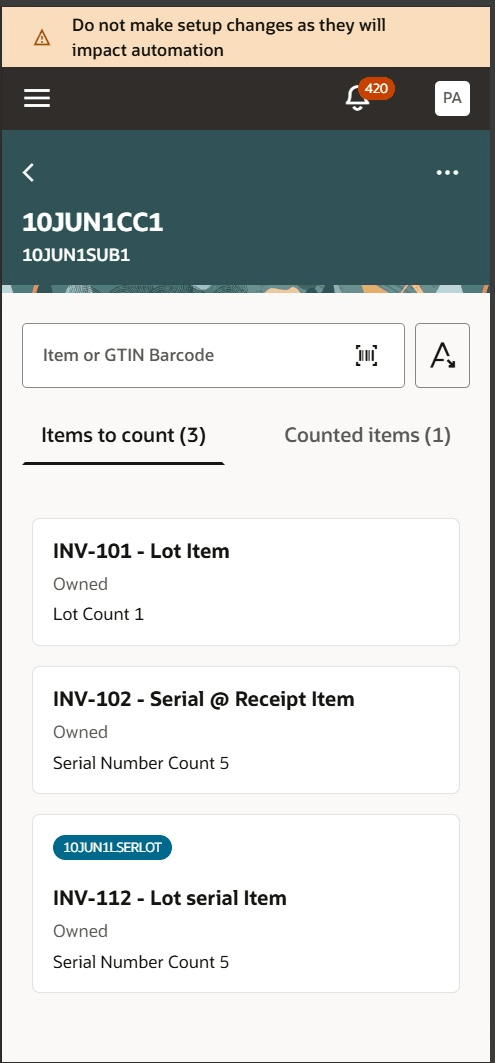
Item description
The mobile item card primary text can be configured to show the item-identification format that best matches your business needs. Supported combinations are:
- Item number + revision
- Item description + revision
- Item number + item description + revision
Improve count accuracy by providing warehouse users with clearer item identification details during mobile count entry. This reduces reliance on item numbers alone and supports more reliable physical inventory and cycle count processing.
Steps to enable and configure
You don't need to do anything to enable this feature.
Tips and considerations
- Revision details appear with the item information when revision details apply.
- Item cards can also show supporting context, such as project, task, ownership, lot count, and serial count, when those details apply to the item being counted.
Key resources
- Oracle Fusion Cloud SCM: Using Inventory Management guide, available on the Oracle Help Center.
- Oracle Fusion Cloud SCM: Implementing Manufacturing and Supply Chain Materials Management guide, available on the Oracle Help Center.
Access requirements
No additional access is required.