Use improved integration for transfer orders routed through Order Management
Organizations that require advanced orchestration for internal material transfers, consistent processing across both internal and customer orders, integration with transportation planning systems, or other complex fulfillment workflows often route their transfer orders through Oracle Fusion Cloud Order Management. In these environments, the timely creation and processing of the corresponding sales orders is critical to maintaining an efficient fulfillment process. To further streamline this integration, Oracle Fusion Cloud Inventory Management now uses an enhanced approach for transmitting transfer order information to Oracle Order Management.
When a transfer order is created, updated, or canceled, Inventory Management sends the transfer order details to the Order Management staging interface. The Import Sales Orders scheduled process then imports the transfer order into Order Management and creates, updates, or cancels the corresponding order in Order Management.
This feature provides these business benefits:
- Supports high volumes of transfer order transactions with improved scalability and processing efficiency.
- Provides faster and more reliable synchronization between Inventory Management and Order Management.
- Improves visibility by providing clear processing statuses and error messages, enabling users to quickly identify and resolve integration issues.
- Uses the enhanced integration framework, eliminating reliance on the legacy transfer order integration process.
Steps to enable and configure
Use the Opt In UI to enable this feature. For instructions, refer to the Optional Uptake of New Features section of this document.
Offering: Manufacturing and Supply Chain Materials Management No Longer Optional From: Update 27B
Schedule the Import Sales Orders process
The new integration framework between Oracle Fusion Cloud Inventory Management and Oracle Fusion Cloud Order Management is asynchronous. To ensure transfer orders are processed in a timely manner, schedule the Import Sales Orders process to run at a regular interval.
- Navigate to Tools > Scheduled Processes.
- Schedule the Import Sales Orders process.
- Set the Process Order Types parameter to Transfer Orders from Inventory. When this option is selected, the process automatically disables the Source System, Customer Name, and Customer Number parameters because they don't apply to transfer orders. It also sets the Delete Processed Orders parameter to Yes by default.
- Click Advanced and configure the process to run on a schedule. Set the scheduling frequency based on your business requirements and how frequently you want transfer orders to be synchronized with Oracle Order Management.
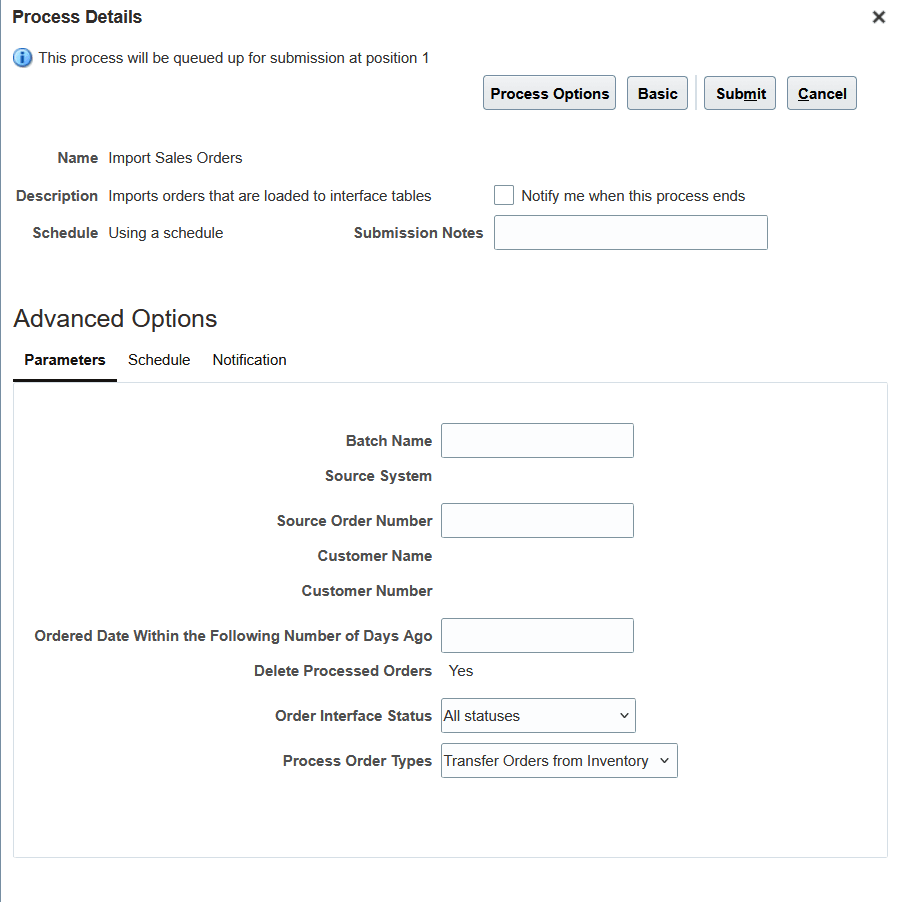
Schedule the Import Sales Orders process
Key resources
- Oracle Fusion Cloud SCM: Using Inventory Management guide, available on the Oracle Help Center.
- Oracle Fusion Cloud SCM: Implementing Manufacturing and Supply Chain Materials Management guide, available on the Oracle Help Center.
- Oracle Fusion Cloud SCM: Implementing Order Management guide, available on the Oracle Help Center.
- Oracle Fusion Cloud SCM: Using Order Management guide, available on the Oracle Help Center.
Access requirements
To schedule the Import Sales Orders process, assign users a configured job role that includes this privilege:
| Privilege status | Privilege name and code |
|---|---|
| Existing |
Import Order (FOM_IMPORT_ORDER_PRIV) |