Use grade and expiration date as on-hand attributes
Organizations that manage products with varying quality grades or limited shelf life need more precise visibility into available inventory than a single aggregated on-hand balance can provide. In industries such as food and beverage, life sciences, healthcare, chemicals, and industrial manufacturing, inventory decisions often depend on attributes such as expiration date and quality grade, regardless of whether an item is lot controlled, serial controlled, or neither. Treating all on-hand inventory as a single quantity can make it difficult to identify inventory that meets customer, production, or regulatory requirements, leading to inefficient allocation, increased waste from expired inventory, or unnecessary manual analysis. To combat this, you need the ability to stripe on-hand inventory by grade and expiration date so inventory is logically segmented into distinct availability buckets based on these business attributes. This provides planners, inventory managers, and warehouse personnel with a more accurate representation of usable inventory, supports quality and shelf-life based allocation strategies, improves inventory visibility, and helps reduce spoilage while ensuring compliant fulfillment and production decisions. Now you can use grade and expiration date as striping attributes to segregate the on-hand quantity of an item whether the item is lot controlled, serial controlled, or neither.
Inventory striping lets you segregate on-hand inventory for lot-controlled and not lot-controlled items by grade and expiration date. The following flows support item grade and item expiration date:
- Usage of preferred grade for the ingredients in a batch.
- Transfer of material with a specific grade between organizations enabled for inventory striping by grade.
- Issue of material with a specific expiration date using movement requests.
- Picking and shipping of the item based on the grade specified on the demand line.
- You can override the grade on the demand line through quick ship when the shipping parameter allows the override of the inventory attributes.
- cycle counting and physical counting of material with grade and expiration date.
- Grade and Expiration Date on the mobile inventory transactions.
- Minimum Remaining Shelf Life (MRSL) for items which aren't enabled for lot control when the shipping organization is enabled for inventory striping by expiration date.
You can use item grade and item expiration date during receiving, inventory, and shipping transactions. On the Configure Inventory Attributes page, use the Attribute Mapping Rules tab to map these attributes to a source in Oracle Fusion Cloud Procurement and Manufacturing.
Document types supported for item grade and expiration date
|
Support item grade |
Support item expiration date |
|
|
Work order |
Yes |
No |
| Transfer order |
Yes |
Yes |
|
Movement request |
Yes |
Yes |
| Sales order | Yes | Yes |
The inventory attributes for Item Grade and Item Expiration Date are seeded by default.
The applicability of the Item Grade attribute can be set to All organizations, Specific organization, or Category, in addition to enabling the item for lot-control and grade control in an organization. You can enable the item grade attribute at the organization or category level and make it applicable to items under serial control or items not under lot or serial control.
Enablement of item grade for different item types
|
Enabled for lot control |
Enabled for grade control |
Item grade applicability level |
|
|
Lot-controlled item |
Yes |
Yes |
|
|
Serial-controlled items |
No |
Not applicable |
|
|
Items not under lot or serial control |
No |
Not applicable |
The applicability of the Item Expiration Date can be set to All organizations, Specific organization, or Category in addition to enabling the item for lot-control and shelf-life control in an organization.
Enablement of item expiration date for different item types
|
Enabled for lot control |
Enabled for shelf- life control |
Item expiration date applicability level |
|
|
Lot Controlled Item |
Yes |
Yes |
|
|
Serial Controlled Items |
No |
Not applicable |
|
|
Items not under lot or serial control |
No |
Not applicable |
Specify item grade or item expiration date before you put away an item so that the on-hand record includes the applicable attribute. The value defaults from the purchasing document or the item's default grade setup in the organization, when configured.
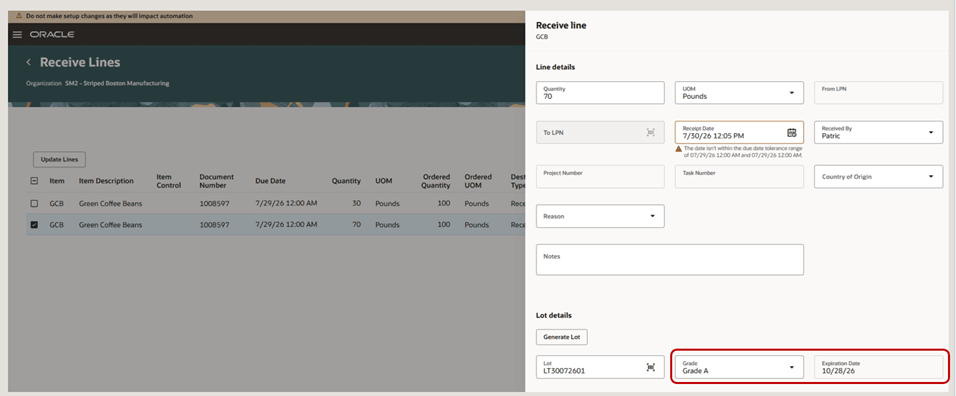
Enter the grade for the item during receiving or put away
On the Inventory Attributes tab of the Item Quantities page, you can view availability by item grade or item expiration date. This tab shows Available to Reserve and Available to Transact quantities for an item by item grade and item expiration date in an organization. It also lets you view on-hand quantities for an item by Country of Origin.
The Detailed view also shows the item grade and item expiration date for an on-hand record. Initiating transactions for an on-hand quantity with grade or expiration date reference defaults these attributes while performing inventory transactions from the Item Quantities page.
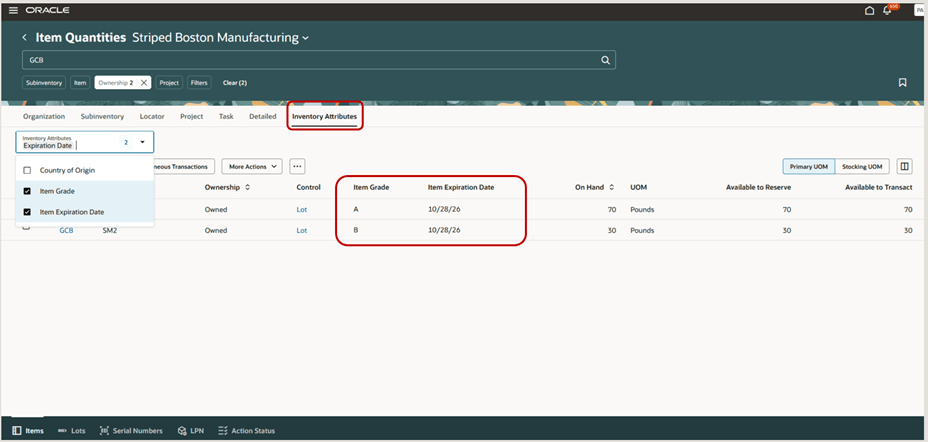
View item quantities by grade and expiration date
For items enabled for item grade or item expiration date, use the Change Grade and Change Expiration Date actions on the Item Quantities page to update the attribute's on-hand inventory. The Item Grade Change and Item Expiration Date Change transaction types support these updates. For lot-control items enabled for lot and grade control, use the existing Lot Grade Change action.
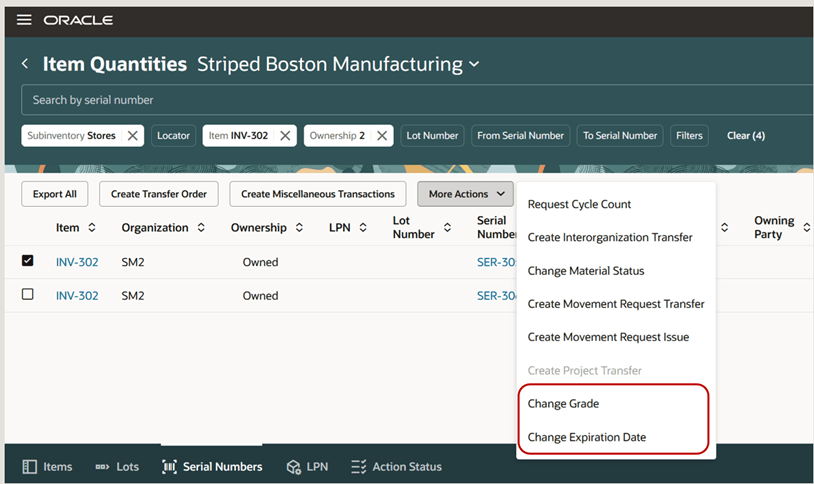
Change grade and change expiration date actions on Item Quantities page
Pick release for a batch ingredient with a preferred grade creates picks that honor the grade specified for the ingredient in the batch. If the demand doesn't specify a preferred grade, pick release uses available inventory. Pick release also honors the grade on transfer order and sales order demand lines.
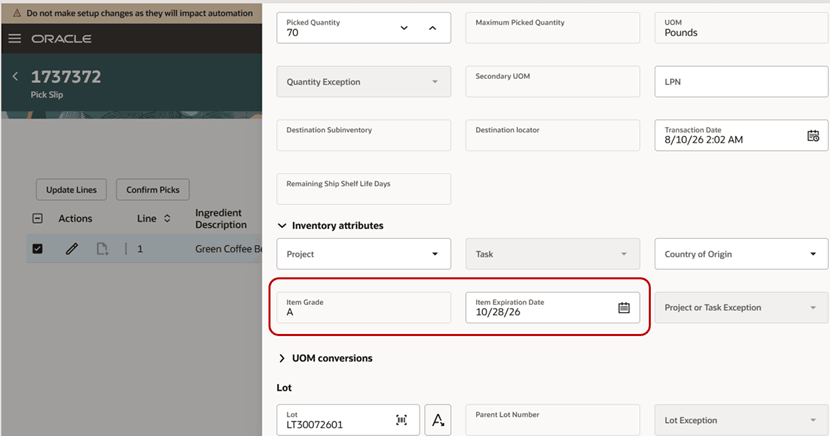
Pick for an ingredient with preferred grade in a batch
Use transfer orders to move graded material between organizations that are enabled for inventory striping by grade. You can’t transfer graded material from a source organization that isn’t enabled for grade-based inventory striping to a destination organization enabled for grade. The grade corresponding to the on-hand record on the Inventory Attributes tab or Detailed view defaults in the Item Grade field of the Inventory Attributes drawer on the New Supply Request page.
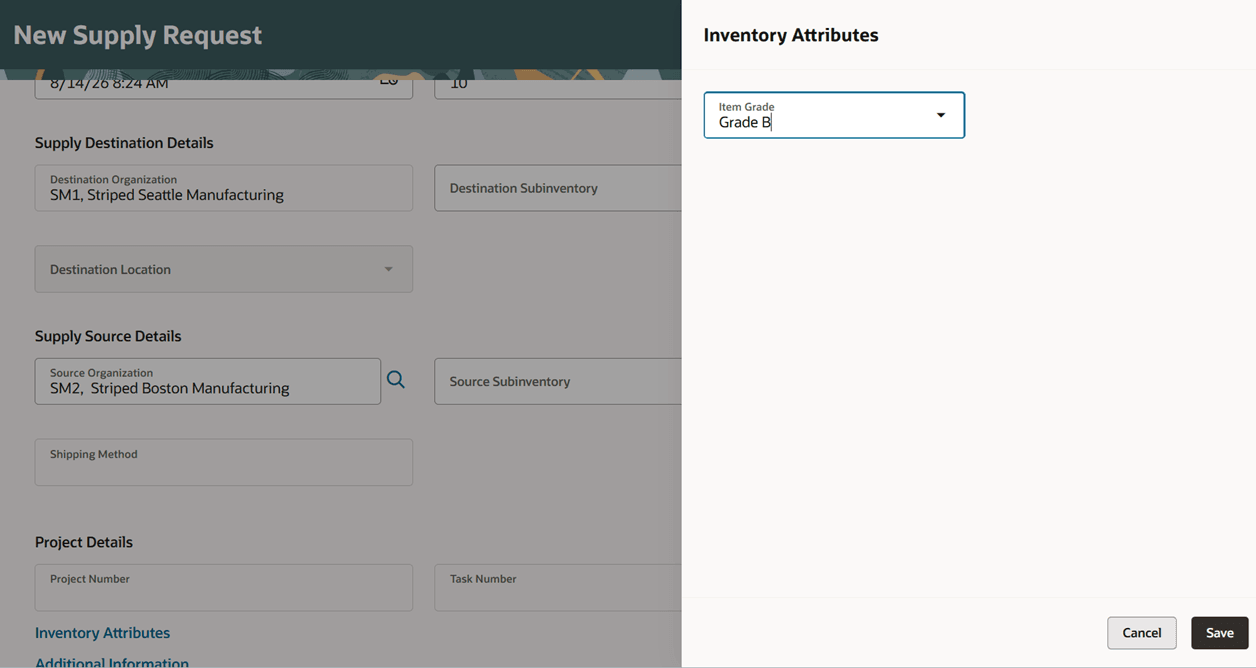
Support creation of transfer order by grade for an item from Item Quantities page
The Production Execution workbench supports item grade for the product and ingredients.
A shipment line can include grade and expiration date values when Order Management extensible flexfields are mapped to Inventory descriptive flexfields through the service mapper. Pick release honors the grade and expiration date specified on the order line. If inventory striping is enabled and invalid inventory attribute values are provided, a shipment request isn't created until valid values are provided. If inventory striping isn't enabled, inventory attributes on a shipment line are ignored when invalid values are passed for inventory attributes.
The updates to the inventory attributes for the shipment lines are only allowed for the lines in the Ready to Release or Backorder status. The updates aren't allowed for the shipment lines in the Released to Warehouse, Staged, or Shipped status.
Quick ship
- Item Grade: For quick ship enabled shipment lines, you can override the item grade entered on the sales order line if shipping parameters allow inventory attribute override for shipment lines eligible for quick ship.
- Expiration Date: In organizations that use expiration date inventory striping, the expiration date provided for a quick ship enabled shipment line creates a reservation with the expiration date. This applies whether the demand line references an expiration date, MRSL, or none.
- Minimum Remaining Shelf Life: If an expiration date is entered for a quick ship line with a MRSL reference, the reservation is created with MRSL. If the organization doesn't use expiration date striping, quick ship doesn't create reservations with a MRSL reference.
The Generate Shipment Request honors the demand attributes for the shipment lines to be interfaced to external systems. The reservations created by Generate Shipment Request carry an item grade or item expiration date reference when the fulfilled organization is enabled for inventory stripping by these attributes.
Ship confirm transactions from Oracle Fusion Cloud WMS must include the grade and expiration date inventory attributes when those attributes apply to an item in the ship-from organization. Otherwise, the ship confirm transaction will fail.
Mobile Inventory
The item card on the mobile inventory transactions for subinventory transfer, miscellaneous transactions, and interorganization transfer can be changed to display grade and expiration date in addition to project, task, country of origin, and owning party site using business rules.
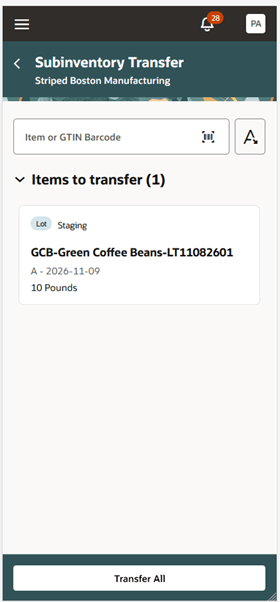
Item card can be modified to display grade and expiration date
The Item Grade and Expiration Date fields are available on the following Redwood pages:
- Item Quantities
- Reservations
- Picks
- Completed Transactions
- Pending Transactions
- Movement Requests
- Lots and Serial Numbers
- Consigned Inventory
- Record Cycle Count
- Cycle Count Approval
- Record Tags
- Physical Inventory Approval
- Confirm Pick Slips
- Outbound Shipments
- Expected Shipment Lines
- Inbound Shipments
- Purchase Orders to Ship
- Awaiting Inspection
- Awaiting Put Away
- Corrections
- Received Lines
- Receiving Returns
- Transfer Orders
- Mobile Pick Confirm
- Mobile Cycle Count
- Mobile Record Tags
- Mobile Stocking Inquiry
- Mobile Subinventory Transfer
- Repack LPN
- Mobile Miscellaneous Transactions
- Mobile Interorganization Transfers
- Mobile Ship Goods
- Mobile Receive Goods
- Mobile Inspect Goods
- Mobile Put Away Goods
- Lot Tranactions
- Download Count Interface Records in Spreadsheet
- Record Physical Inventory Tags in Spreadsheet
- Manage Pick Transactions from External System
- Reservations Interface
- Download Shipment Message Interface Records in Spreadsheet
- Download Shipping Transaction Correction Records in Spreadsheet
- Download Inventory Balance Messages for Error Management in Spreadsheet
- Download Inventory Balance Messages for Approval Management in Spreadsheet
Using grade or expiration date as an on-hand attribute enables you to accurately assess usable inventory, support shelf-life and quality driven fulfillment strategies, reduce product waste, improve regulatory compliance, and optimize inventory utilization across warehouse and inventory operations.
Steps to enable and configure
If you use custom job roles, first assign these new privileges to your appropriate job role.
- Configure Inventory Striping Attributes (INV_CONFIGURE_INVENTORY_STRIPING_ATTRIBUTES_PRIV)
- Item Grade Change (INV_ITEM_GRADE_CHANGE_PRIV)
- Item Expiration Date Change (INV_ITEM_EXPIRATION_DATE_CHANGE_PRIV)
- Manage Inventory Striping Attributes Data (INV_MANAGE_INVENTORY_STRIPING_ATTRIBUTES_DATA)
You can modify the following details on the Configure Inventory Attributes page:
- Attribute Name: The name of the inventory attribute. For example, Item Grade is seeded by default and can be renamed when the inventory attribute is deployed.
- On-Hand Column Name: The on-hand column to which the inventory attribute is mapped. Item Grade is mapped to the ITEM_GRADE_CODE attribute.
- Status: Determines the lifecycle status of the inventory attribute.
- Value Set: Indicates the value set associated with the inventory attribute.
- Default Value: Indicates the value that defaults during transactions when the inventory attribute is not specified.
- Upgrade Default Status: Indicates the value used to associate existing on-hand quantities for items enabled for the inventory attribute but not enabled for lot or serial control.
- Applicable for Item Types: Determines whether an inventory attribute can be enabled for lot-controlled items, serial-controlled items, or items that aren't enabled for lot or serial control.
Status values
- Draft: Indicates that the inventory attribute is being changed. Editing a deployed inventory attribute creates a copy in Draft status.
- Error: Indicates that the inventory attribute is in Error status.
- Deployed: Indicates that the inventory attribute is deployed and available for transactions.
- Redeploy Needed: Indicates that applicable organizations have been added to an inventory attribute, but the attribute hasn't been deployed.
- Deploying: Indicates that the Deploy Inventory Attributes scheduled process is still running.
Attribute mapping
Attribute mapping determines whether an inventory attribute is already used as an existing lot or serial attribute.
- Lot Attribute: Item Grade is mapped to the grade_code in inv_lot_numbers. Item Expiration Date is mapped to the expiration_date in inv_lot_numbers.
- Serial Attribute: Indicates that the inventory attribute is mapped to an existing serial number attribute.
Reservation and required attributes
By default, both Item Grade and Item Expiration Date are enabled for reservations and required for transactions.
Enabled: Select the Enabled checkbox to enable the the inventory attribute.
Applicability level: The applicability level determines the level at which the inventory attribute applies to transactions.
The applicability can be set at these levels:
- All organizations: The inventory attribute applies to all items in all inventory organizations.
- Specific organization: The inventory attribute applies to specific items.
- Category: The inventory attribute applies to the items associated with a specific category.
Choose a Default Value for an inventory attribute for each applicable organization. This defaults the inventory attribute when you perform transactions for items which are enabled for serial control or items which aren't enabled for lot or serial control.
Click the Done and Activate button after you've updated the attribute details. This launches the Deploy Inventory Striping Attributes scheduled process.
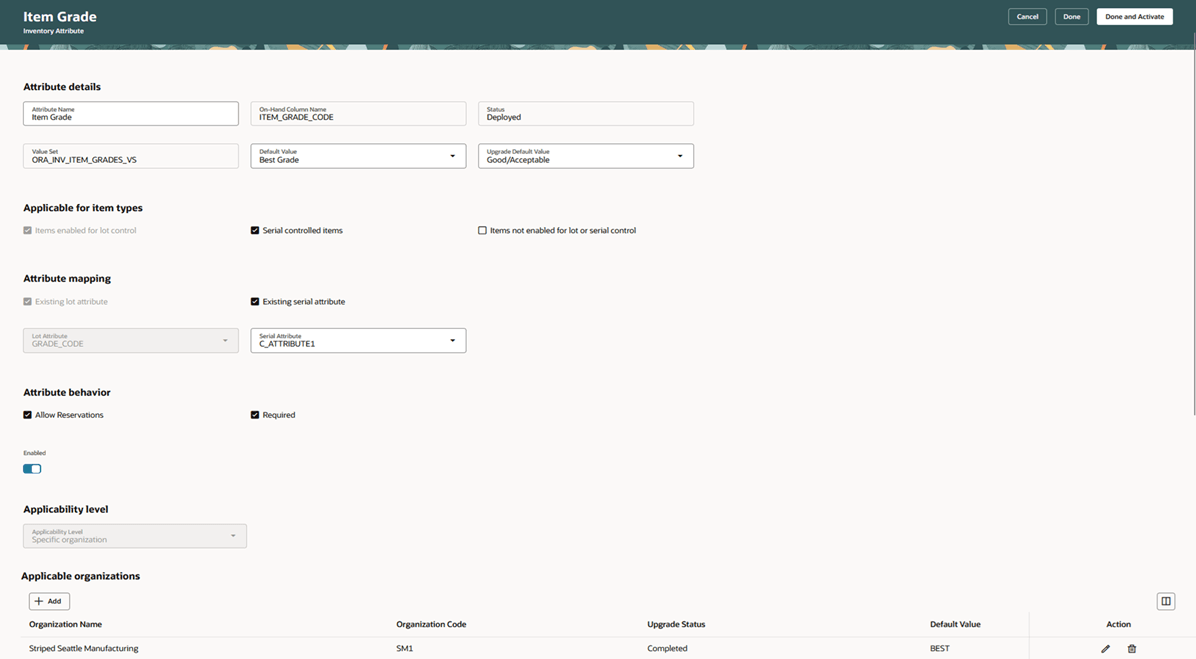
Configure Inventory Attributes
Map Item Grade or Item Expiration Date attributes to an attribute in an Object Type for a source in Oracle Fusion Cloud Procurement or Manufacturing using the Attribute Mapping Rules. The Attribute Mapping Rules can be found on the secondary tab of the Configure Inventory Attributes page.
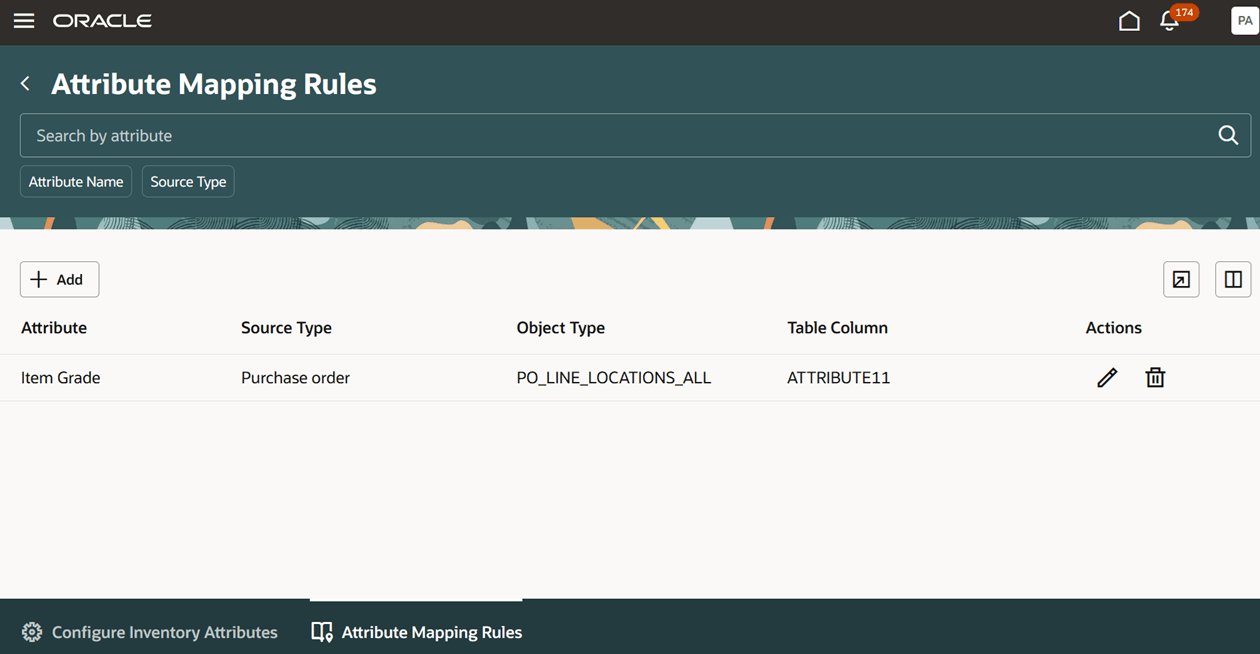
Attribute Mapping Rules tab
Tips and considerations
- You can’t update an inventory attribute while the attribute deployment is in process.
- The Item Grade attribute is enabled for lot-controlled items when the items are enabled for lot control and grade in an organization and the item grade is made applicable to the item either in an organization or a category.
- Specify the Default Value for an inventory attribute to default the attribute value for transactions like miscellaneous receipt or PO receipt when the inventory attribute is enabled for items which aren’t under lot or serial control.
- Specify the Upgrade Default Value for an inventory attribute to associate existing on-hand inventory to a default attribute value during the upgrade process.
- You can update the applicability level when the applicability records exist for an inventory attribute. For example, updating the applicability level from Specific organization to Category isn’t allowed when records exist with the applicability by organization for items.
- The Item Grade and Item Expiration Date attributes can be enabled for serial-controlled items. Mapping these attributes to an existing serial attribute, captures the inventory attribute in the serial attribute.
- When the attribute is not mapped to an existing serial attribute, the grade or the expiration date information is tracked with the on-hand record and captured in the On-hand Column Name associated with the inventory attribute.
- Enabling the inventory attribute for items which aren’t enabled for lot or serial control enables the inventory attribute at the on-hand quantity level for items.
- When the applicability level for item grade or item expiration date is set to All organizations, and when you have some organizations enabled for manufacturing or maintenance, then the inventory attribute must be mapped to an existing lot attribute. Once the inventory attribute is made applicable to organizations enabled for manufacturing or maintenance, then it can’t be made applicable to items which aren’t enabled for lot or serial control.
For example, here's the Inventory attribute applicability levels for different item types:
|
Manufacturing organization |
Lot-controlled items |
Serial-controlled items |
Items not enabled for lot or serial control |
Enabled for applicability (Applicable when Applicability set to specific organization) |
|
|
M1 |
No |
Yes |
Yes |
No |
Yes |
|
M2 |
Yes |
Yes |
Yes |
No |
Yes |
|
M3 |
Yes |
Yes |
Yes |
Yes |
No |
Applicability level set to All organizations:
- In the above example, the Applicability level can’t be set to All organizations for an inventory attribute when some organizations are enabled as manufacturing or maintenance organizations and have items which aren’t enabled for lot or serial control.
- The applicability level can be set to All organizations if none of the organizations are enabled for Manufacturing or Maintenance.
Applicability level set to Specific organization:
- The Applicability level can be set to Specific organization for the Item Grade or Item Expiration Date attributes.
- In the above example, M1 organization can be enabled for applicability for the inventory attribute because it’s not enabled as a manufacturing or maintenance organization.
- M2 organization can be enabled for applicability for the inventory attribute only when the inventory attribute is mapped to an existing serial attribute since organization M2 is enabled as a manufacturing organization.
- The M2 organization can be enabled for applicability for the inventory attribute because it isn’t associated with any items that aren’t enabled for lot or serial control.
- The M3 organization can’t be enabled for applicability because it is associated to items which aren’t enabled for lot or serial control.
Applicability level set to Category:
- The Applicability level can be set to Category for Item Grade or Item Expiration Date attributes.
- In the above example, M3 organization can be enabled for applicability for the item grade only when the M3 organization is mapped to an existing serial attribute and specific category is assigned to the lot or serial controlled items which isn’t assigned to items which aren’t under lot or serial control.
- The new items appear under the View Applicability Changes action for an inventory attribute corresponding to applicable organizations, with the addition of new items to an applicable organization or addition or removal of items from a category in an applicable organization. The Deploy Inventory Attributes scheduled process is launched automatically to make the inventory attribute applicable for the new items added to a category or to make it inapplicable for items removed from a category.
- Item Grade can't be deployed when it's associated with an organization that contains on-hand quantities for items enabled for lot control but not enabled for grade. Ensure that the items are enabled for both lot control and grade in every organization where Item Grade is applicable for inventory striping.
- Item Expiration Date can't be deployed when it's associated with an organization that contains on-hand quantities for items enabled for lot control but not enabled for shelf-life control. Ensure that the items are enabled for both lot control and shelf-life control in every organization where Item Expiration Date is applicable for inventory striping.
- When the inventory attribute is mapped to a specific attribute in an object for a source using the Attribute Mapping Rules, you must associate the inventory attribute with the descriptive flexfield for that object. For example, associating the Grade attribute with the po_line_locations_all object type for the purchase order source type requires you to associate the inventory attribute to the descriptive flexfield on the po_line_locations_all object.
- Ensure that the data type of the inventory attribute associated with the value set on the Configure Inventory Attributes page matches the data type of the attribute on the object type for a source when you have mapped an inventory attribute to a source using the Attribute Mapping Rules.
- The default values for grade and expiration date can be specified for each applicable organizations. The Upgrade status corresponding to the applicable organization indicates whether the existing on-hand inventory for these attributes is associated with a Grade and Expiration Date post upgrade. The user needs to click the Done and Activate button after associating an inventory attribute to an applicable organization. This launches the Deploy Inventory Attributes scheduled process to associate the existing on-hand inventory to Grade and Expiration Date attributes when inventory striping is enabled for these attributes.
- Pick release creates picks that honor the grade specified for the ingredient when the opt-in Specify the Preferred Grade of Materials and Product in a Recipe is enabled. Without this opt-in, picks are created for whatever ingredient grade is available during pick release.
- The inventory attributes are supported on REST services and VBCS Excel plugin.
- For transfer orders, substitute items must have the same inventory attributes enabled as the original item. For example, if item X is enabled for grade and expiration date attributes, substitute item Y should also be enabled for those attributes. If the substitute item isn't enabled for an attribute, that attribute won't apply to its transfer order line.
- The Attribute Mapping rules can’t be specified for item grade and item expiration date attributes for the work order source type since manufacturing uses the preferred grade in the recipe for ingredients or end product and manufacturing doesn’t support inventory striping by expiration date in an organization enabled for manufacturing or maintenance.
- The classic pages don’t get rendered when the inventory organization is enabled for inventory striping by grade or expiration date attributes.
- The transfer orders with inventory attributes when eligible to be interfaced to Distributed Order Orchestration don’t propagate the inventory attributes to Oracle Fusion Cloud Order Management, but the shipment lines for the transfer order will carry the inventory attribute reference.
Key resources
Oracle Fusion Cloud SCM: Implementing Manufacturing and Supply Chain Materials Management guide, available on the Oracle Help Center.
Access requirements
If you are using custom job roles, then you need to add privileges identified as new in this update:
| Privilege status | Privilege name and code |
|---|---|
| New |
Configure Inventory Striping Attributes INV_CONFIGURE_INVENTORY_STRIPING_ATTRIBUTES_PRIV |
| New |
Item Grade Change INV_ITEM_GRADE_CHANGE_PRIV |
| New |
Item Expiration Date Change INV_ITEM_EXPIRATION_DATE_CHANGE_PRIV |
| New |
Manage Inventory Striping Attributes Data INV_MANAGE_INVENTORY_STRIPING_ATTRIBUTES_DATA |