Perform scheduled cycle counts for locator controlled subinventories on a mobile device using an optimized flow
Inventory accuracy depends on the timely and efficient execution of cycle counts. Repetitive navigation steps that add little value to the actual counting activity slow the process. In facilities where locators typically contain a single item, repeatedly navigating through locator selection screens between count entries is redundant and significantly extends the time required to complete cycle count activities.
To improve counting efficiency, you can now use a simplified cycle count entry process that reduces repetitive locator selection steps and enables a more continuous counting workflow when each locator contains a single item or only a few items.
Use the optimized scheduled cycle count flow on a mobile device to count inventory more efficiently in locator-controlled subinventories. After you select a cycle count and subinventory, you proceed directly to the Items to count page without selecting a locator.
Each item card displays its associated locator, so you can verify the inventory location as you record the count. Use the Counted items tab to review previously counted items while you complete the cycle count.
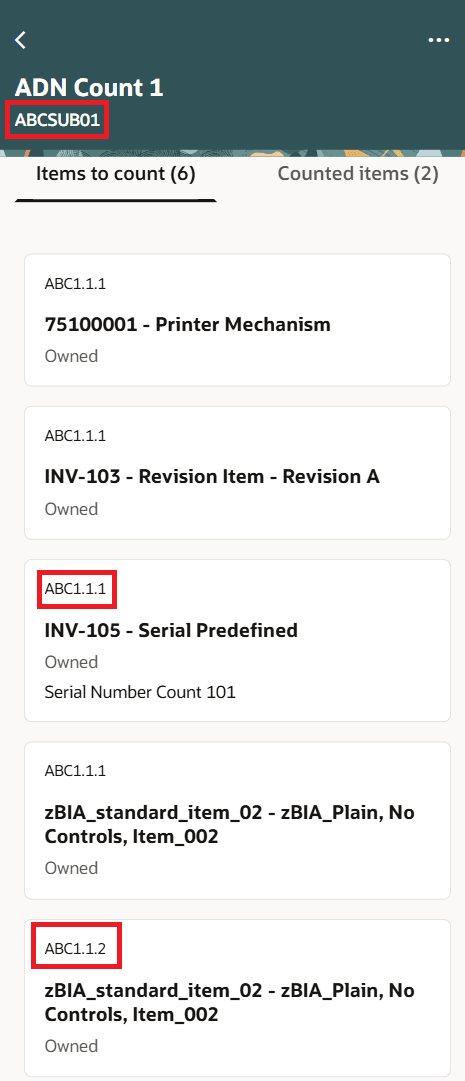
Optimized mobile flow
By eliminating unnecessary user interactions, warehouse associates can move through count tasks more quickly, improve productivity, and complete cycle count programs with less effort while maintaining inventory accuracy.
Steps to enable and configure
Leverage the Visual Builder Studio to expose your applications. To learn more about extending your application using Visual Builder, visit Oracle Help Center > your apps service area of interest > Books > Configuration and Extension.
- Open the Business Rules configuration for the Subinv Select page.
- Under Page Properties, set Skip Locator Navigation to Y.
- Publish the business rule.
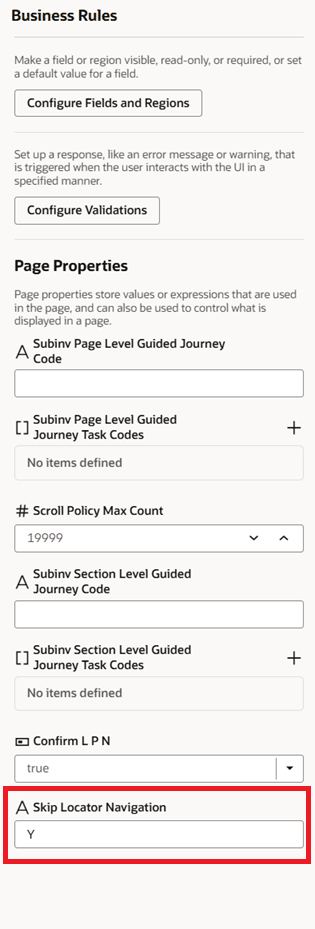
Business rules
Tips and considerations
- This configuration applies to the scheduled cycle count mobile flow.
- When enabled, the locator selection card is skipped after subinventory selection.
- Item cards continue to display the associated locator.
Key resources
- Oracle Fusion Cloud SCM: Using Inventory Management guide, available on the Oracle Help Center.
- Oracle Fusion Cloud SCM: Implementing Manufacturing and Supply Chain Materials Management guide, available on the Oracle Help Center.
Access requirements
To extend application pages using Visual Builder Studio, you must be assigned a configured job role that contains this privilege:
|
Privilege status |
Privilege name and code |
|---|---|
| Existing |
Administer Sandbox FND_ADMINISTER_SANDBOX_PRIV |
| Existing |
View Administration Link FND_VIEW_ADMIN_LINK_PRIV |