Optimize manual cycle count selection for a single subinventory using a mobile device
Cycle counting is a critical inventory control activity that helps organizations maintain accurate inventory records without disrupting daily warehouse operations. In some situations, warehouse operators need to perform manual cycle counts to quickly verify inventory discrepancies or validate stock in a specific location outside the normal cycle count schedule. These ad hoc counts often require operators to record counts for multiple items stored within the same location. Requiring users to repeatedly reselect the same location for each count entry adds unnecessary navigation, reduces productivity, and increases the likelihood of selection errors. To streamline manual counting activities, you can now use the Save and Record Next action to record a count entry and immediately begin recording the next count while retaining key contextual information, such as the selected subinventory and locator.
Users can now select Save and Record Next when recording multiple manual cycle counts for the same subinventory and locator. After the current count is recorded, the application opens the next manual count entry while retaining the selected subinventory and locator.
This enhancement reduces manual touches per count session, shortens the time required to record each count line, lowers the risk of selecting the wrong location, and supports more counts per shift.
Use the optimized Record Manual Count flow to:
- Record successive manual cycle counts without leaving the Record Manual Count flow.
- Use Save and Record Next to record the current count and open the next entry.
- Retain the selected subinventory and locator for the next count.
- Change the retained subinventory or locator by using Save when the counting context changes.
- Select Back to return to the previous page without saving the current entry.
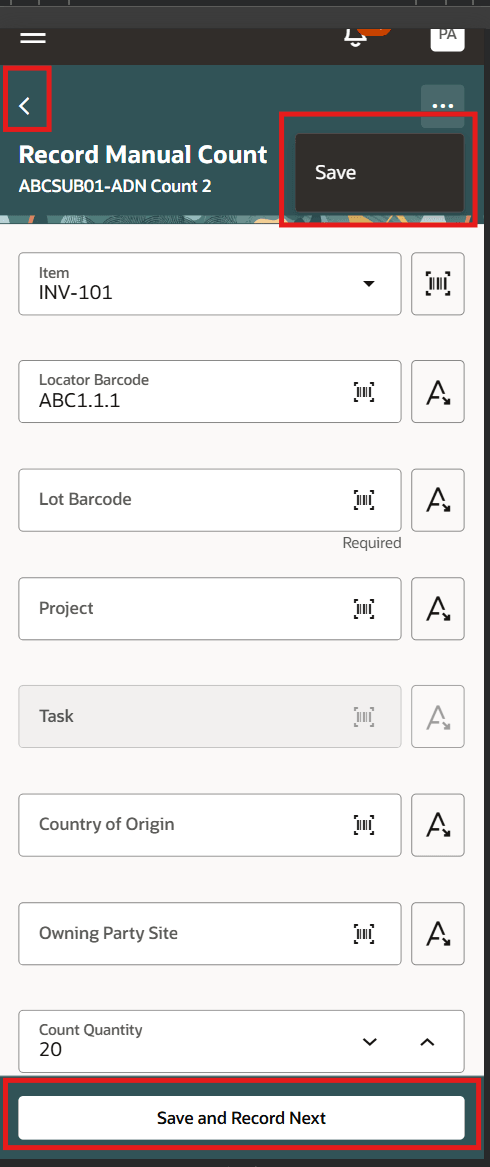
Use Save and Record Next to record the current manual cycle count and open the next entry
This feature helps eliminate repetitive data entry so warehouse operators can complete manual counting activities more efficiently, reduce errors, and focus on accurately verifying inventory.
Steps to enable and configure
You don't need to do anything to enable this feature.
Tips and considerations
- Selecting Save and Record Next records the current manual cycle count and opens the next count entry with the subinventory and locator retained.
- Users can change the retained subinventory or locator before recording the next count.
- Users can select Back to return to the previous page without saving the current entry.
- This enhancement applies only to manual cycle count entry. Physical inventory counts aren't part of this feature.
Key resources
- Oracle Fusion Cloud SCM: Using Inventory Management guide, available on the Oracle Help Center.
- Oracle Fusion Cloud SCM: Implementing Manufacturing and Supply Chain Materials Management guide, available on the Oracle Help Center.
Access requirements
Users who are assigned a configured job role that contains these privileges can access this feature:
|
Privilege status |
Privilege name and code |
Predefined job roles |
|---|---|---|
|
Existing |
Record Cycle Count Sequence (INV_RECORD_CYCLE_COUNT_SEQUENCE_PRIV) | Warehouse Operator (ORA_INV_WAREHOUSE_OPERATOR_JOB) Warehouse Manager (ORA_INV_WAREHOUSE_MANAGER_JOB) Inventory Manager (ORA_INV_INVENTORY_MANAGER_JOB) |
|
Existing |
Record Cycle Count Sequence Using Responsive Inventory (INV_RECORD_CYCLE_COUNT_SEQUENCE_PWA_PRIV) |
Warehouse Operator (ORA_INV_WAREHOUSE_OPERATOR_JOB) |