Route min-max created purchase requisitions for approval automatically
Min-Max Planning helps organizations maintain optimal inventory levels by automatically generating purchase requisitions when on-hand quantities fall below predefined replenishment thresholds. While this automation reduces manual planning effort, many organizations must also comply with procurement policies that require purchase requisitions to be reviewed and approved based on various factors. As a result, organizations often face a tradeoff between operational efficiency and governance. Automatically approving system-generated requisitions may bypass required approval controls, while creating them in an incomplete state requires buyers to manually review and submit every requisition before the approval process can begin. This additional step introduces unnecessary administrative effort and delays replenishment. Now, when the Min-Max Replenishment Reorder Approval profile option is set to Approval Required, Oracle Fusion Cloud Inventory Management automatically creates the purchase requisition and submits it to the Oracle Fusion Cloud Procurement approval workflow.
You can view the requisition generated from min-max planning by navigating to the My Requisitions page.
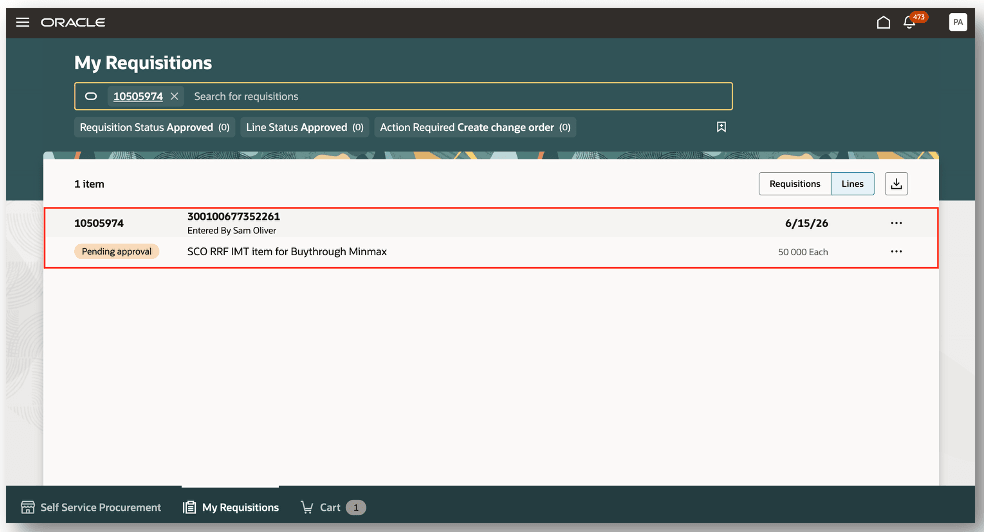
My Requisitions
This feature eliminates the manual submission step while preserving configured approval rules so you can accelerate replenishment processing, reduce administrative overhead, and ensure that system-generated purchase requisitions consistently follow established procurement governance.
Steps to enable and configure
Follow these steps to enable the Inventory profile option:
- In the Setup and Maintenance work area, search for and select the Manage Inventory Profile Options task.
- On the Manage Inventory Profile Options page, search for and select the INV_MINMAX_REORDER_APPROVED profile option code.
- In the Profile Values section, set the Profile Value.
- Approval required: requisition is created in Pending approval status
- Click Save and Close. Changes in the profile value will affect users the next time they sign in.
You have the option to set the profile level to Site or User.
Tips and considerations
You can enable a profile option at the following levels:
- Site level (lowest): The entire site of deployment
- User level (highest): A specific user
Key resources
- Oracle Fusion Cloud SCM: Using Inventory Management guide, available on the Oracle Help Center.
- Oracle Fusion Cloud SCM: Implementing Manufacturing and Supply Chain Materials Management guide, available on the Oracle Help Center.
- Oracle Fusion Cloud SCM: Security Reference for Manufacturing and Supply Chain Materials Management guide, available on the Oracle Help Center.
Access requirements
Users who are assigned the Supply Application Administrator configured job role can access the Manage Inventory Profile Options page.
Users who are assigned a configured job role with the following privilege can access this feature.
| Privilege Status | Privilege Name and Code |
|---|---|
| Existing |
Print Min-Max Planning Report (INV_PRINT_MIN_MAX_PLANNING_REPORT_PRIV) |