View lot attributes in a table when recording lots
In industries such as pharmaceuticals, food and beverage, chemicals, and manufacturing, warehouse and production personnel often need to verify critical lot-specific information while recording lot numbers during transactions. Without visibility into these lot attributes, such as expiration date, material status, grade, or other characteristics, users must navigate to separate inquiry pages or reports to verify the information before selecting a lot number. This slows transaction processing and increases the risk of selecting an incorrect or noncompliant lot. Now you can view lot-specific attributes in a clear, table-based view when recording lot numbers for transactions.
This enhancement provides a more consistent experience across the Record Lots and Record Lots and Serial Numbers flows on Inventory and Receiving pages. It also supports editing applicable attributes directly in the table.
These pages have been modified to show all the applicable lot attributes:
Inventory
- Subinventory Transfer
- Pending Transactions
- Miscellaneous Transactions
- Interorganization Transfer
- Project Transfer
- Consigned Inventory
- Repack LPN
- Lot Transactions (Split, Merge, and Translate)
- Create Picks
- Confirm Picks
Receiving
- Purchase Orders to Ship
- Expected Shipment Lines
- Receipts Awaiting Inspection
- Receipts Awaiting Put Away
- Receipt Corrections
These lot attributes are displayed on Record Lots and Record Lots and Serial Numbers pages:
- General lot attributes: Lot, Quantity, Origination Date, Origination Type, Maturity Date, Hold Date, Retest Date
- Shelf-life controlled items: Expiration Date, Expiration Action Date, Expiration Action
- Child lot enabled items: Parent Lot
- Lot status enabled items: Material Status
- Dual unit of measure enabled items: Secondary Quantity, Secondary UOM
- Lot grade enabled items: Grade
- New lots only: Supplier Lot
- Transaction-only attribute: Reason
- Additional Information: Available through an icon
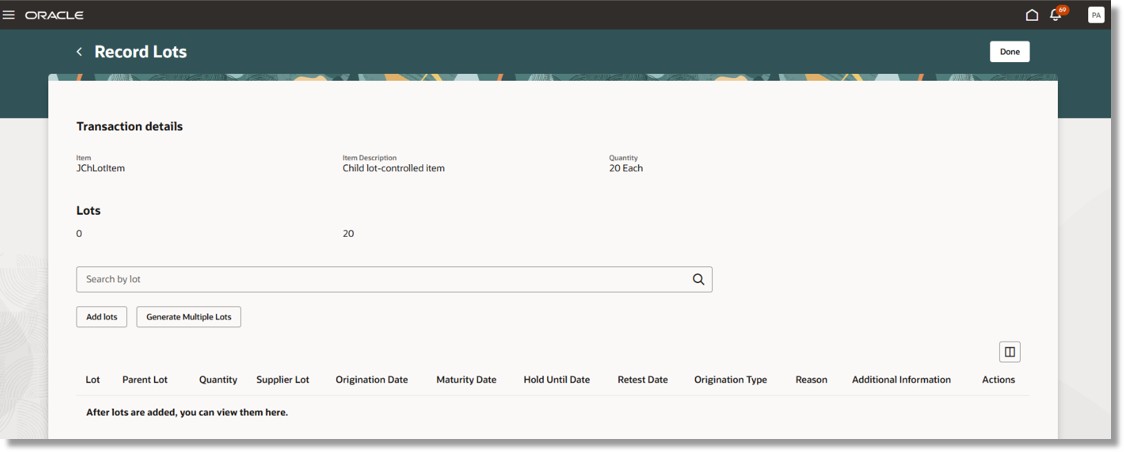
Record Lots page
The Record Lots and Serial Numbers page now presents lot and serial information in a tabbed layout for lot- and serial-controlled items, improving visibility and streamlining data entry.
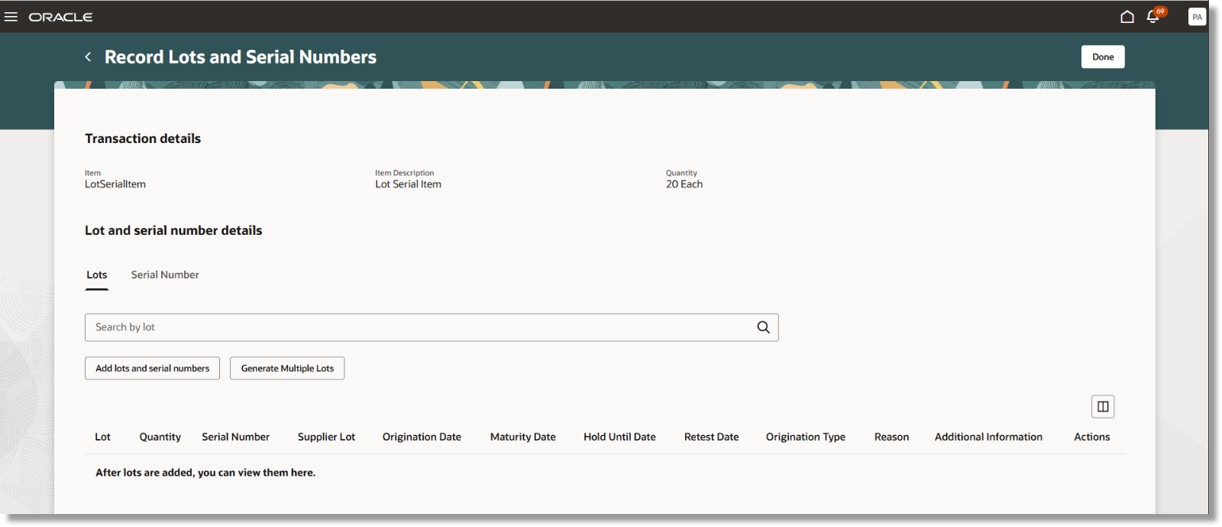
Record Lots and Serial Numbers page
Providing these lot-specific attributes in a clear, table-based view when recording lots for transactions enables users to quickly compare available lots, make informed decisions, ensure regulatory and quality compliance, reduce errors, and improve operational efficiency without interrupting their workflow.
Steps to enable and configure
You don't need to do anything to enable this feature.
Tips and considerations
- Additional lot information is available through an icon and can be displayed as a table column using Manage Columns.
Key resources
- Oracle Fusion Cloud SCM: Using Inventory Management guide, available on the Oracle Help Center.
- Oracle Fusion Cloud SCM: Security Reference for Manufacturing and Supply Chain Materials Management guide, available on the Oracle Help Center.
Access requirements
No additional access is required. Users with existing access to the Redwood Inventory and Receiving transactional pages can access this feature.