LPN packing advisor
In warehouse operations, the way inventory is packed and stored during put away has a significant impact on downstream efficiency. You often receive products in bulk, but the quantities needed for replenishment, manufacturing, or order fulfillment can vary considerably. As a result, you must make decisions about how inventory should be packed into License Plate Numbers (LPNs) for storage. These decisions are frequently based on tribal knowledge, static rules, or individual judgment and may cause inconsistent packing configurations, increased handling, inefficient picking, and unnecessary inventory repacking during fulfillment process.
To maximize operational efficiency, you need a data-driven approach that aligns inventory packaging with actual consumption and fulfillment patterns. The LPN Packing Advisor analyzes historical warehouse transactions and recommends packing quantities for downstream operations. During put away, warehouse operators can review a recommendation and either use it or retain the current packing configuration.
The LPN Packing Advisor is a predefined AI agent in Oracle Fusion that is delivered through AI Agent Studio. The agent is fully functional and ready to execute tasks immediately without requiring users to write custom prompts, logic, or build workflows from scratch.
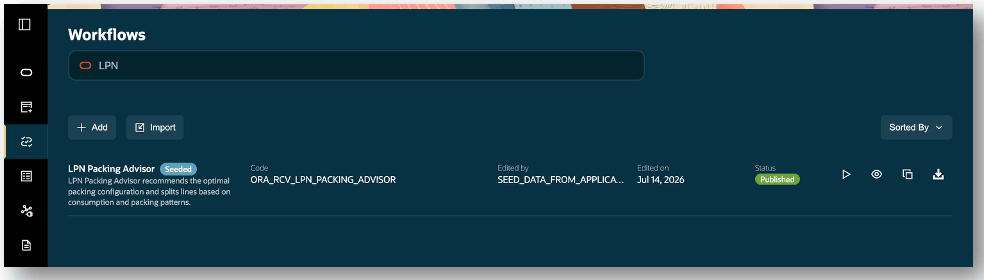
LPN packing advisor
Invoke the LPN Packing Advisor when you perform a put away transaction. For example, a put away transaction is executed for a quantity of 100 each for Item RCV-100, the LPN Packing Advisor will review the historical transactions executed for the selected organization, item, quantity, and Units of Measure (UOM).
In this example, the recommendation is to store the put away quantity of 100 each in units of 10 each. The advantage of performing put away transaction in LPNs of quantity 10 each is to show how the material will be stored and eventually issued out for a transaction, such as a sales order issue that saves time and resources during put away transaction.
The LPN Packing Advisor uses historical transaction data to determine the optimal packing configuration. For example, in the last 30 days, there may be 50 sales order issue transactions packaged in a quantity of 10 each. Using this historical transaction data, the LPN Packing Advisor recommends to put away items into inventory in units of 10 each.
Select the Generate Packing Suggestions to view recommendations. In this use case, the recommendation is to pack the put away quantity of 100 Each into LPNs of 10 Each. After you scan or enter the To LPN, the LPN Quantity is automatically populated. Select Add LPN to add LPN and view the list of added LPNs.
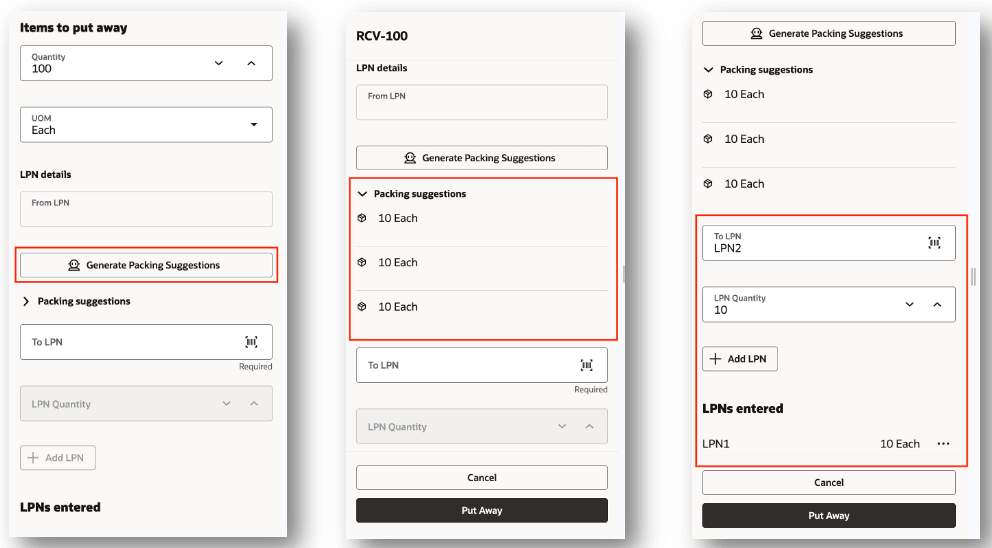
Put away goods
You can invoke the LPN Packing Advisor AI agent from the prompt. Enter prompts in the following sample formats. The results are displayed in a table.
Sample prompts
- Packing suggestions for item number RCV-100, organization 00ADELORG, quantity 100, and UOM each.
- Find the most optimal configuration for item number INV-100 in organization 00ADELORG with quantity 24 each.
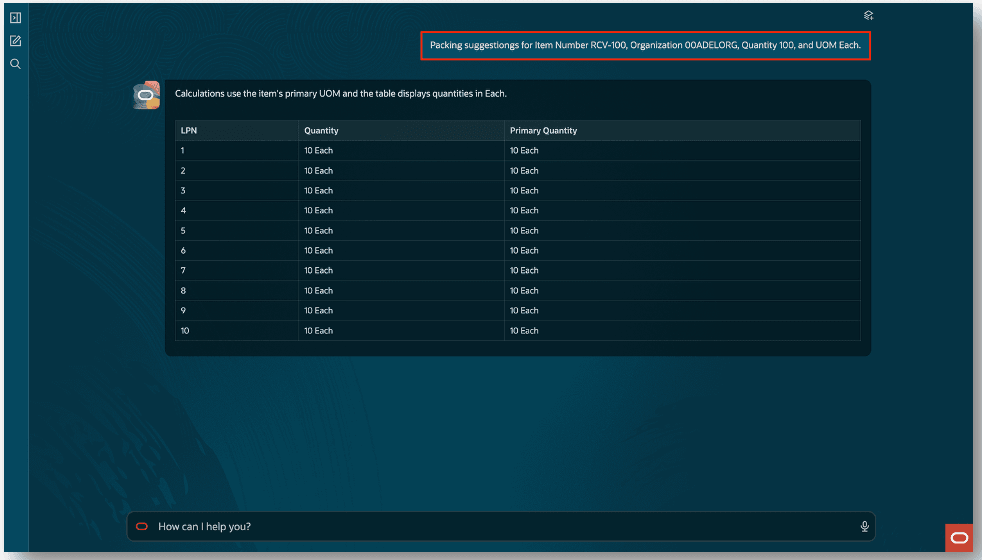
Packing suggestons
This feature helps reduce handling costs, improve fulfillment productivity, increase inventory flow efficiency, and standardize packing decisions across the warehouse.
Steps to enable and configure
Leverage the Visual Builder Studio to expose your applications. To learn more about extending your application using Visual Builder, visit Oracle Help Center > your apps service area of interest > Books > Configuration and Extension.
Configure Advanced Inventory parameters
Before you set up Oracle Fusion Cloud Advanced Inventory Management, see the licensing and enablement information at the beginning of the Advanced Inventory Management section.
Use these steps to enable LPNs for the organization:
- In the Setup and Maintenance work area, search for and select the Advanced Inventory Parameters task.
- On the Advanced Inventory Parameters page, select Enable LPNs.
- Select Save.
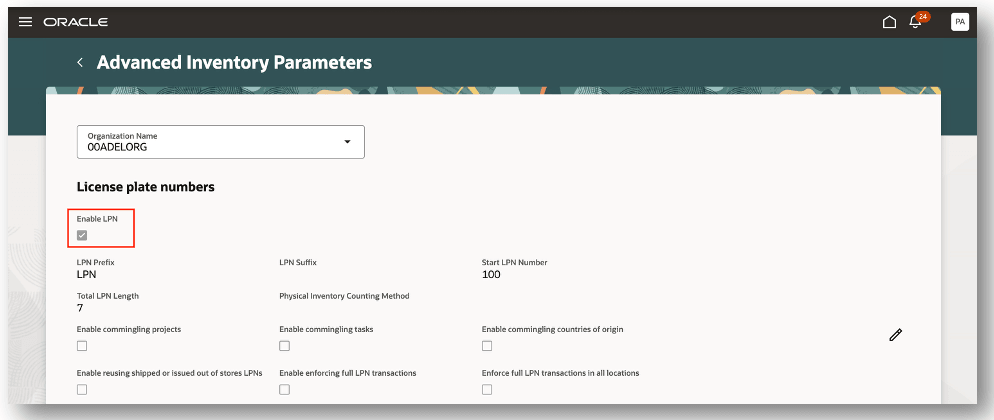
Advanced inventory parameters
Configure subinventories
Use these steps to enable LPN for the subinvnetory:
- In the Setup and Maintenance work area, search for and select the Configure Subinventories task.
- On the New Subinventory page, select Enable LPN.
- Select Submit and Close.
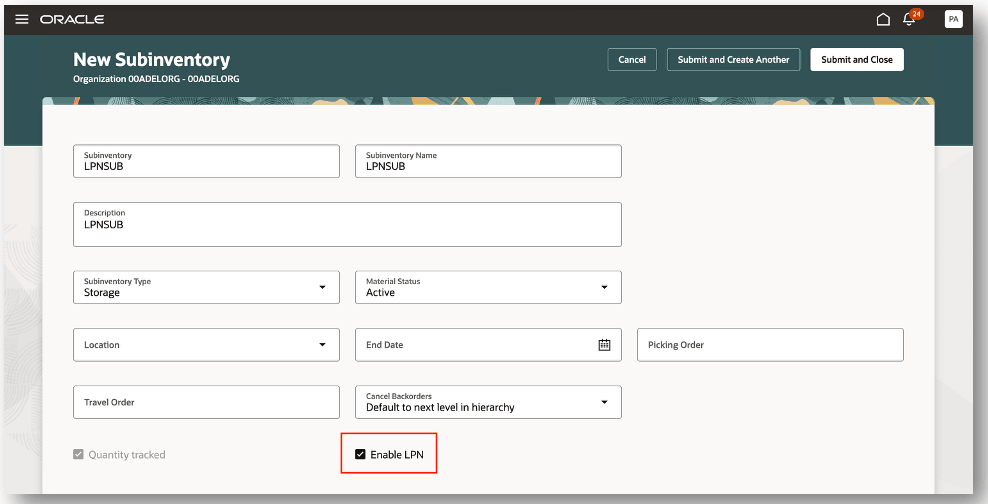
Configure subinventories
Visual builder studio
Visual builder studio
You can customize the LPN Packing Advisor by setting variables to control the behavior.
Configure the following variables:
- Set Past Days - Set the default number of past days to analyze historical inventory transactions. The default is 30 Days.
- Exclude Transaction Types - Customer-editable transaction type switches.
- Set it to true to exclude that transaction source type from packing history analysis.
- Set it to false to include it. The work order is excluded by default.
- excludeWorkOrder - Default true
- excludeSalesOrder - Default false
- excludeAccount - Default false
- excludeMovementRequest - Default false
- excludeAccountAlias - Default false
- excludeTransferOrder - Default false
- excludeInventory - Default false
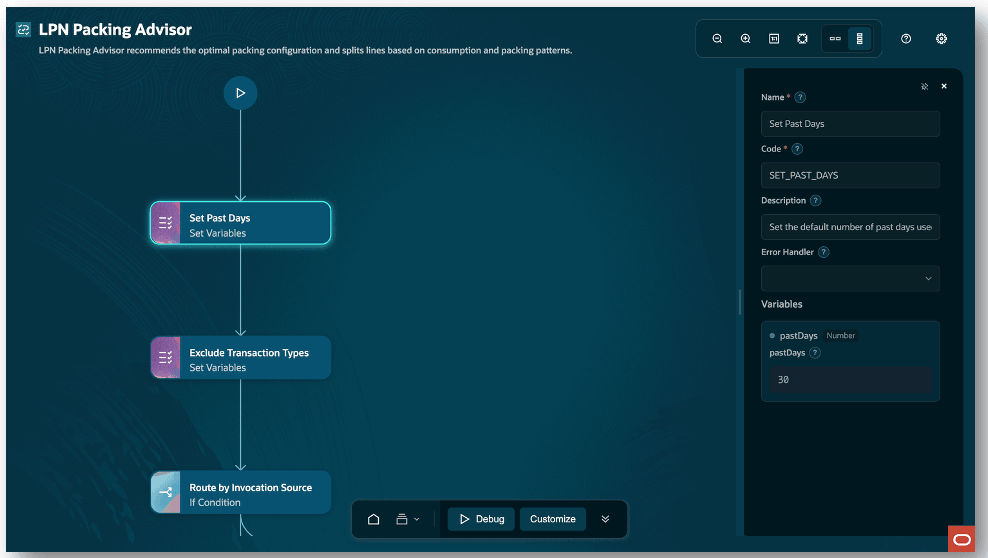
Configure variables
If you use custom job roles, assign the new privilege Access LPN Packing Advisor Agent (AIM_ACCESS_LPN_PACKING_ADVISOR_AGENT_PRIV) to your appropriate job role.
Tips and considerations
- This feature requires an Advanced Inventory Management license.
- The Enable LPN parameter must be selected for the inventory organization in the Advanced Inventory parameters setup page.
- The put away subinventory must be LPN enabled to activate Generate Packing Suggestions AI workflow. You can create a subinventory that is LPN enabled by navigating to the Configure Subinventories setup page.
The following transaction sources, transaction types, and transaction actions are considered when determining packing recommendations.
| Transaction Source | Transaction Type | Transaction Actions |
|---|---|---|
| Sales Order | Sales Order Issue | Issue from stores |
| Sales Order | Direct Sales Order Issue | Direct issue from stores |
| Account | Account Issue | Issue from stores |
| Movement Request | Movement Request Issue | Issue from stores |
| Account Alias | Account Alias Issue | Issue from stores |
| Inventory | Direct Organization Transfer | Direct Organization Transfer |
| Inventory | Intransit Shipment | In-transit shipment |
| Inventory | Miscellaneous issue | Issue from stores |
| Inventory | LPN Repack | LPN Repack |
| Inventory | Field Service Usage | Issue from stores |
| Inventory | Lot Conversion Decrease | Issue from stores |
| Inventory | Residual Quantity Issue | Issue from stores |
| Inventory | Deduct Sample Quantity | Direct issue from stores |
Key resources
Access requirements
To access the LPN Packing Advisor, users must be assigned a custom job role that contains this privilege:
| Privilege status | Privilege name and code |
|---|---|
| New |
Access LPN Packing Advisor Agent AIM_ACCESS_LPN_PACKING_ADVISOR_AGENT_PRIV |
To access the Oracle AI Agent Studio for Fusion Applications and manage SCM AI agents, users must be assigned a custom job role that contains these duty roles:
| Duty role status | Duty role name and code |
|---|---|
| Existing |
SCM Intelligent Agent Management Duty ORA_RCS_SCM_AI_AGENT_MANAGEMENT_DUTY |
| Existing |
SCM Intelligent Agent Management Duty ORA_RCS_SCM_AI_AGENT_MANAGEMENT_DUTY_HCM |
| Existing |
Fai Genai Agent Administrator Duty ORA_DR_FAI_GENERATIVE_AI_AGENT_SCM_ADMINISTRATOR_DUTY |
To interact with AI agents in product pages, users must be assigned a custom job role that contains this duty role:
| Duty role status | Duty role name and code |
|---|---|
| Existing |
Fai Genai Agent Runtime Duty ORA_DR_FAI_GENERATIVE_AI_AGENT_RUNTIME_DUTY |
In the Security Console, filter by Roles and Permission Groups to find this duty role.
To allow users to interact with agents, you must also enable permission groups in the Security Console on those users' custom job roles that contain the Fai Genai Agent Runtime Duty role. You can enable permission groups when you manage the basic information of your custom job roles.
Users' custom job roles must also contain privileges that allow access to the pages where AI agents are enabled.
See Access Requirements for AI Agent Studio (for administrators) and How can I give users access to AI agents (for end-users) for more information.