Control creation of new subinventories with a privilege
Many organizations want to delegate day-to-day inventory maintenance to their supply chain teams while retaining tighter governance over configuration tasks that have financial and system-wide implications. For example, warehouse and inventory managers routinely need to maintain existing subinventories by updating item associations, creating and managing locators, and adjusting replenishment settings such as min-max values to support daily operations. However, creating a new subinventory is typically a controlled administrative task because it often requires additional financial and system configuration, such as associating the subinventory with the appropriate general ledger accounts for inventory valuation and ensuring compliance with internal governance policies. Now you can control which users are allowed to create new subinventories using a specific privilege.
You can now control which users can create subinventories by using the Create Subinventory (INV_CREATE_SUBINVENTORY_PRIV) privilege.
To enable this security, users must go to the Page Properties in the Edit Page in Visual Builder Studio task and set the Enable Security for Create Subinventory option to true. Once enabled, the Create New Subinventory, Create Subinventory, and Create Subinventory from Existing options are hidden by default for all users in the Configure Subinventories task.
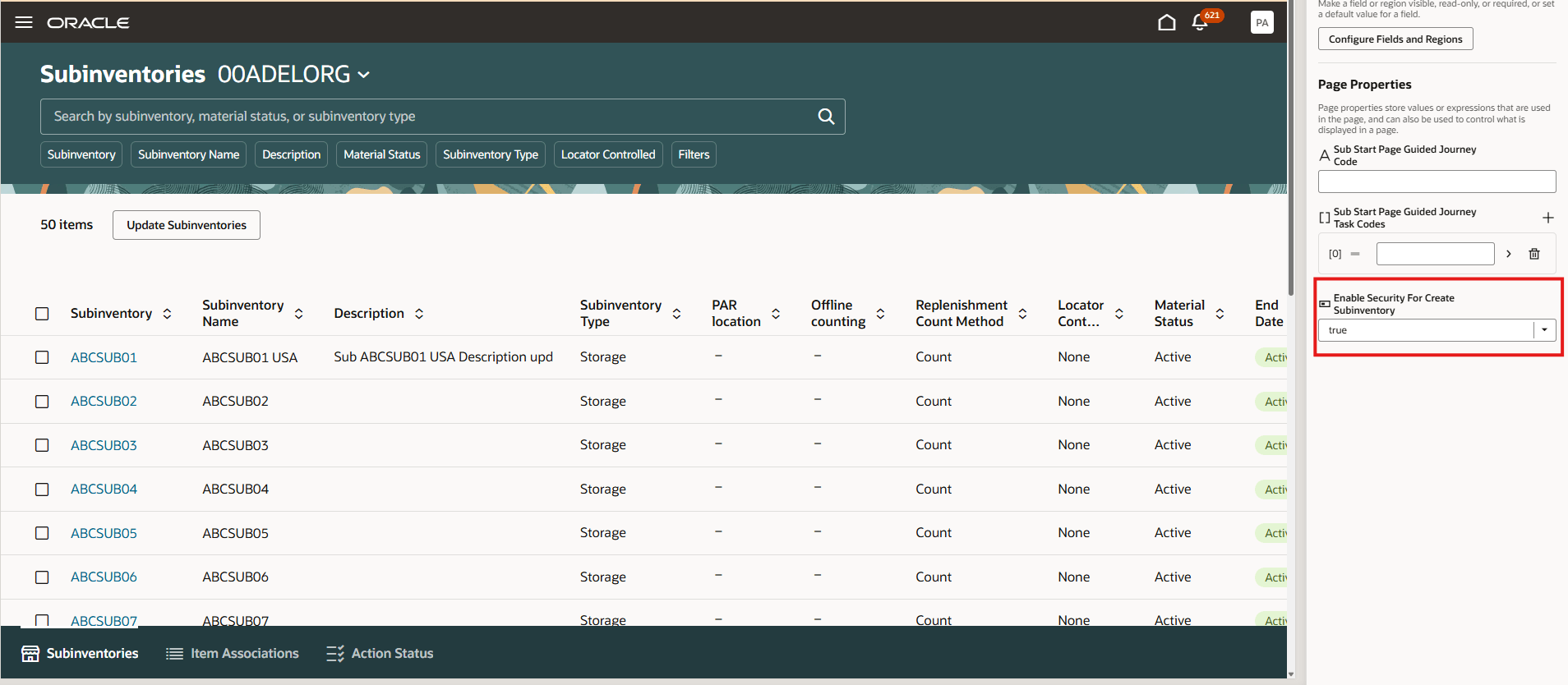
Hide create subinventory using business rules
Users granted the Create Subinventory privilege can view and use these options on the Configure Subinventories page. Other users can continue to maintain existing subinventories but can't create new ones. This feature helps organizations enforce tighter controls over subinventory creation while supporting daily inventory maintenance. This enhancement ensures that only authorized users can view and use the New Subinventory button, helping prevent unauthorized lot creation and improving process control.
Introducing a separate privilege for creating subinventories, empowers operational users to efficiently manage existing inventory structures while restricting the creation of new subinventories to authorized administrators. This reduces operational bottlenecks without compromising financial controls.
Steps to enable and configure
Leverage the Visual Builder Studio to expose your applications. To learn more about extending your application using Visual Builder, visit Oracle Help Center > your apps service area of interest > Books > Configuration and Extension.
- In the Security Console, assign the Create Subinventory (INV_CREATE_SUBINVENTORY_PRIV) privilege to the applicable roles for users who must create subinventories.
- In the Edit Page in Visual Builder Studio task, open Page Properties for the Configure Subinventories page.
- Set the Enable Security for Create Subinventory page property to True.
- Publish the page changes.
When the page property is enabled, the Create New Subinventory, Create Subinventory, and Create Subinventory from Existing options are hidden from users who don’t have the privilege. Users with the privilege can access these options.
Tips and considerations
- You can determine whether you can extend a specific page using Visual Builder Studio by using the Edit Page in Visual Builder Studio task from the Setting and Actions menu.
- Keep the Pages list closed while you work in Visual Builder Studio Express mode to get a cleaner view of the page you’re extending.
Key resources
- Follow the instructions here to Access Visual Builder Studio and start extending your application pages in Visual Builder Studio.
- Refer to these resources for additional information:
Access requirements
To extend application pages using Visual Builder Studio, you must be assigned a configured job role that contains this privilege:
| Privilege status | Privilege name and code |
|---|---|
| Existing |
Administer Sandbox (FND_ADMINISTER_SANDBOX_PRIV) |
To access the options for creating new subinventories when the page property is enabled, users must be assigned a configured job role that includes this privilege:
| Privilege status | Privilege name and code |
|---|---|
| New |
Create Subinventory (INV_CREATE_SUBINVENTORY_PRIV) |
The Create Subinventory privilege is not assigned to any predefined job roles. In the Security Console, you must manually assign the privilege to a configured job role.