Configure and use parent lot for lot-controlled items
Organizations that manage lot-controlled inventory often need to maintain relationships between an original lot and the smaller lots derived from it to support traceability, quality management, and regulatory compliance. To strengthen the relationship between parent and child lot numbers, you can now configure and use parent lots to establish hierarchical relationships between lots.
Feature highlights
- For child lot-controlled items, the Parent Lot field is now required for all inventory transactions.
- Parent lots aren't transactable.
- When a child lot is created, it inherits the lot attributes from its parent lot. You can subsequently update the child lot attributes independently of the parent lot. For instance, a child lot can have an expiration date that differs from the expiration date of its parent lot.
- The Lot Selector is introduced to enhance lot search capabilities when recording lots. This enables users to search and select lots based on lot attributes such as expiration date, grade, and other relevant criteria.
- Lot Selector Views are configurable, allowing users to customize the attributes displayed, specify their display order, and define the filters used to search for and select lots.
- When Parent Lot Required is enabled for an item:
- Lot split: A lot can be split only when the resultant lot has the same parent lot as the source lot.
- Lot merge: Lots can be merged only when they have the same parent lot.
- Lot translation: When a lot is translated to a new lot, the source lot's parent lot defaults as the parent lot for the translated lot. The defaulted parent lot can be updated, if required.
Lot Selector Views: navigation
- Quick Actions - Supply Chain Execution > Inventory Setup > Lot Selector Views
- Setup and Maintenance > Setup: Manufacturing and Supply Chain Materials Management > Inventory Management > Lot Selector Views
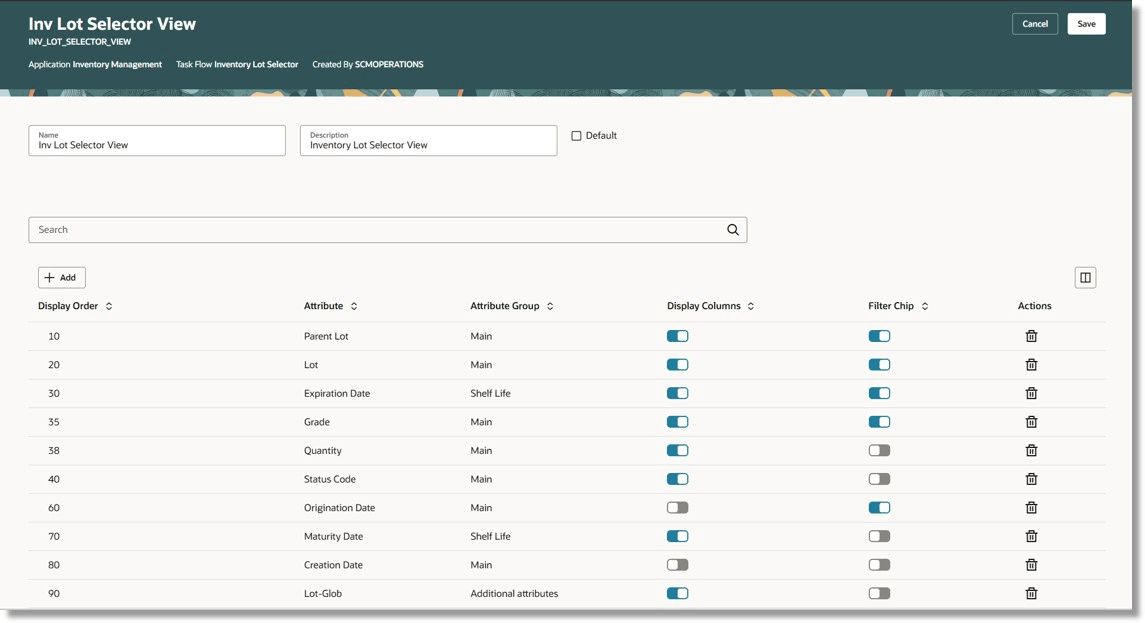
Lot Selector View page
After configuring the Lot Selector View, the configured attributes and filters are displayed on the transactional page as shown below.
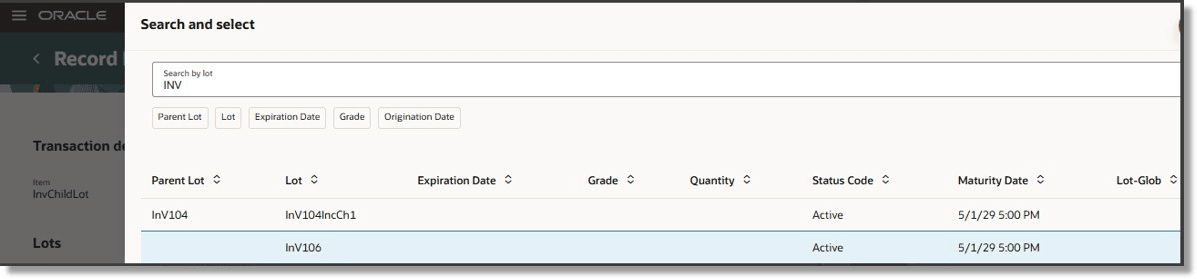
Lot Selector on a transactional page
A new Allow Transactions field on the Lots page indicates whether transactions are allowed for a lot. For all parent lots, Allow Transaction is set to No. A New Parent Lot action button has been added to create a new parent lot.
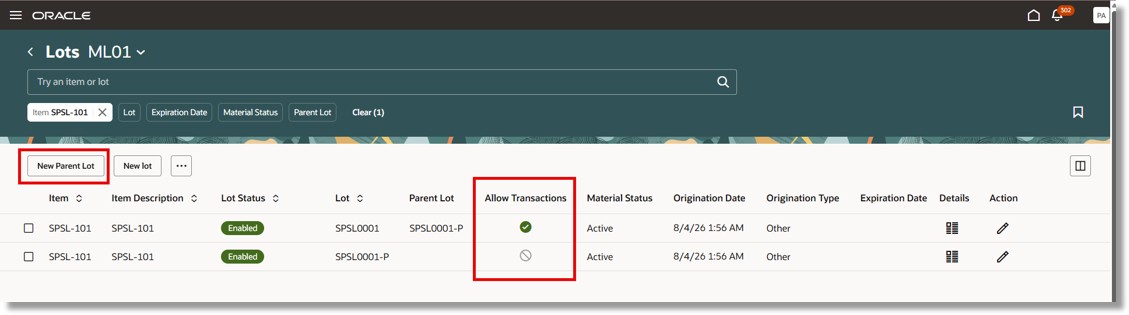
Lots page
The following Redwood pages have been modified to display the Lot Selector in the Lot field drop-down, add the Generate Parent Lot action, and add the Parent Lot field where applicable and missing.
| Desktop pages | Mobile pages | |
|---|---|---|
|
Inventory |
|
|
| Shipping |
|
|
| Receiving |
|
|
A tighter relationship between parent and child lots enables more accurate inventory tracking and genealogy across inventory transactions and business processes.
Steps to enable and configure
Here are the conditions to enable Sublot functionality:
- The new Inventory organization parameter Allow Parent Lot Management must be enabled.
- This parameter is defined at the master organization and controlled at the Inventory organization.
- The new Inventory item attribute Parent Lot Required must be enabled.
- Navigate to Item Specifications > Inventory > Child Lot section.
- The attribute is controlled at the Inventory organization level.
Use the privilege Configure Lot Selector Views (INV_CONFIGURE_LOT_SELECTOR_VIEW_PRIV) to configure and manage Lot Selector Views. This privilege is new in this release and included in the Inventory Administration Duty (ORA_INV_INVENTORY_ADMINISTRATION_DUTY) role.
Tips and considerations
Organization parameter validations
- When disabling the Parent Lot Required parameter at the master organization:
- The Allow parent lot management parameter must not be enabled for any inventory organization, regardless of whether the organization is a Definition or Reference organization.
- The Parent Lot Required item attribute must not be enabled for any item.
- When enabling or disabling the Allow parent lot management parameter for an inventory organization, whether a Definition or Reference organization:
- The Parent Lot Required item attribute must not be enabled for any item in the organization.
Item attribute validations
- The Parent Lot Required attribute can only be enabled for child lot-controlled items.
- The Parent Lot Required attribute can only be enabled when the Allow parent lot management inventory organization parameter is enabled.
- The Parent Lot Required attribute can be enabled or disabled only when no on-hand quantity exists for the item.
- When the Parent Lot Required attribute is enabled, the Copy Lot Attributes defaults to Yes and can't be changed.
Upgrade path
To ensure that existing lots remain transactable after enabling the Parent Lot Required functionality for selected items, run the Correct Lots for Parent Lot Compliance scheduled process as a prerequisite data-fix process before enabling the functionality. This scheduled process creates parent lots for existing lots when the corresponding parent lots don't already exist and marks the newly created parent lots as nontransactable.
Key resources
- Oracle Fusion Cloud SCM: Using Inventory Management guide, available on the Oracle Help Center.
- Oracle Fusion Cloud SCM: Security Reference for Manufacturing and Supply Chain Materials Management guide, available on the Oracle Help Center.
Access requirements
No additional access is required to use the Parent Lot Required functionality. Users with existing access to the Redwood Inventory Management, Shipping, and Receiving transactional pages can use this functionality.
Users with the Configure Lot Selector Views (INV_CONFIGURE_LOT_SELECTOR_VIEW) privilege can configure and manage Lot Selector Views. This privilege is included in the Inventory Administration Duty (ORA_INV_INVENTORY_ADMINISTRATION_DUTY) role.
| Privilege status | Privilege name and code |
|---|---|
| New |
Configure Lot Selector Views INV_CONFIGURE_LOT_SELECTOR_VIEW |