Capture the charge reference attributes from Payables uploads
Accurate landed cost calculation requires invoice charges such as freight, insurance, and duties to be associated with the applicable invoice lines. Prior to this update, when you imported invoices in Oracle Fusion Payables using File-Based Data Import (FBDI), you had to either manually enter the landed cost charge and charge reference information from the invoice user interface or associate the information using REST APIs.
You can now import landed cost charges and charge references for invoice lines using the Payables Standard Invoice Import FBDI template. A new sheet in the template enables you to provide the invoice and line identifiers, charge name, reference type, reference value, and comments for invoice lines enabled for landed cost.
After the Payables invoice import process completes, the application automatically spawns the Import Landed Cost Charges and References for Invoice Lines scheduled process. The process validates the imported landed cost information, associates valid charges and charge references with the applicable landed-cost-enabled invoice lines, and displays successfully processed and failed charge and charge reference records in the process output along with validation error details.
For records that fail validation, create or correct the landed cost charges and charge references manually in Oracle Fusion Payables or use the existing REST APIs.
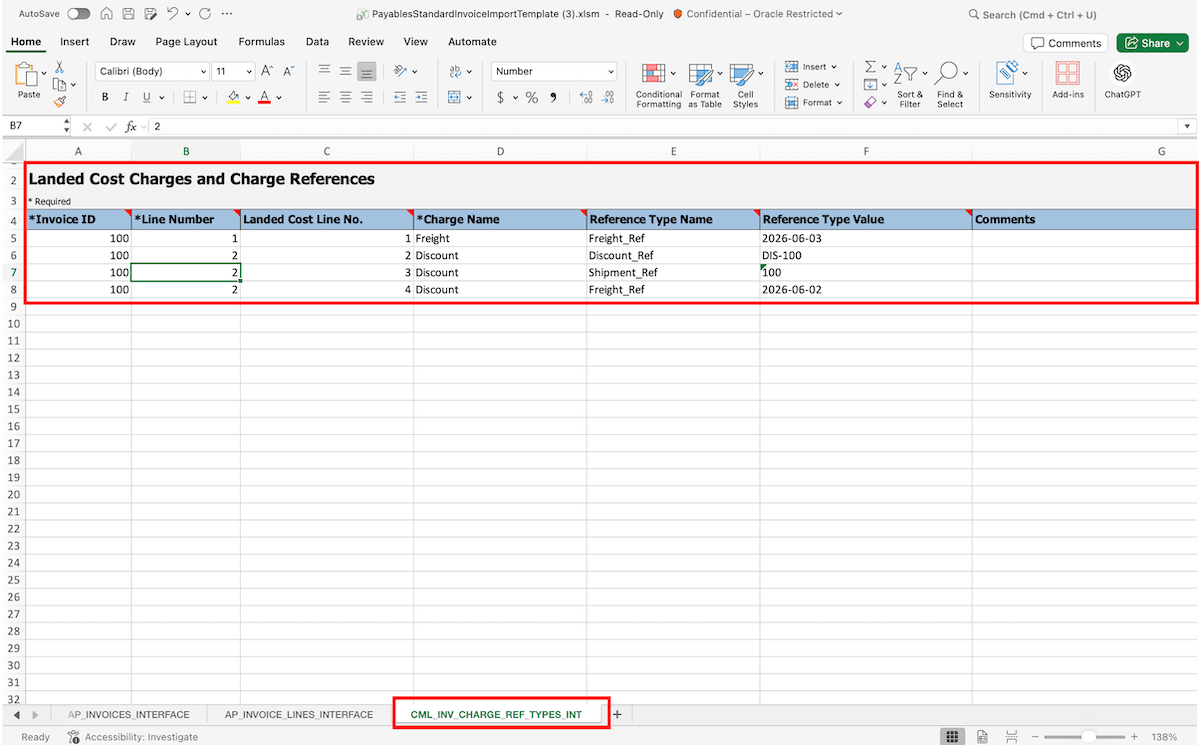
Charges and charge references sheet in the payables standard invoice import template
Some of the benefits of this feature include:
- Reduce manual effort by importing landed cost charges and charge references along with Payables invoices instead of entering them individually from the invoice user interface.
- Improve the accuracy and consistency of landed cost processing by associating charge information with the applicable invoice lines during bulk import.
- Streamline high-volume invoice processing by automatically validating and processing landed cost charge information after the Payables invoice import completes.
Steps to enable and configure
Use the opt-in AP_39450994 to invoke Import Landed Cost Charges and References for Invoice Lines scheduled process.
- Navigate to the Setup and Maintenance work area and go to the setup task Manage Standard Lookups.
- Search for the lookup type ORA_ERP_CONTROLLED_CONFIG.
- Under the Lookup Codes section, look for the code AP_39450994 .
- If the code isn’t available, create a new lookup code with the following details:
- Lookup Code: AP_39450994
- Enabled: Checked
- Start Date: 1/1/00
- Meaning: AP_39450994
- Description: AP_39450994
Tips and considerations
- Use the CML_INV_CHARGE_REF_TYPES_INT sheet to provide charge and charge reference information for invoice lines enabled for landed cost processing. If the LCM Enabled attribute isn't selected for an invoice line, the charge reference information is ignored.
- For date-based reference values, use the YYYY-MM-DD format.
- The Import Landed Cost Charges and References for Invoice Lines scheduled process runs automatically after the Payables invoice import process completes. You can't run this process manually.
- Invoice line processing is independent of charge and charge reference processing. If an invoice line passes all validations, it's processed even when an error occurs while processing the associated charge or charge reference.
- For failed records, create or correct the landed cost charges and charge references in Oracle Fusion Payables, using the REST API, or on the Charge Invoice Associations page.
- You can also create a custom BI Publisher report based on the CML_INV_CHARGE_REF_TYPES_INT interface table to review validation errors for failed charge and charge reference records.
- Refer to the Oracle Fusion Payables update 26D feature: Landed Cost Charge Association to Invoice Lines Using File-Based Data Import.
Key resources
- Oracle Fusion Cloud SCM: Implementing Manufacturing and Supply Chain Materials Management guide, available on the Oracle Help Center.
- Oracle Fusion Cloud SCM: Using Supply Chain Cost Management guide, available on the Oracle Help Center.
Access requirements
If you're using custom job roles, then validate that that you've the existing privileges listed.
| Privilege status | Privilege name and code |
|---|---|
| Existing | Import Payables Invoice (AP_IMPORT_PAYABLES_INVOICE_PRIV) |