Use OAuth authentication for your connected equipment integrations
When configuring an integration with connected equipment using a broker host, you can now choose the authentication method that best aligns with your broker’s security requirements. Select basic authentication when the broker uses a username and password, or OAuth authentication when the broker supports token-based access managed by an identity provider such as Oracle Identity Cloud Service (IDCS).
This enhancement provides administrators the flexibility to configure equipment integrations per their organization’s security architecture and the authentication capabilities of the broker host. It also enables organizations adopting OAuth-based security standards to connect equipment through supported broker hosts without relying on basic credentials.
You can define the authentication type as part of the broker host configuration. The selected authentication type is used when the application communicates with the broker for connected equipment integrations.
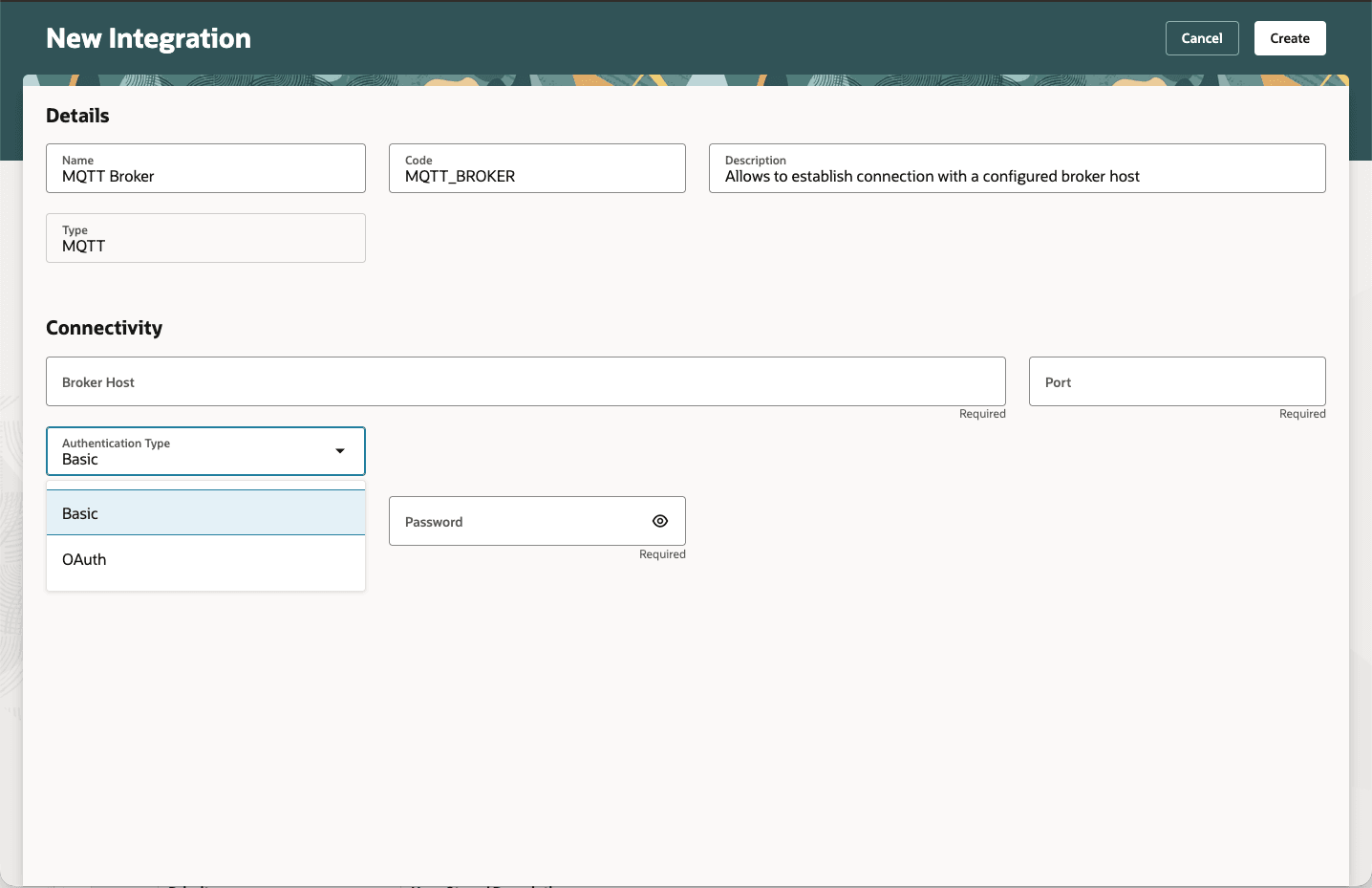
Authentication Type options
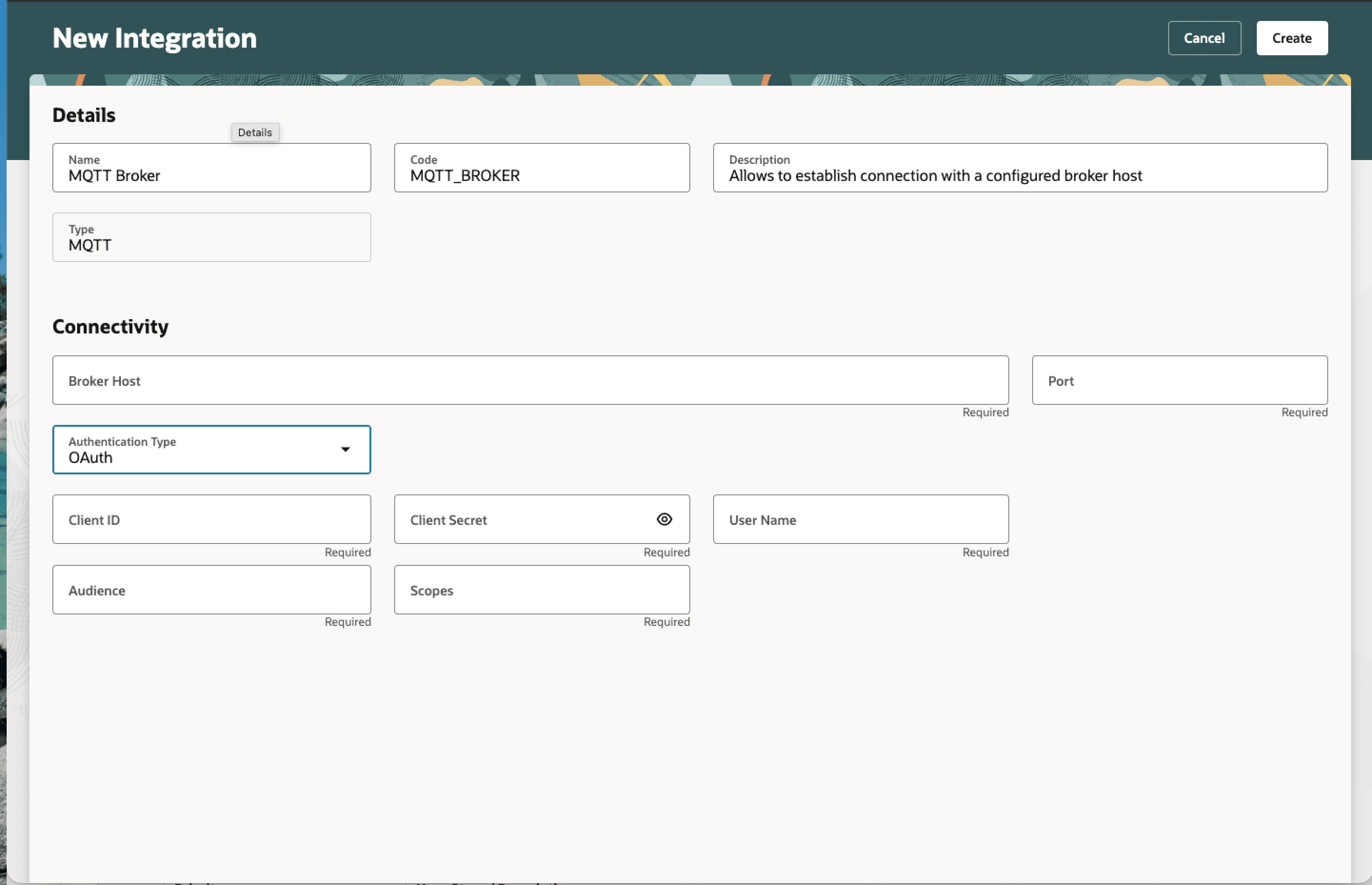
OAuth details for configuring the integration
Enhanced authentication support provides the following advantages:
- Supports secure connectivity with broker hosts that use OAuth-based authentication.
- Enables a smoother path for organizations transitioning from basic credentials to OAuth-based authentication.
Steps to enable and configure
No steps are required to enable this feature.
Tips and considerations
- Confirm that your broker host supports the authentication method before configuring the integration.
- Your MQTT broker must be configured to validate tokens issued by the identity provider, Oracle Identity Cloud Service (IDCS).
Key resources
- Oracle Fusion Cloud SCM: Refer to the Using Manufacturing guide, available on the Oracle Help Center.
- Oracle Fusion Cloud SCM: Refer to the Implementing Manufacturing and Supply Chain Materials Management guide, available on the Oracle Help Center.
Access requirements
Configuring Smart Operations Integrations
Users who are assigned a configured job role that contains the following privileges and duty roles can configure or view the integration:
| Privilege status | Privilege name and code |
|---|---|
| Previously delivered | Manage Smart Operations Integrations SMO_MANAGE_SMART_OPERATIONS_INTEGRATIONS_PRIV |
| Previously delivered | View Smart Operations Integrations SMO_VIEW_SMART_OPERATIONS_INTEGRATIONS_PRIV |
| Duty role status | Duty role name and code |
|---|---|
| Previously delivered | Manage Smart Operations Integrations ORA_DR_SMO_MANAGE_SMART_OPERATIONS_INTEGRATIONS_DUTY |
| Previously delivered | Application Deployment Administration ORA_DR_ASM_APPLICATION_DEPLOYER_DUTY |
| Previously delivered | Viewing Smart Operations Integration Status Duty ORA_DR_SMO_VIEW_SMART_OPERATIONS_INTEGRATION_STATUS_DUTY |
| Previously delivered | View Smart Operations Integrations ORA_DR_SMO_VIEW_SMART_OPERATIONS_INTEGRATIONS_DUTY |