Use operational parameters and enhanced execution capabilities when simultaneously executing multiple operations at a workstation
Simultaneous execution lets operators run multiple eligible work order operations together at a workstation. With this update, operators can include operations from nonstandard work orders and collect operational parameters while reporting quantities for the operations in the shared execution session.
Key Capabilities
- Select operations from nonstandard work orders for simultaneous execution at an eligible workstation.
- View a unified superset of operational parameters from all selected work order operations, enter each parameter value once, and apply and evaluate it against the specification for every applicable operation transaction.
- Raise a resource or miscellaneous exception for an out-of-range operational parameter value, and view operational parameters collected during the simultaneous execution session on demand.
Support nonstandard work orders
Operators can now select operations from work orders with the nonstandard work order type for simultaneous execution at a workstation. This removes the previous operation selection restriction for this work order type, so operators can use the same shared execution flow for eligible nonstandard operations.
Collect operational parameters while reporting quantities
When operators report completed, rejected, or scrapped quantities for multiple operations in a simultaneous execution session, the application compiles the operational parameters defined for all selected work order operations into one consolidated list. The list is the superset of the parameters required by the selected operations. Operators enter a value, once for each displayed parameter. The application then associates that value with each operation for which the parameter applies, eliminating repetitive entry while preserving operation level records.
Although parameters are collected in a single shared entry flow, each entered value is evaluated internally against the specification configured for the corresponding work order operation. This gives operators a streamlined reporting experience while retaining the correct operation-specific assessment of the recorded values. The parameters collected through connected equipment is displayed with details.
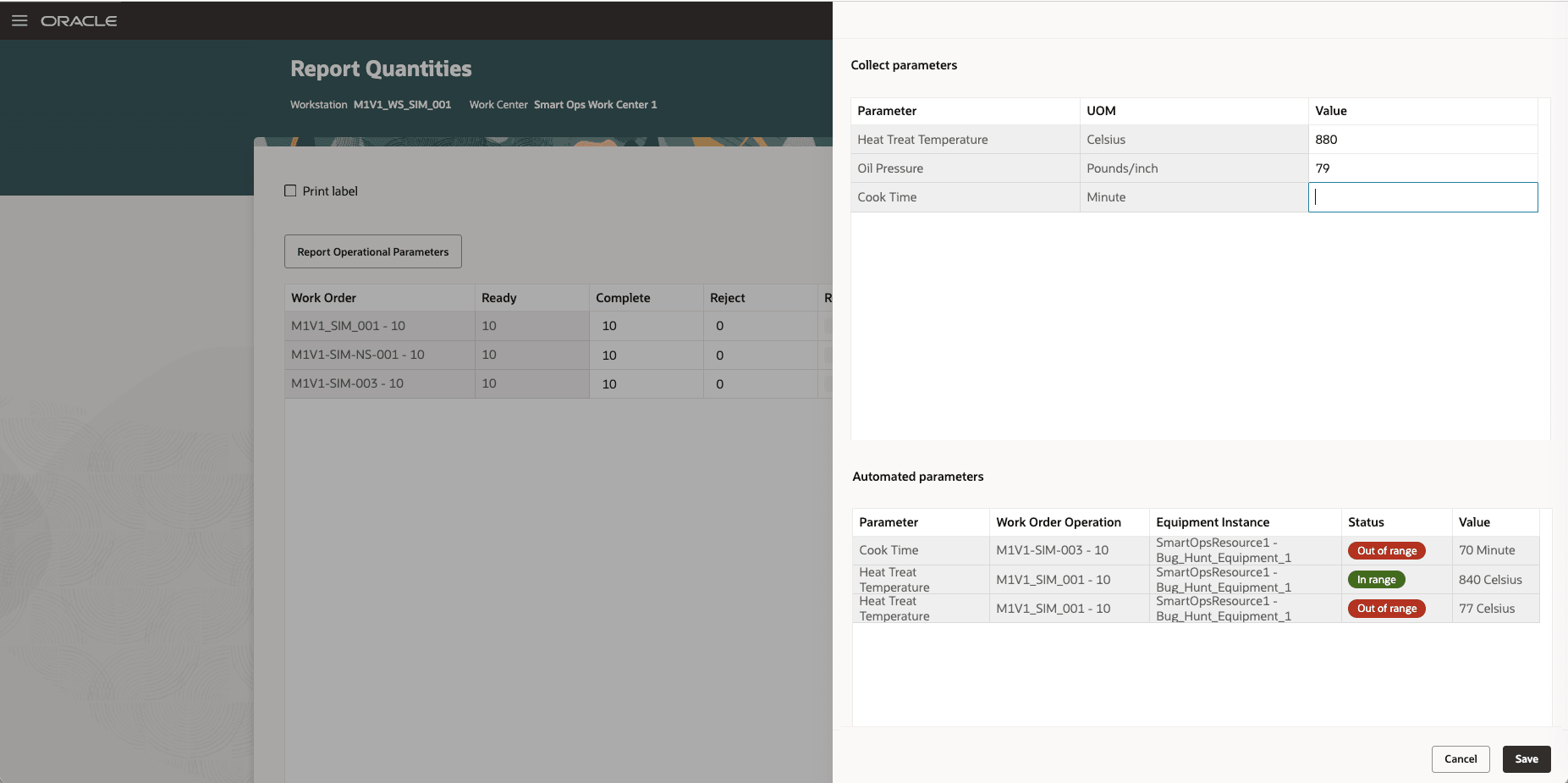
Operators can collect operational parameters while reporting quantities
Operators can view operational parameters collected during the execution session on demand. This provides visibility into the values recorded for the simultaneously executed operations as work progresses and supports timely follow-up when a value requires attention.
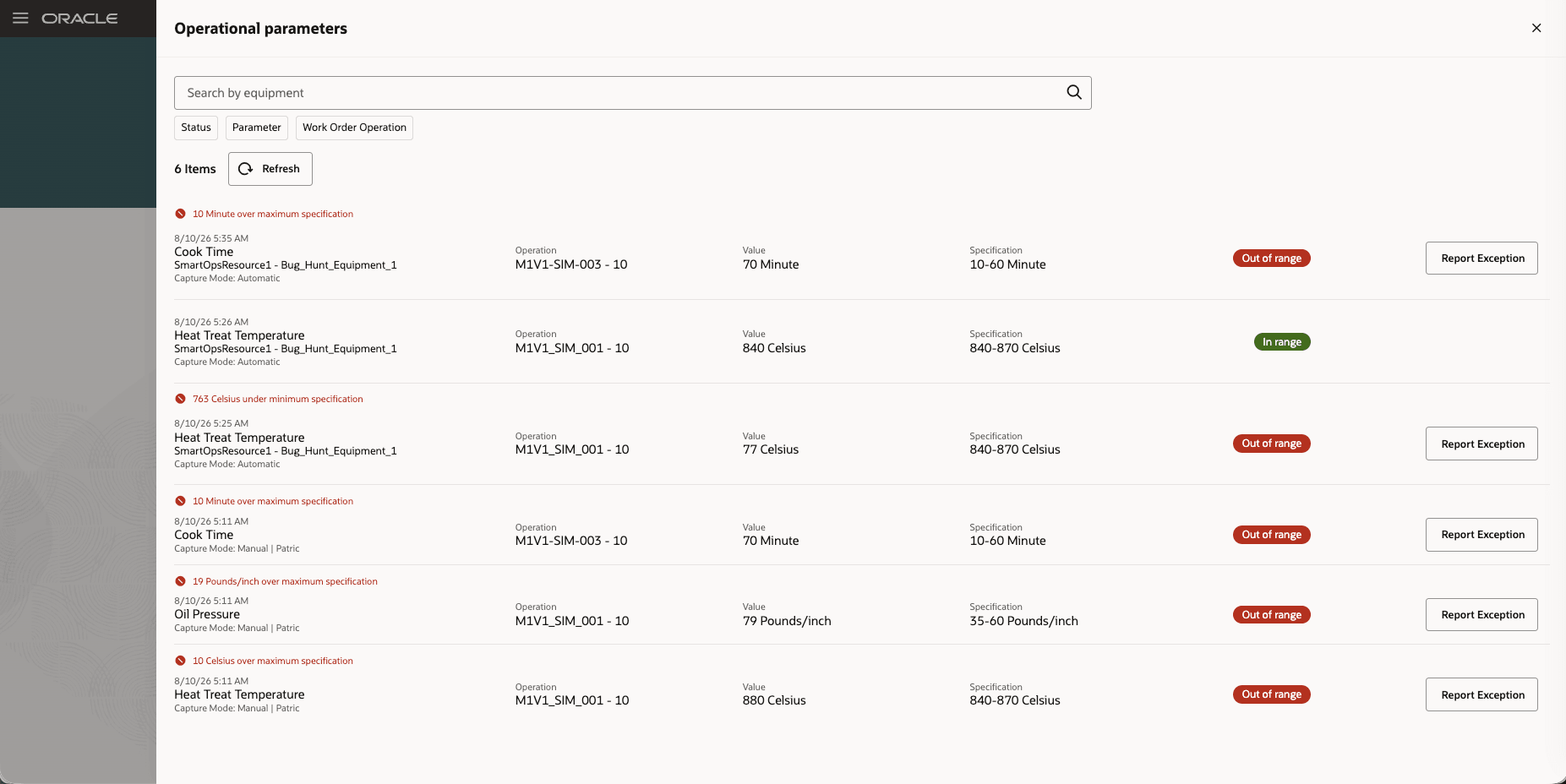
View operational parameters while executing operations simultaneously at a workstation
Operators can raise an exception directly from an out-of-range operational parameter value. When the equipment resource that supplied the value is defined as an operation resource, the operator can create a resource exception. Otherwise, the operator can raise a miscellaneous exception.
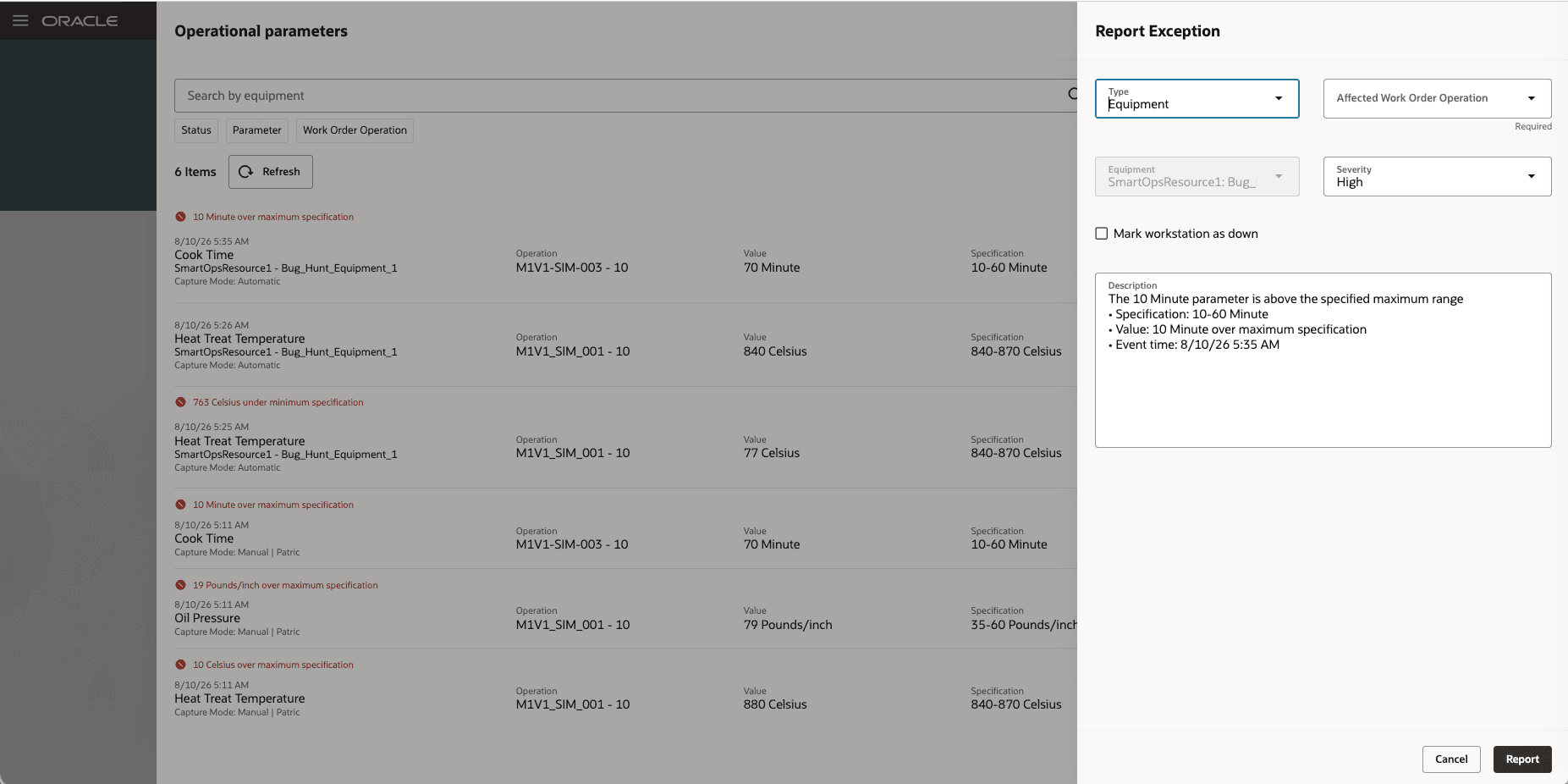
Raise an exception for an out-of-range operational parameter value
This update provides the following advantages:
- Reduce reporting effort by letting operators enter shared operational parameters once for multiple applicable operations.
- Improve quality control by evaluating each recorded value against the specification for its respective operation and enabling immediate exception reporting for out-of-range values.
- Increase operational flexibility by supporting simultaneous execution of eligible operations from nonstandard work orders.
Here's the demo of these capabilities:
Steps to enable and configure
- To create a workstation that supports simultaneous execution, navigate to Supply Chain Execution > Work Definition > Workstations, create a new workstation, and select the Simultaneous Execution Enabled option. This option was available in earlier releases.
- To collect operational parameters during work order execution, the parameters must be defined in the work definition associated with the work order. Navigate to Supply Chain Execution > Work Definition, edit the applicable work definition, and add the parameters that need to be collected during execution. This capability was available in earlier releases.
Tips and considerations
- An operational parameter value entered for a consolidated parameter is recorded only for operations to which that parameter applies.
- Operators can report an exception only when an operational parameter value is out of range.
- The exception type is determined by whether the source equipment resource is an operation resource.
Key resources
- Watch the Use operational parameters and enhanced execution capabilities when simultaneously executing multiple operations at a workstation demo.
- Refer to the Oracle Fusion Cloud SCM: Using Manufacturing guide, available on the Oracle Help Center.
- Refer to the Oracle Fusion Cloud SCM: Implementing Manufacturing and Supply Chain Materials Management guide, available on the Oracle Help Center.
Access requirements
If you are using custom job roles, then you need to validate that you have the previously delivered privileges listed.
| Privilege status | Privilege name and code |
|---|---|
| Previously delivered | Supervise Production WIP_SUPERVISE_PRODUCTION_PRIV |
| Previously delivered | Execute Production at a Workstation WIP_EXECUTE_WORKSTATION_PRIV |