View user access analysis and configure catalog exclusion condition
You can now benefit from the following enhancements in Access Control Lists:
-
User access analysis: Analyze a user's access to a specific object based on permissions defined in teams.
-
Exclusion operator for catalogs: Create conditions using the exclusion (Is Not) operator for the catalog and category attributes, with support for exclusions based on the catalog hierarchy.
User access analysis
You can now analyze a user's access—to a secured object instance—that's configured through access control lists.
On the Search Teams page, select Actions > Analyze User Access to open the Analyze User Access drawer.
In the Analyze User Access drawer, select up to two users and the object type for which you want to analyze access. The search results display access details for the selected users and object instance.
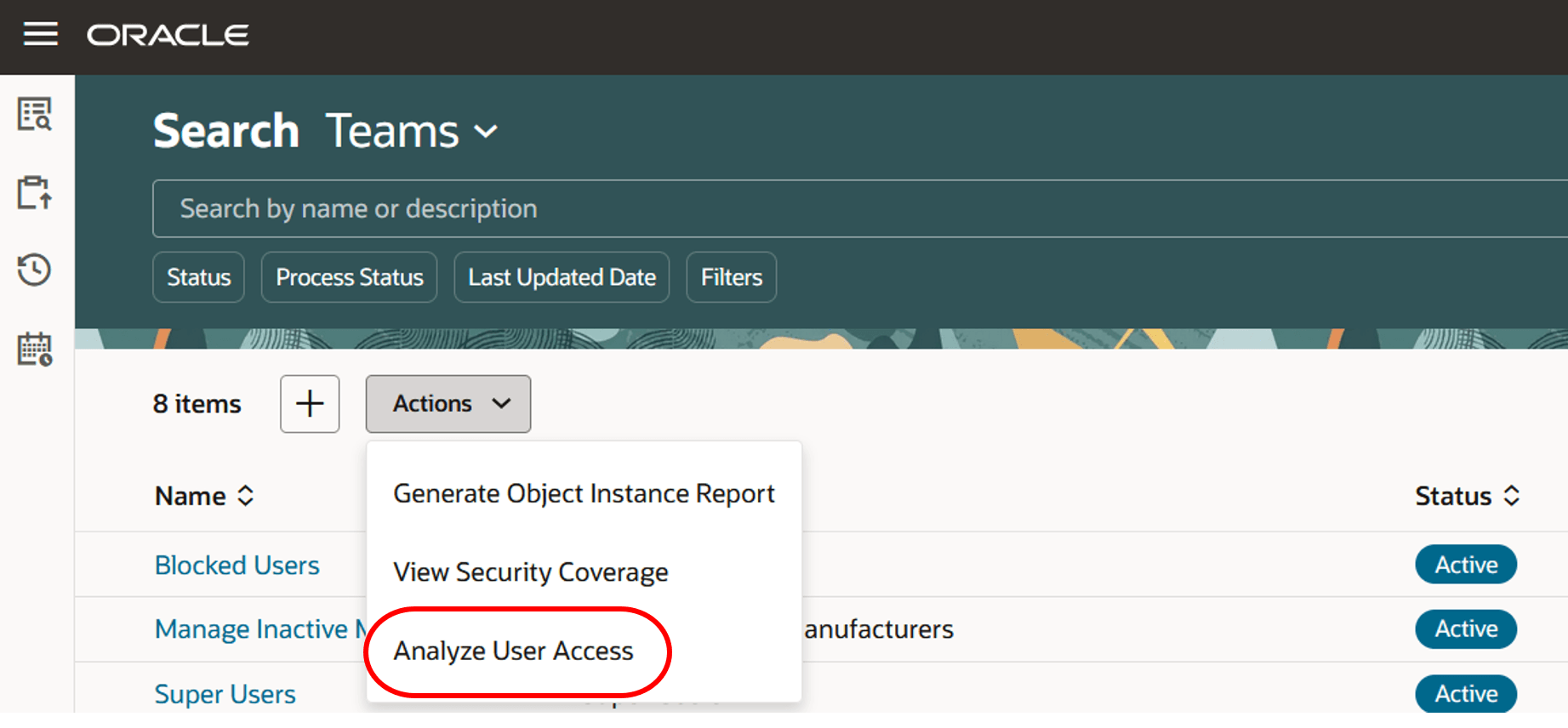
The analyze user access action on the search teams page
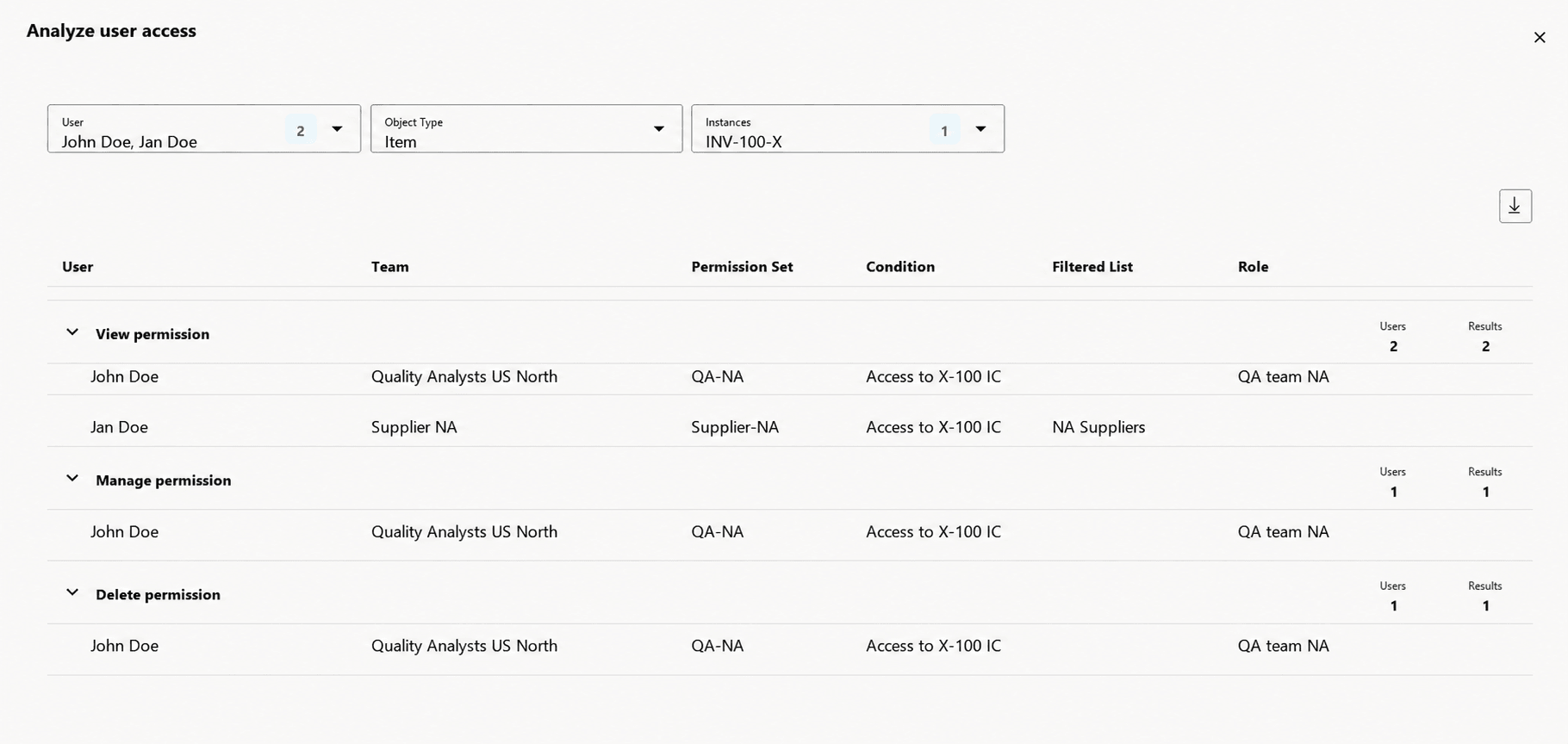
Details of access granted to users through access controls lists
The screenshot displays the user access analysis results for users Jerry Walker and Erin Wolf on item INV-100-X.
-
John, a member of the Quality team, has View, Manage, and Delete permissions for INV-100-X.
-
Jan, a member of the Supplier group, has only View permission for INV-100-X.
Permissions are grouped in the following order: Create, View, Manage, Delete, and Publish.
When two users are selected, the analysis compares their access to the same object instance.
You can export the analysis results for offline review and auditing.
Exclusion (is not) operator for catalogs
Use the Is Not operator to exclude a catalog or category hierarchy from a user's access.
For example, consider the following catalog hierarchy:
-
Electronics
-
Smartphones
-
Phone X Series
-
Phone X Pro
-
-
-
Laptops
-
Laptop Air
-
Laptop Pro
-
-
Exclude a catalog
If you define the condition Catalog Is Not Electronics, users can't access the Electronics catalog or any of its categories. Users automatically receive access to all other catalogs and their categories.
Exclude a category
If you define the condition Category Is Not Phone X Series, users can't access the Phone X Series category or any of its child categories, such as Phone X Pro.
Users can still access:
-
Other categories in the Electronics catalog that aren't under Phone X Series, such as Laptops, Laptop Air, and Laptop Pro.
-
All other catalogs and their categories.
Scheduled processes
-
Refresh the Access Control List for Teams: Run this process manually, if you disable and later enable the profile option Enable Access Control List for Items. This process runs automatically when you save a permission set used in a team or add a permission set to the team.
-
Upgrade Product Management Data: To support the new Is Not operator for the Catalog, you must upgrade existing condition definitions by running the Upgrade Product Management Data scheduled process for the Teams functional area.
This feature provides the following business benefits:
-
View and compare access permissions across your enterprise easily and efficiently.
-
Quickly identify permission areas that may need further refinement or tuning.
-
Grant access to catalogs more efficiently by using the exclusion (Is Not) operator. This condition excludes access to the selected catalog or category and its hierarchy, while automatically granting access to all other catalogs and categories outside the excluded hierarchy.
Steps to enable and configure
-
To use criteria-based access control for catalogs, enable the profile option Enable Access Control List for Catalogs. By default, the profile option is set to No.
-
After enabling the profile option, the catalogs continue to honor the existing security settings until you create a permission set and add it to an active team that impacts at least one catlog or category.
Once the profile option is enabled and a permission is created for a catalog, all catalogs that aren’t assigned to a specific functional area in the application will become private. You must manually assign user permissions to such catalogs.
Tips and considerations
-
Criteria-based access control for catalogs is supported only on Redwood pages. Classic pages don’t support it and continue to use data security configured at the individual catalog or category level. If you enable criteria-based access control, it’s recommended not to use both Redwood and the Classic pages, because using criteria-based access control and existing catalog or category security concurrently in the same environment isn’t supported and can result in inconsistent catalog or category access.
-
In order to exclude a complete hierarchy, use 'Is Not' on catalog and category attribute.
-
You can select a maximum of two users for access analysis at a time.
-
The Object Type list displays only object types for which ACL security is enabled.
-
If a selected user doesn’t have access to the object instance, the drawer displays a no data.
-
The analysis is read-only and is intended for review or troubleshooting.
-
Use the export option to download the analysis results for offline review or audit purposes.
Key resources
-
Oracle Fusion Cloud SCM Using Product Master Data Management Guide, available on the Oracle Help Center.
-
Oracle Fusion Cloud SCM Implementing Product Management Guide, available on the Oracle Help Center.
Access requirements
Users who are assigned a configured job role that contains these privileges can access this feature:
|
Privilege status |
Privilege name and code |
|---|---|
|
Existing |
To configure conditions for catalogs or categories using a filtered list:
|
|
Existing |
To configure teams, permission sets, and conditions:
|
|
Existing |
To access catalogs and categories in Redwood
|
|
Existing |
To access journeys setup and configure the roles in role hierarchy:
|
|
Existing |
To access business rules:
|
|
Existing |
Additionally, add the following to access an object report:
The duty role Redwood Item Catalogs (ORA_EGP_RW_ITEM_CATALOGS_DUTY) contains both the Access Redwood Catalogs and Manage Redwood Catalogs privileges and can be used directly with Administration users or modified to use with other job roles. |