Search for suppliers using tax identifiers
Search for suppliers from a new Redwood workbench to quickly find, manage, and analyze suppliers. Smart search supports flexible matching across supplier attributes, including Taxpayer ID and Tax Registration Number (TRN). Configure extensible key performance indicators (KPIs) to monitor supplier activity, such as pending profile change requests or expired business classifications, and use the supplier workbench to support lightweight supplier reporting and analysis.
The page opens with a count of all active suppliers sorted by most recently created. Use the search bar to find a supplier or filters to narrow results such as, supplier type, creation date, country, and status. Taxpayer ID and tax registration number are now available as exact-match filters, to help you find suppliers quickly. The Suppliers search provides you with the flexibility to tailor the displayed result columns using business rules or provide page guidance using guided journeys. You can also tailor the page by adding new OTBI-based key performance indicators (KPIs) to present suppliers and their related information as your business needs. The actions to create and register suppliers are also available from this page.
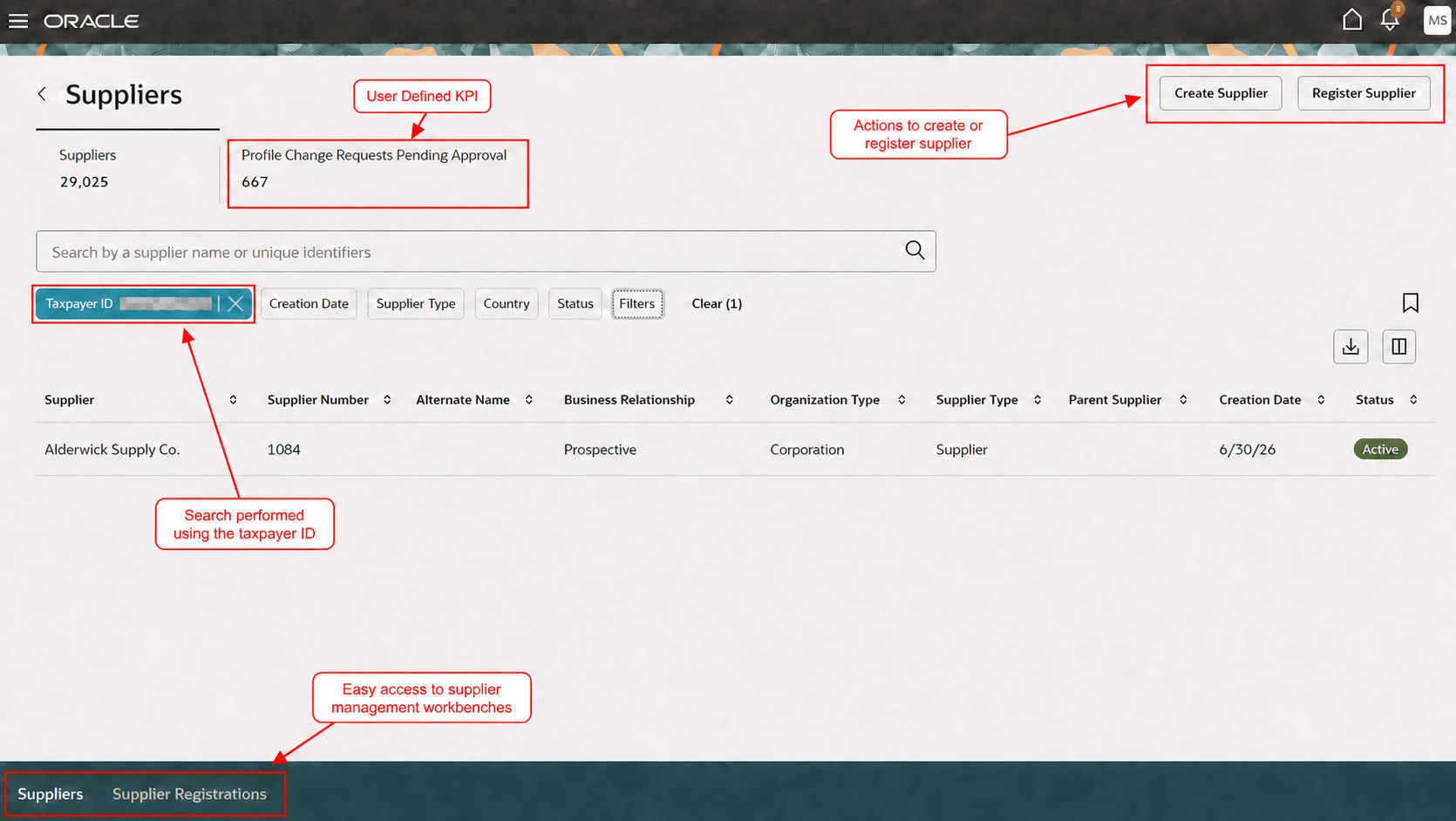
Search with the Taxpayer ID on Suppliers workbench
This Suppliers search page replaces the the Manage Suppliers (Classic UI) and Suppliers (New) pages.
Search by tax identifiers to locate supplier records more accurately and efficiently, helping reduce time spent reviewing similar supplier names and improving supplier-data verification.
Steps to enable and configure
To use this feature, enable the following profile options. For instructions, see Set Profile Option Values topic.
- Enable the Redwood pages for manage suppliers (ORA_POZ_MANAGE_SUPPLIERS_REDWOOD_ENABLED).
- Enable Redwood Supplier Management (ORA_POZ_SUPPLIER_MANAGEMENT_REDWOOD_ENABLED). This is an existing profile option, no action is required if it’s already enabled.
The supplier search index must be configured by running the scheduled process by the name ESS job to create index definition and perform initial ingest to OSCS. Set the index name to fa-prc-suppliers. This is a one-time task and is required even if the job was run for the Suppliers (New) page.
No additional configuration is required to search for suppliers using taxpayer ID or tax registration number.
Tips and considerations
- Suppliers task has been added in the Supplier Management and Purchasing work areas.
- Taxpayer ID and tax registration number support exact-match search and are available as filters. These values aren’t displayed in the search results.
- You must have the appropriate data security policies to search using taxpayer ID and tax registration number.
- When searching by taxpayer ID, you don’t need to enter the value in the exact stored format. The search removes special characters from the search value and uses the normalized Taxpayer ID to find matching suppliers.
- You can save searches and download supplier search results from the Suppliers workbench.
- You can't remove the seeded scorecard that lists all the suppliers.
- You can add OTBI-based KPIs and data visualizations for additional supplier search or review scenarios, for example list all suppliers with pending profile change requests. For details about how to add your own key performance indicators (KPIs) and visualizations to this page, see: Flexible Reporting in Redwood Dashboards.
Key resources
- For information about using Oracle Visual Builder Studio to extend your Redwood application pages, see Oracle Fusion Cloud HCM and SCM: Extending Redwood Applications for HCM and SCM Using Visual Builder Studio.
- For information about guided journeys, refer to Overview of Guided Journeys.
Access requirements
Users who are assigned a configured job role that contains this existing privilege and who meet the following data security conditions can search suppliers with tax registration number and taxpayer ID.
Data security conditions for taxpayer ID and tax registration number
- Non-individual taxpayer ID: They have access to the Supplier Personally Identifiable Information data resource with Maintain Supplier Corporate Identifiers action.
- Individual taxpayer ID: They have access to the Supplier Personally Identifiable Information data resource with Maintain Supplier Individual Identifiers PII action.
- Tax registration number: They have access to the Party Tax Profile for Table ZX_PARTY_TAX_PROFILE data resource.
Privilege:
| Privilege status | Privilege name and code |
|---|---|
| Existing |
Search Supplier POZ_SEARCH_SUPPLIERS_PRIV |
Users who are assigned a configured job role that contains these existing duties can search suppliers with tax registration number and non-individual taxpayer ID.
Duties:
| Duty role status | Duty role name and code |
|---|---|
| Existing |
Supplier Profile Inquiry ORA_POZ_SUPPLIER_PROFILE_INQUIRY_DUTY |
| Existing |
Supplier Profile Management ORA_POZ_SUPPLIER_PROFILE_MANAGEMENT_DUTY |
Users who are assigned a configured job role that contains this existing privilege can personalize the page to add user-defined scorecards.
Privilege:
| Privilege status | Privilege name and code |
|---|---|
| Existing |
Administer Sandbox FND_ADMINISTER_SANDBOX_PRIV |