Add payment details with a new address or site
The feature Redwood: Manage Supplier Profile is now enhanced to allow adding payment details on new supplier addresses and sites. When you create an address or site, you can also add related bank accounts, payment methods, and payment attributes as part of this update. This helps reduce follow-up work because you no longer need a 2 step process to add payment details to addresses and sites, where you create the address or site in step 1, and return later to add payment details in step 2. If you're using approvals, approvers can review new address and site information with the associated payment details in a single profile change approval request.
Steps to create new addresses and sites remain the same. After you create them, use the Payments tab to select the new address or site that is created in the current change request to add payment methods, bank accounts, and payment attributes.
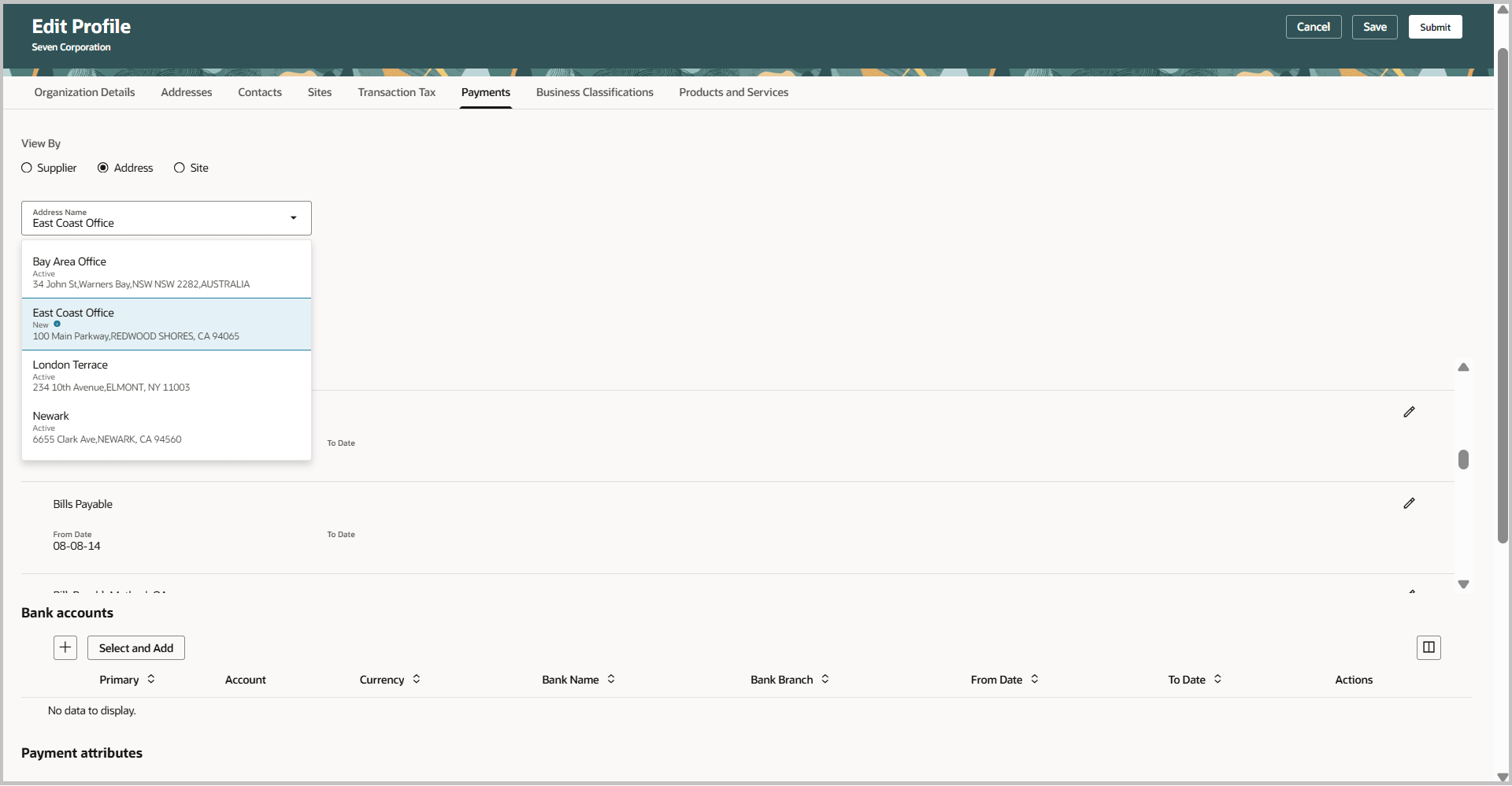
Edit supplier - Payments tab
After you submit the changes, select View Change Request to see the change details.
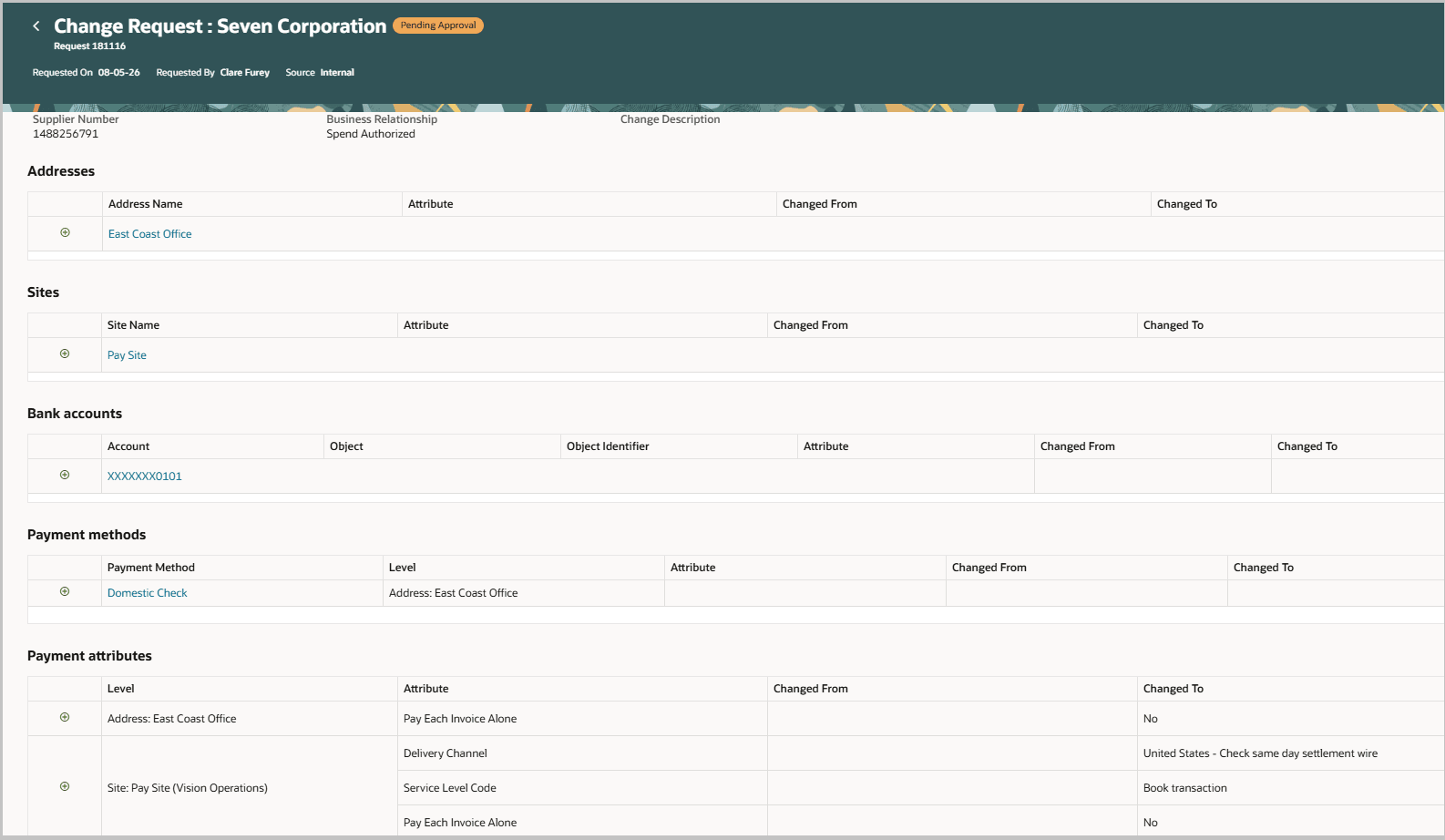
View change request for new address and site with payment details
This feature improves supplier profile maintenance by letting you complete the payment setup for new addresses and sites in a single supplier profile change request, reducing work for supplier administrators and approvers.
Steps to enable and configure
To use this feature, you must enable the following existing profile options if you haven't already.
- Redwood Page for Supplier Management Enabled (ORA_POZ_SUPPLIER_MANAGEMENT_REDWOOD_ENABLED)
- Redwood Pages for Supplier Profile Enabled (ORA_POZ_SUPPLIER_PROFILE_REDWOOD_ENABLED)
Tips and considerations
- If you've used the Supplier Profile Change Request Approval Notification Report to configure the approval notification, you may need to review and repeat the changes you made to the report template because the template has been updated to show payment details added to new addresses and sites.
- If a new address or site is deleted before the change request is submitted for approval, the payment details are automatically removed and not applied to the supplier profile.
- Existing functionalities under the Payments tab such as adding new payment methods, setting them as default, adding or selecting bank accounts, specifying payment attributes remain unchanged.
- While this feature improves the usability of adding address/site level payment details it is recommended managing payment details at the supplier level.
Key resources
- Refer to the What's New for details on enabling and using the Redwood: Manage Supplier Profile feature released in the Update 26A.
- Refer to the What's New for details on managing intermediary accounts and descriptive flexfields for supplier bank accounts in Redwood supplier profile.
Access requirements
Internal users who are assigned a configured job role that contains these existing privileges can manage payments (payment methods, bank accounts, payment attributes) for supplier addresses and sites.
| Privilege status | Privilege name and code | Privilege purpose |
|---|---|---|
| Existing |
Maintain Supplier POZ_MAINTAIN_SUPPLIER_PRIV |
Edit supplier profile. |
| Existing | Maintain Supplier Payment POZ_SUPPLIER_PAYMENT_PRIV | Edit payments. |
| Existing |
Manage External Payee Payment Details IBY_MANAGE_EXTERNAL_PAYEE_PAYMENT_DETAILS_PRIV |
Edit payments. |
| Existing |
Manage Third Party Bank Account IBY_MANAGE_THIRD_PARTY_BANK_ACCOUNT_PRIV |
Edit bank accounts. |
| Existing | Maintain Supplier Address POZ_MAINTAIN_SUPPLIER_ADDRESS_PRIV | Edit addresses and address-level payments. |
| Existing | Maintain Supplier Site POZ_MAINTAIN_SUPPLIER_SITES_PRIV |
Edit sites and site-level payments. |