Create suppliers with trusted data from Moody's
Embed trusted data from Moody's, such as firmographic and risk data, to enrich supplier profile during supplier creation. Extending Moody’s enrichment to supplier creation helps you create supplier profiles with trusted data, reduce manual entry, and improve supplier-data consistency.
This feature expands on the existing supplier registration enrichment, powered by the Moody’s Orbis database. You can now search and select a company using the Moody’s repository and automatically populate mapped supplier attributes while creating a supplier profile.
User steps:
- Search for a company – On the new supplier panel, search by company name and review relevant matches returned from Moody's (enter manually if supplier is not found, for example individuals are not supported in Moody's).
- Select a company and populate attributes – After you select a company any mapped profile attributes from Moody's are automatically populated on the panel.
- Create the supplier and submit changes – Enter other attributes on the new supplier panel and Create the supplier. When the supplier is created, additional mapped profile attributes that aren't present on the panel are retrieved and populated in the supplier profile. You also see a message indicating that the supplier profile was enriched. After completing the other profile information, submit the changes. These changes will be routed for approval or get directly applied as per your approval configuration.
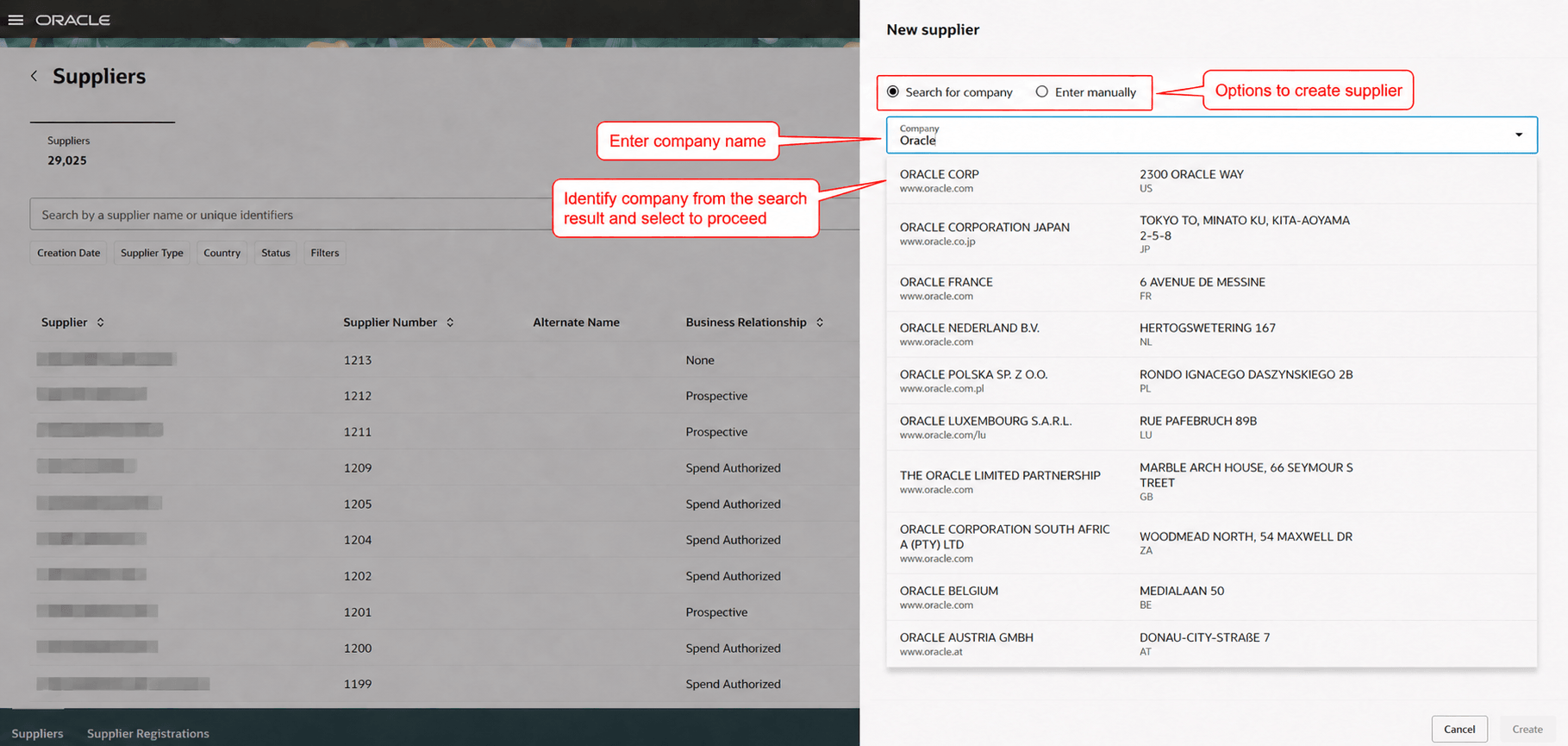
Moody's company search
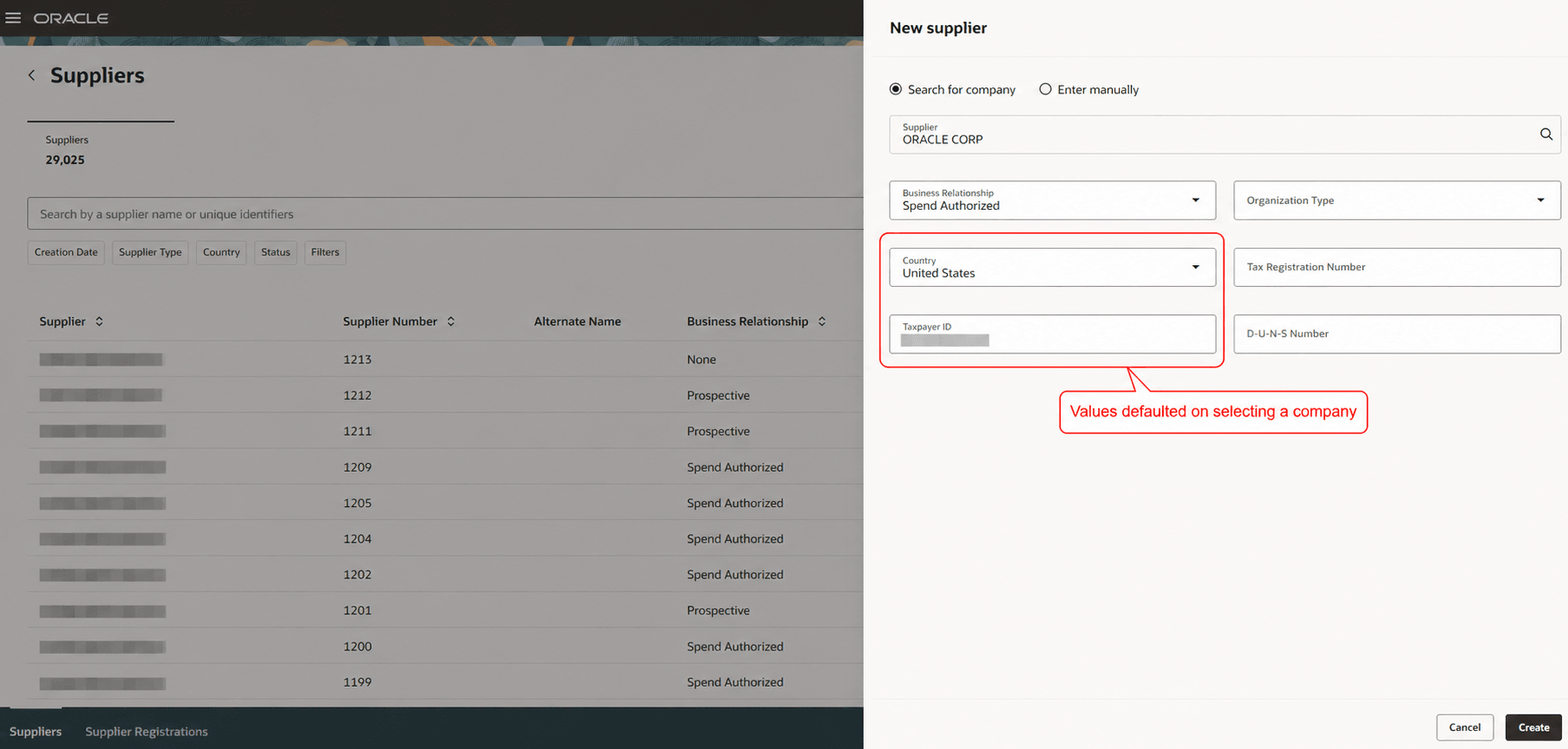
Attributes populated with Moody's data
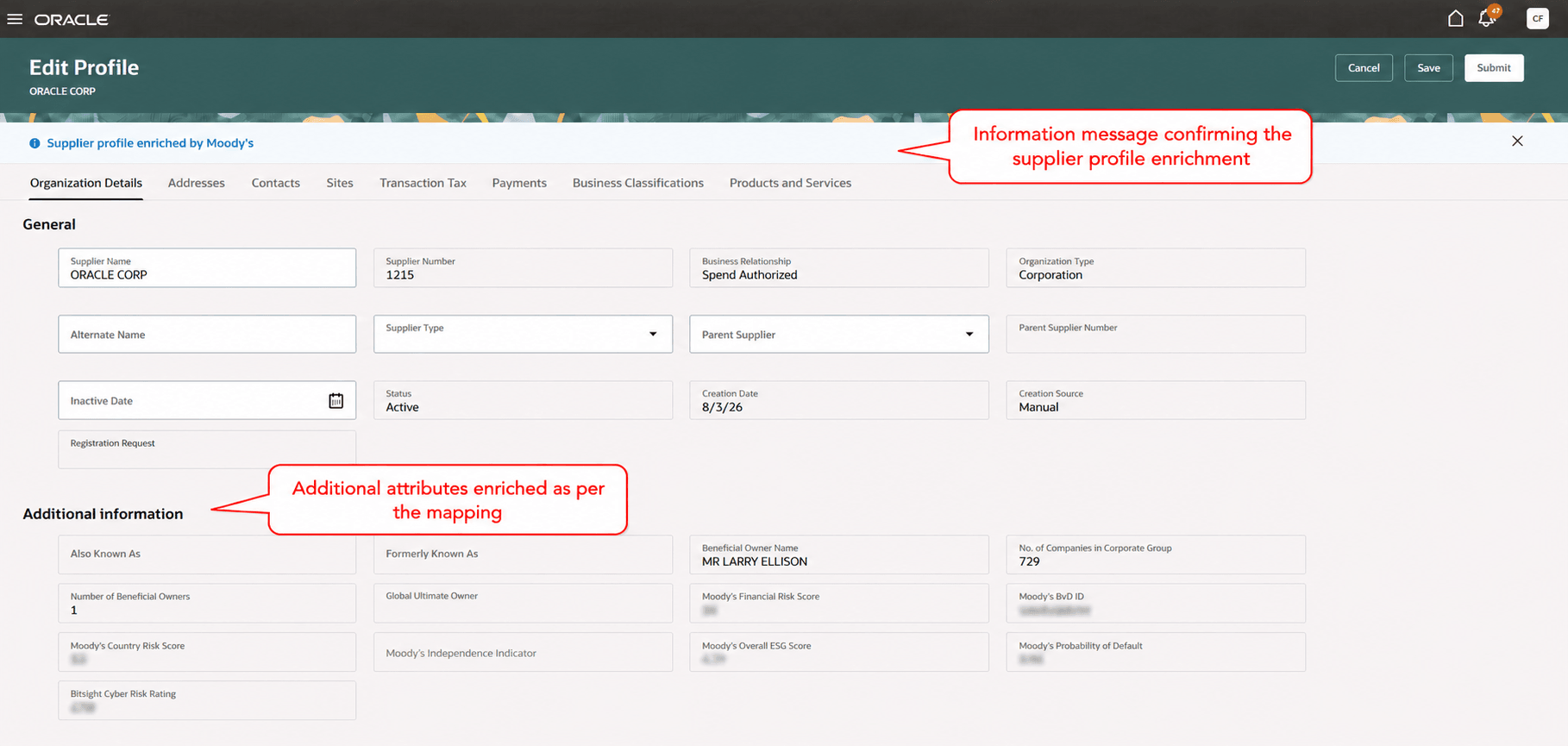
Successful enrichment
The feature has flexible configuration for using Moody's data:
- Configure search results: Define the company attributes such as website, address and so on, that will be displayed in search results to help users identify the company they are looking to create.
- Configure attribute mappings: Configure the company details to be retrieved and populated during supplier creation. This includes mapping to standard company attributes as well as supplier descriptive flexfields to capture additional data such as Moody’s company scores.
This seamless integration allows you to augment supplier profiles with Moody's trusted data, reduce manual entry and improve supplier-data consistency.
Steps to enable and configure
This feature requires a paid subscription to the Moody’s Orbis database with API access and setup in the Oracle Fusion Cloud application.
Subscription to Moody’s Orbis database
- If you already have a subscription to Moody’s Orbis database via API, contact your Moody's Customer Success Manager to confirm your API access credentials. Or send an email to clientservices@moodys.com.
- If you do not have a paid subscription to the Moody’s Orbis database via API, fill out the Contact Us form found here, or contact your designated Moody’s representative.
- Ensure your subscription includes API delivery access.
Application setup
Note: If you're already using the 26B feature Redwood: Register suppliers with trusted data from Moody's, you only need to configure attribute mappings for the supplier profile attributes. For attributes shared between supplier registration and supplier creation, you can reuse the existing mappings by adding the corresponding supplier registration attribute as the profile attribute. If the attribute names differ, map them accordingly.
Follow the setups in this order:
- Configure backend integration: In the Manage Backends for Visual Builder Studio setup task, create the backend required for the integration.
- Extension ID: oracle_prc_supplierregistrationUI
- Backend Name: ExternalDataProviderForSuppliers
- Instance URL: Provided by Moody’s.
- Authentication: Configure using the credentials provided by Moody’s.
- Configure enrichment service provider (search integration) and mapping for supplier profile enrichment. These setups define the search experience and map Moody’s data to supplier profile attributes. Follow the customer connect post Set Up Moody’s Search and Enrichment for Supplier Registration for more details on these two setups.
- You can also do this setup using the REST APIs directly: External Data Provider for Suppliers and Map External Data Provider and Supplier Attributes REST APIs.
- When configuring attribute mappings between Moody’s data and supplier profile attributes, ensure the data types and field lengths are compatible to prevent data truncation or integration errors.
- To use this feature, enable the following profile options:
- Enable Redwood Supplier Management (ORA_POZ_SUPPLIER_MANAGEMENT_REDWOOD_ENABLED). This is an existing profile option, no action is required if it’s already enabled.
- Enable the Redwood Pages for Supplier Profile (ORA_POZ_SUPPLIER_PROFILE_REDWOOD_ENABLED). This is an existing profile option, no action is required if it’s already enabled.
- You can access the New Supplier panel to create suppliers from the Suppliers (New) page or the Suppliers page. The Suppliers page is a new Redwood supplier search experience available in this update. To use the Suppliers page, enable the Redwood Pages for Manage Suppliers profile option (ORA_POZ_MANAGE_SUPPLIERS_REDWOOD_ENABLED).
Tips and considerations
- Search begins after you enter at least three characters.
- If the company isn’t found, refine your search or select Enter Manually to create the supplier.
- When you create a supplier, the application retrieves additional mapped attributes and saves them as draft. If an error occurs while retrieving attribute values or saving a draft, a warning banner appears on the supplier profile. Review the error and correct the mappings as needed.
- Supplier creation and profile completion aren’t prevented if additional mapped attributes can’t be retrieved or saved.
- If you aren’t already using the 26B feature Redwood: Register Suppliers with Trusted Data from Moody’s, you can enable Moody’s enrichment for both supplier creation and registration in this update. If you already use the 26B feature:
- You don’t need to configure the backend again.
- You don’t need to enable Moody’s as an enrichment provider again.
- You don’t need to configure attributes for supplier search as it is same for the supplier registration and creation.
- Configure mappings for supplier profile attributes, even if you’ve already mapped supplier registration attributes. Although they can correspond to the same UI attributes, supplier profile and supplier registration attributes may differ; use the appropriate attributes for each mapping.
Key resources
- Refer to the What's New for details on enabling and using the 26B update feature: Redwood: Register Suppliers with Trusted Data from Moody's.
- For information about the Moody’s Orbis Database, see Orbis database: Global private company data and intelligence.
- For information about External Data Provider for Suppliers REST API, see External Data Provider for Suppliers REST.
- For information about Map External Data Provider and Supplier Attributes REST API, see Map External Data Provider and Supplier Attributes REST.
Access requirements
Users who are assigned a configured job role that contains these existing privileges can create suppliers using trusted data from Moody's.
| Privilege status | Privilege name and code |
|---|---|
| Existing |
Access Suppliers Work Area Overview POZ_ACCESS_SUPPLIER_WORKAREA_OVERVIEW_PRIV |
| Existing |
Search Supplier POZ_SEARCH_SUPPLIERS_PRIV |
| Existing |
Create Supplier POZ_CREATE_SUPPLIER_PRIV |
Users who are assigned a configured job role that contains these existing privileges can configure the backend, provider and attribute mapping setups.
| Privilege status | Privilege name and code |
|---|---|
| Existing |
Manage External Data Providers for Suppliers POZ_DIRECTCONNECT_DATA_PROVIDERS_SETUP_PRIV |
| Existing |
Create and Edit Backends for Visual Builder Studio ORA_FND_TRAP_PRIV |