Redwood: Enhance Supplier Bank Account and Transaction Tax Management
Supplier profile management in Redwood has enhanced bank account and transaction tax capabilities as part of the Manage Supplier Profile feature released in Update 26A.
With this update, you can manage intermediary accounts and descriptive flexfields for supplier bank accounts in Redwood supplier profile.
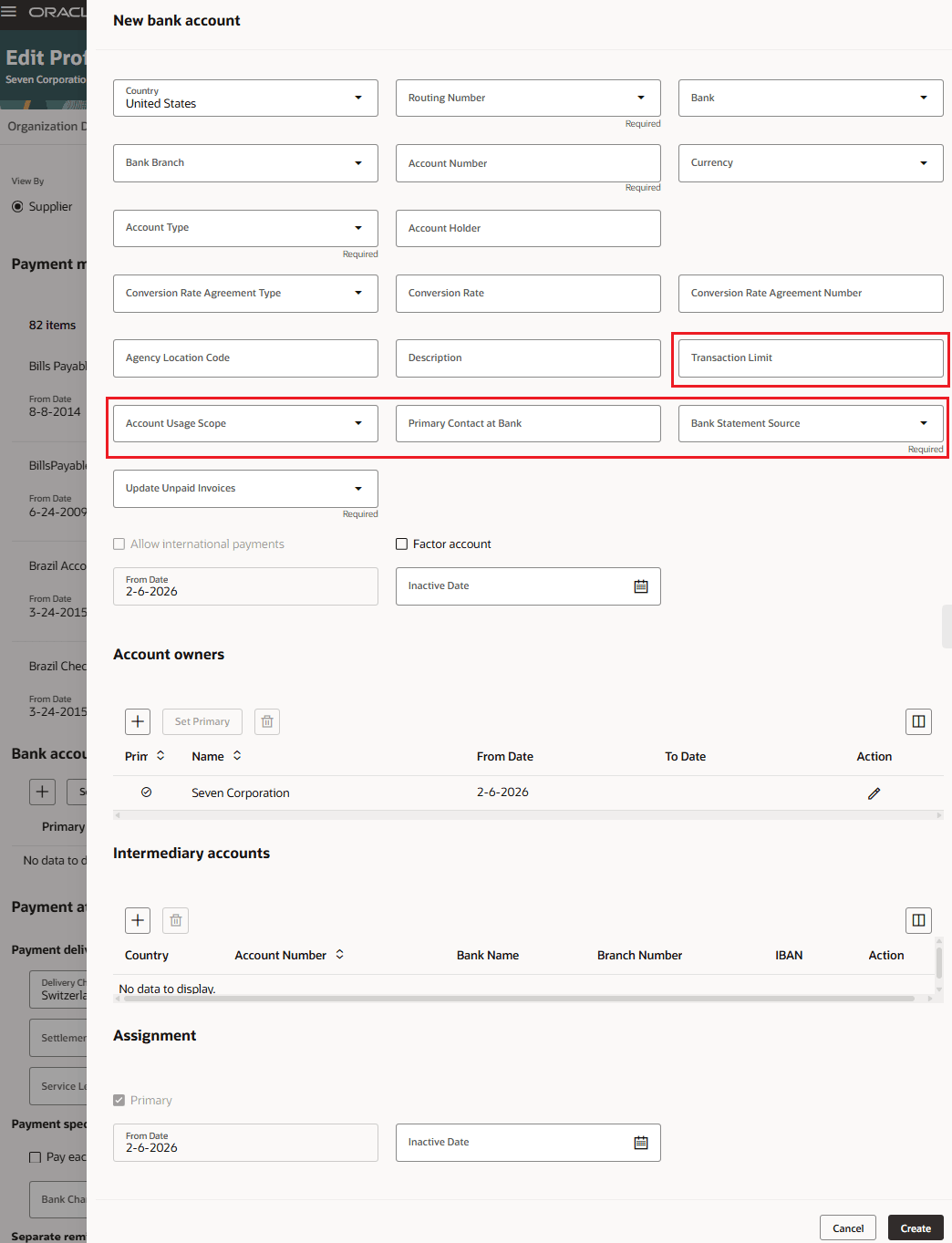
Add New Supplier Bank Account with Intermediary Accounts and Descriptive Flexfields
Also, managing supplier transaction tax information is expanded to include: classifications, tax reporting codes, taxpayer identifiers, and withholding tax exemptions.
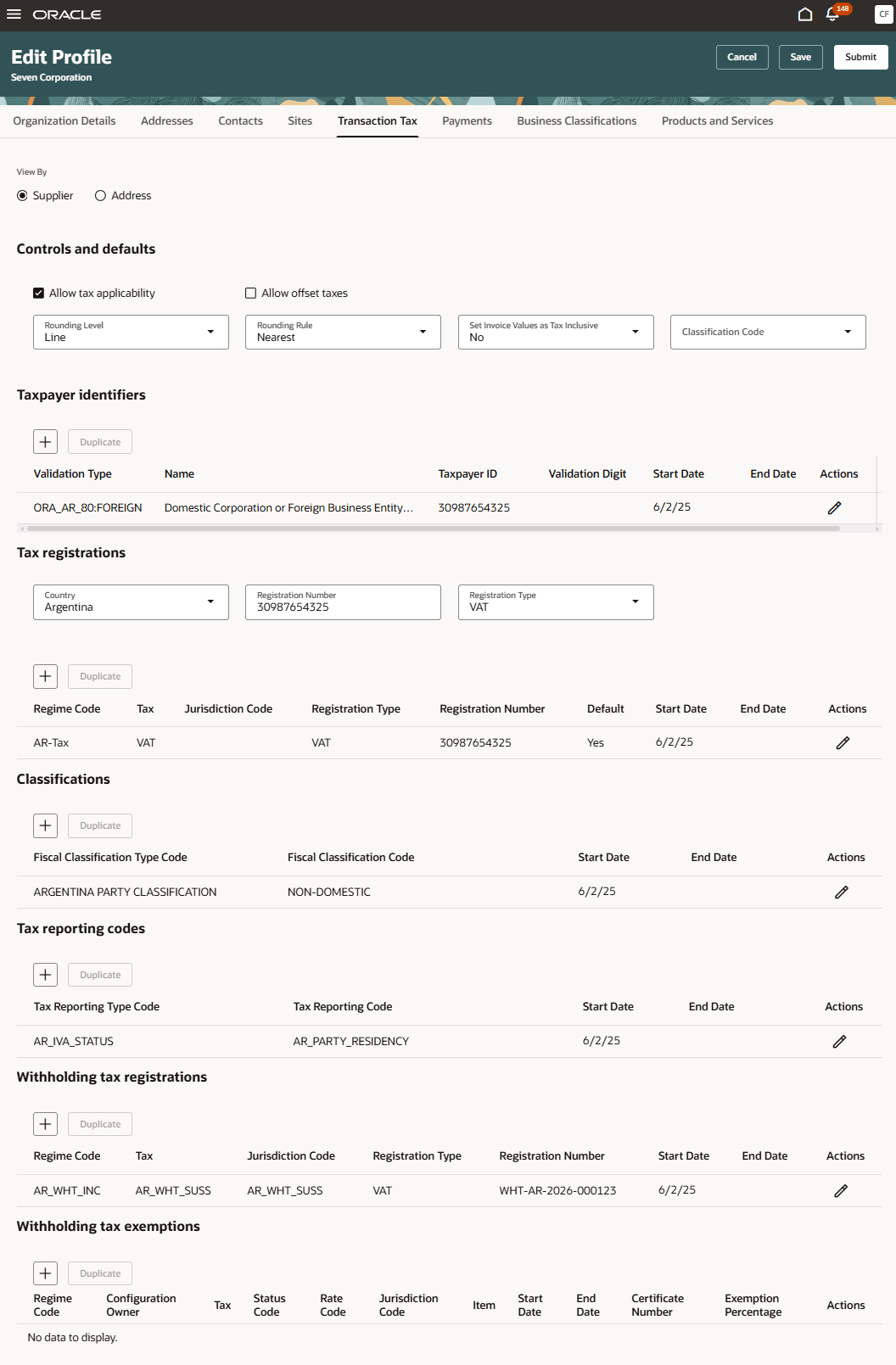
Transaction Tax
You can also view qualifications and assessments information for a supplier and its sites on the Redwood supplier profile.
Steps to enable and configure
To use this feature, you must enable the following existing profile options if you haven't already.
- Redwood Page for Supplier Management Enabled (ORA_POZ_SUPPLIER_MANAGEMENT_REDWOOD_ENABLED)
- Redwood Pages for Supplier Profile Enabled (ORA_POZ_SUPPLIER_PROFILE_REDWOOD_ENABLED)
Tips and considerations
- Transaction tax, as mentioned in the update 26A What's New isn't under change control, that is, any change on transaction tax will get applied directly without requiring approval.
- You can configure the additional bank account attributes, that aren’t exposed by the Bank Account User Rules REST API, including descriptive flexfields and intermediary accounts using Business Rules in VB Studio. Use Bank Account User Rules REST API to configure country-specific rules for the supported attributes.
- For IBAN countries (per the SWIFT IBAN registry), you can create a supplier bank account by providing either the account number or the IBAN, even if a required bank account rule exists for IBAN.
- On the view profile:
- Payments attributes in the payments tab is enhanced to include country information for payment delivery channel, bank instruction code 1 and 2, and the payment reason code.
- Bank accounts in the payments tab is enhanced to include values for conversion rate agreement type, conversion rate, conversion rate agreement number, agency location code, description, and factor account.
- Additional guided journeys are also supported for new sections on bank accounts and transaction tax.
- If a rare error is encountered when applying an approved profile change request from a supplier, you can no longer edit the changes, but you can still follow the link in the error notification and review the error details. You can then make corrections separately (for example, make an inactive lookup value active) and return to the Change Request page to process (or cancel) the change request.
Key resources
- Refer to the What's New for details on enabling and using the Redwood: Manage Supplier Profile feature released in the Update 26A.
- Refer to the section Bank Account User Rules in the REST API for Oracle Fusion Cloud Financials guide for details on the country-specific bank account user rules.
Access requirements
Internal users who are assigned a configured job role that contains these existing privileges and who meet any of the following data security conditions can manage the supplier profile for transaction tax and payments, including bank accounts:
- Privilege to edit supplier profile
- Maintain Supplier (POZ_MAINTAIN_SUPPLIER_PRIV)
- Privileges to manage transaction tax
- View Supplier Transaction Tax (POZ_VIEW_SUPPLIER_TRANSACTION_TAX_PRIV)
- Maintain Supplier Transaction Tax (POZ_MAINTAIN_SUPPLIER_TRANSACTION_TAX_PRIV)
- To manage address level transaction tax, add View Supplier Address (POZ_VIEW_SUPPLIER_ADDRESS_PRIV) or Maintain Supplier Address (POZ_MAINTAIN_SUPPLIER_ADDRESS_PRIV).
- Privileges to manage payments
- View Supplier Payment (POZ_VIEW_SUPPLIER_PAYMENT_PRIV)
- Maintain Supplier Payment (POZ_MAINTAIN_SUPPLIER_PAYMENT_PRIV)
- Manage External Payee Payment Details (IBY_MANAGE_EXTERNAL_PAYEE_PAYMENT_DETAILS_PRIV)
- To manage bank accounts, add View Third Party Bank Account (IBY_VIEW_THIRD_PARTY_BANK_ACCOUNT_PRIV or Manage Third Party Bank Account (IBY_MANAGE_THIRD_PARTY_BANK_ACCOUNT_PRIV).
- To manage address level payment information, add View Supplier Address (POZ_VIEW_SUPPLIER_ADDRESS_PRIV) or Maintain Supplier Address (POZ_MAINTAIN_SUPPLIER_ADDRESS_PRIV).
- To manage site level payment information, add View Supplier Site (POZ_VIEW_SUPPLIER_SITES_PRIV) or Maintain Supplier Site (POZ_MAINTAIN_SUPPLIER_SITES_PRIV).