Process multiple purchasing document actions in real time
Process selected actions on purchasing documents in real time when the number of selected records is within the processing limit.
Before this update, when you performed any action by selecting more than 1 purchase order or purchase agreement, the action was processed using a scheduled process. With this update, the real-time processing threshold for multi-select actions on purchase orders and purchase agreements is set to 5, similar to the threshold value for processing requisitions. You can also increase the threshold value to process more than 5 records in real time. Selections exceeding the threshold value are submitted as a scheduled process.
Real-time actions on purchase orders and purchase agreements now support partial processing. Records without errors are processed successfully, while row-level error details are displayed for the records that couldn't be processed.
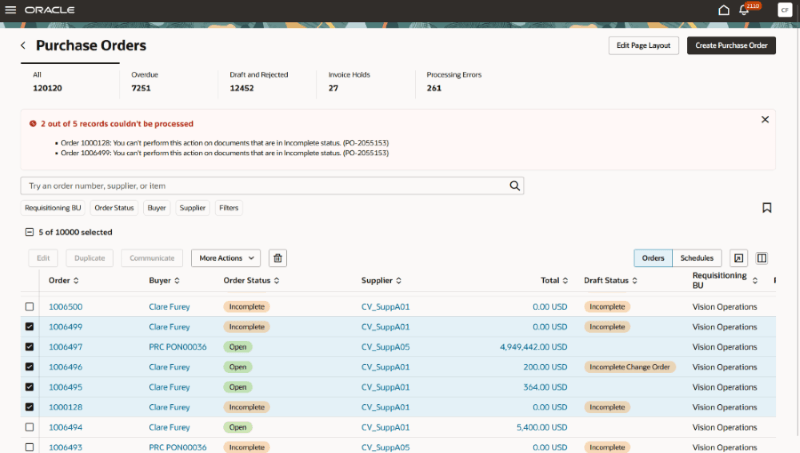
Error in real-time processing - Partial records processed
You can configure real-time processing thresholds for these purchasing document actions:
| Scope | Actions |
|---|---|
| Purchase Agreement | Hold, Remove Hold, Freeze, Unfreeze, Cancel, Finally Close |
| Purchase Order | Delete, Acknowledge, Hold, Remove Hold, Cancel, Close, Reopen, Freeze, Unfreeze |
| Purchase Order Schedule | Cancel Schedule, Close Schedule, Reopen Schedule, Firm Schedule, Undo Firm Schedule |
This feature helps you process smaller groups of purchasing documents without waiting for scheduled processing, while automatically submitting larger selections as scheduled processes.
Steps to enable and configure
- In the Setup and Maintenance work area, search for and select the Manage Administrator Profile Values task.
- On the Manage Administrator Profile Values page :
- To specify the maximum number of selected purchase orders that can be processed in real time, set the Purchase Order Action Real-Time Processing Row Limit (ORA_PO_PURCHASE_ORDER_ROW_LIMIT) profile option to a positive integer. The default value is 5.
- To specify the maximum number of selected purchase agreements that can be processed in real time, set the Purchase Agreement Action Real-Time Processing Row Limit (ORA_PO_PURCHASE_AGREEMENT_ROW_LIMIT) profile option to a positive integer. The default value is 5.
- To specify the maximum number of selected requisition lines that can be processed in real time, set the Process Requisition Action Real-Time Processing Row Limit (ORA_PO_PROCESS_REQ_ROW_LIMIT) profile option to a positive integer. The default value is 5.
- Select Save and Close.
Note: Changes to the profile value take effect the next time users sign in.
Tips and considerations
- This feature applies only to actions that already support bulk processing on the new user experience pages for Purchase Orders, Purchase Agreements, and Process Requisitions.
- If the profile option value is blank or set to a value less than 5, the threshold defaults to 5.
- Consider the expected processing time for your purchasing documents when setting the threshold, and test the setting before processing larger numbers of documents.
- This feature doesn’t apply to these actions:
- Publishing multiple staged documents from the Staged Documents page.
- Performing a mass edit of purchase order schedules.
Access requirements
No specific privileges are required to process multiple purchasing document actions in real time.