View negotiation and award approval history
View approval history during negotiation and award approval using the Redwood experience. This provides greater transparency into approvers, approval actions, comments, and status changes. From the Approval History page, you can review both negotiation approval history and award approval history depending on the stage of the negotiation. Expand or collapse each section to review approval steps in chronological order, including the action performed, the person who performed it, the action date, and any notes provided to the approver.
On the Negotiations page, select View Negotiation and then select View Approval History.
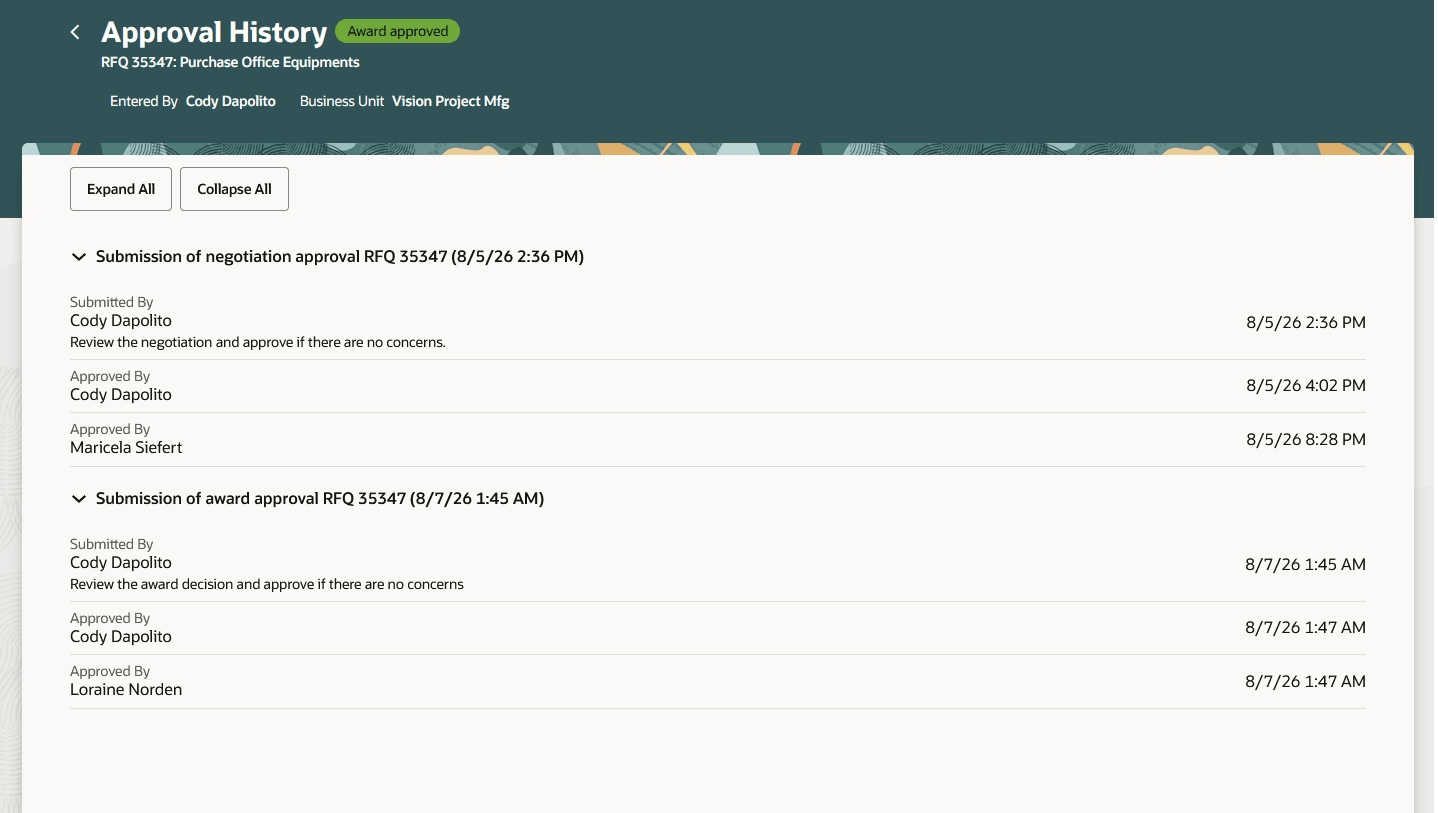
Negotiation and award approval history
The approval history hierarchy displayed depends on the enabled approval configuration and the negotiation’s current status. The Approval History page can show negotiation approval history, award approval history, or both. For draft negotiations, access the Approval History page from the Manage Approvers page or from the actions menu on the View Draft Negotiation page.
Viewing a consolidated approval history improves transparency and helps category managers quickly understand approval progress, decisions, and related comments when managing negotiations and awards.
Steps to enable and configure
To use this feature, you must enable these profile options if you haven't already.
- Redwood Pages for Sourcing Enabled (ORA_PON_SOURCING_REDWOOD_ENABLED).
- Redwood Page to Create Negotiation Enabled (ORA_PON_CREATE_NEGOTIATION_REDWOOD_ENABLED)
For instructions on enabling a profile option, refer to the Set Profile Option Values topic.
Tips and considerations
- Comments entered when making an approval decision from a notification are also displayed within the approval hierarchy on the Approval History page.
Key resources
- For information about using Oracle Visual Builder Studio to extend your Redwood application pages, see Oracle Fusion Cloud HCM and SCM: Extending Redwood Applications for HCM and SCM Using Visual Builder Studio.
- Refer to Overview of Guided Journeys in the Oracle Fusion Cloud Human Resources: Implementing and Using Journeys guide, available on the Oracle Help Center.
Access requirements
Users who are assigned a configured job role that contains these privileges can access this feature:
| Privilege status | Privilege name and code |
|---|---|
| Existing | Create Supplier Negotiation (PON_CREATE_SUPPLIER_NEGOTIATION_PRIV) |
| Existing | Edit Supplier Negotiation (PON_EDIT_SUPPLIER_NEGOTIATION_PRIV) |
| Existing | View Supplier Negotiation (PON_VIEW_SUPPLIER_NEGOTIATION_PRIV) |