Fulfill requisitions when awarding to contract
You can now preserve requisition details when creating supplier contracts from a negotiation award. When you finalize an award or use the Create Outcome action in the Award page, the requisition and award allocation details are passed to the draft supplier contracts. During contract fulfillment, the allocated award quantity and requisition traceability are maintained, and requisition quantities are marked as fulfilled.
This feature helps category managers and procurement teams to complete requisition-backed Source to Contract flows without manually returning or reprocessing requisition demand. For Agreement class contract types, you can choose whether to fulfill requisitions when creating supplier contracts. For Enterprise class contract types, requisitions are fulfilled automatically.
Choose how requisitions are fulfilled when creating supplier contracts
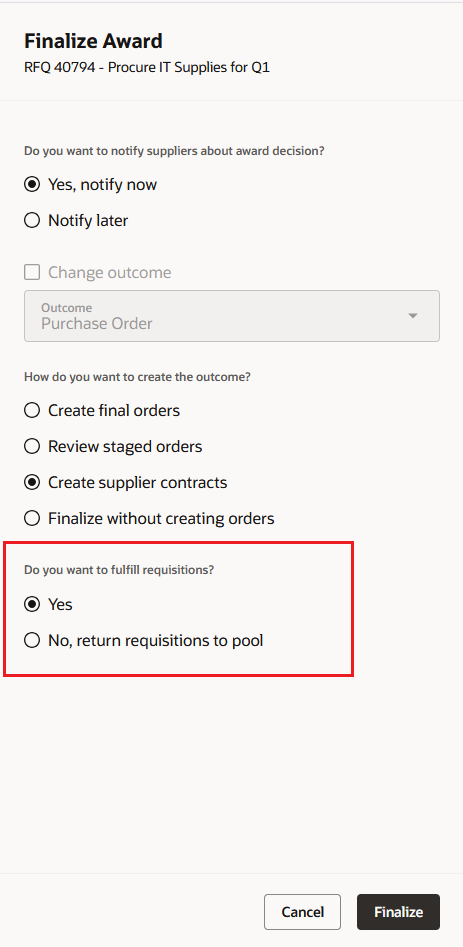
Finalize award drawer
When you create supplier contracts for a requisition-backed negotiation, the award decision (such as partial award or multiple-supplier awards) determines how the backing requisition demand is handled. For Agreement class contract types, the Finalize Award drawer and Create Outcome drawer let you choose whether to fulfill requisitions by allocating awarded quantities to backing requisition lines or return the requisition demand to the Process Requisitions pool. For Enterprise class contract types, the fulfill requisitions choice isn't displayed. The application automatically allocates requisitions when supplier contracts are created.
Preserve requisition references on fulfillment lines
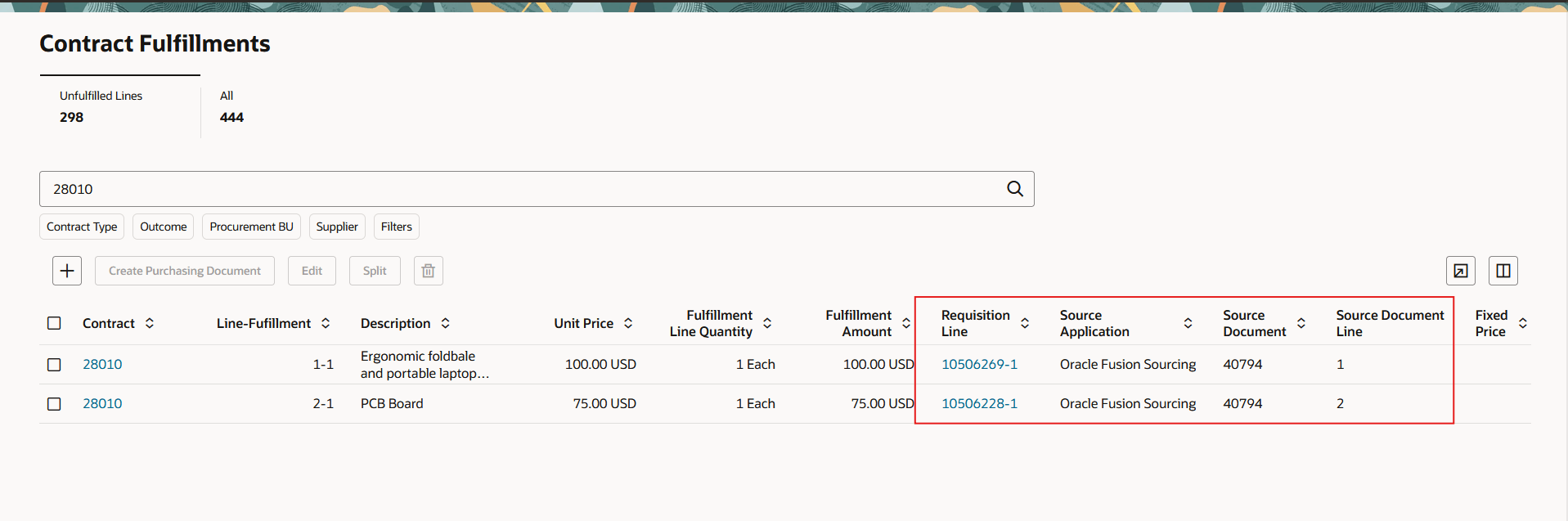
Contract fulfillment lines
When requisition demand is fulfilled through a supplier contract, the application preserves allocation details and requisition references from the negotiation award. When the supplier contracts are created, the corresponding requisition line status changes to On Contract. Draft supplier contract lines and downstream contract fulfillment lines can carry the backing requisition information needed to trace demand from requisition through negotiation, award, supplier contract, and fulfillment.
For requisition-backed awards, contract fulfillment creates fulfillment lines from the award allocations and carries the requisition reference and allocated quantity. Negotiations without backing requisitions continue to create fulfillment lines from contract lines as before.
The application handles award quantities that differ from backing requisition quantities. If the awarded quantity is greater than the requisition quantity, fulfillment creates an additional line for the quantity that isn't backed by a requisition. If the awarded quantity is less than the requisition quantity, the application splits the requisition line as needed and returns the unfulfilled demand to the Process Requisitions pool.
Requisition lines that aren't awarded are returned to the Process Requisitions pool.
Example: A requisition requests 100 laptops.
- If you award 120 laptops, fulfillment creates one requisition-backed line for 100 laptops and an additional line that's not requisition-backed for the extra 20 laptops.
- If you award 70 laptops, fulfillment fulfills 70 laptops against the requisition and returns the remaining 30 laptops to the Process Requisitions pool for further action.
This feature helps you maintain requisition traceability when supplier contracts are created from negotiation awards. It reduces manual follow-up for requisition-backed awards and helps ensure that awarded demand flows to the intended supplier contract and fulfillment outcome.
Steps to enable and configure
Use the Opt In UI to enable this feature. For instructions, refer to the Optional Uptake of New Features section of this document.
Offering: Procurement
This featue doesn't have a separate opt-in. In the Procurement offering and Sourcing functional area, enable the opt-in for the existing feature, Create Supplier Contracts from Negotiation Award, if it isn't already enabled.
To use this feature, you must enable these profile options if you haven't already.
- Redwood Pages for Sourcing Enabled (ORA_PON_SOURCING_REDWOOD_ENABLED).
- Redwood Page to Create Negotiation Enabled (ORA_PON_CREATE_NEGOTIATION_REDWOOD_ENABLED)
- Redwood Page to Award Negotiation Enabled (ORA_PON_AWARD_NEGOTIATION_REDWOOD_ENABLED)
For instructions on enabling a profile option, refer to the Set Profile Option Values topic.
Tips and considerations
- After supplier contracts are created from the award, you can't reopen the award decision. This feature will be supported in a future update.
- Splitting award quantities is not supported for budget-controlled requisition lines that have reserved funds or use encumbrance accounting.
- If you reduce the quantity on a contract line below the total quantity of its associated requisition lines, requisition lines won't be fulfilled and are returned to the Process Requisitions pool.
Key resources
- Redwood: Manage Contract Terms in Negotiations
- Using Procurement Contracts
- For information about using Oracle Visual Builder Studio to extend your Redwood application pages, see Oracle Fusion Cloud HCM and SCM: Extending Redwood Applications for HCM and SCM Using Visual Builder Studio.
Access requirements
Users who create, edit, or view supplier contracts created from a negotiation award need configured roles that include the required Contracts privileges.
| Privilege Status | Privilege Name | Privilege Code | Required For |
|---|---|---|---|
| Existing | Create Contract | OKC_CREATE_CONTRACT_PRIV | Create supplier contracts from the negotiation or base contract flow, or after finalizing award. |
| Existing | Edit Contract | OKC_EDIT_CONTRACT_PRIV | Edit draft contracts after creation. |
| Existing | View Contract | OKC_VIEW_CONTRACT_PRIV | View supplier contracts created from negotiation pages. |