Search for suppliers using a Contains search in requisitions
Finding suppliers while creating requisitions is now easier and more flexible. Previously, the supplier search returned results only when the entered value matched the beginning of a supplier name, alternate name, or supplier number. Searches by D-U-N-S number required an exact match.
With this update, the Supplier search supports contains matching for supplier name, alternate name, and supplier number, allowing you to find suppliers by entering any portion of these values. Enter a single character to perform a starts with match search on name, number or alternate name, and two or more characters to perform a contains search. Searches by DUNS number continue to require an exact match.
The enhanced search experience is available wherever you search for suppliers using the following flows:
- Smart form request.
- Noncatalog request.
- Enter requisition line.
- Edit requisition line.
- Marketplace shopping.
Here are illustrations of different searches that you can perform:
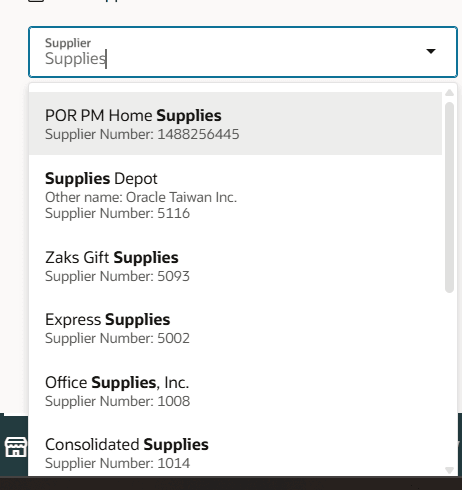
Contains search on supplier name
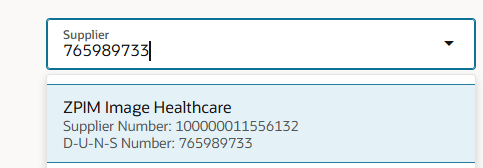
D-U-N-S number exact match
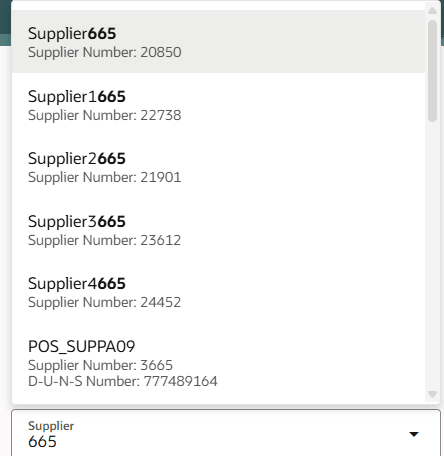
Supplier name or number contains match results
The enhanced search reduces the time spent searching for suppliers, improves supplier discovery, and helps users complete requisitions more quickly. This feature is also beneficial in bringing back valid suppliers in other languages where names can begin with a single character.
Steps to enable and configure
To use this feature, run initial ingestion on the supplier search index using these steps:
- Navigate to Tools > Scheduled Processes.
- Find the ESS job to create index definition and perform initial ingest to OSCS scheduled job.
- Set the parameter: fa-prc-poz-suppliersforssp.
- Select Submit.
After the process runs successfully, the initial ingestion creates and populates the search index required for the enhanced supplier search capability. For subsequent upgrades, the search framework automatically runs ingestion when it detects an index version change.
Note: You don't need to run this ingestion process for subsequent changes to suppliers such as adding or editing suppliers.
Tips and considerations
- The enhanced supplier search is available after the initial supplier search index ingestion completes successfully.
- The functional behavior of suppliers are returned in the search remains unchanged from prior updates:
- The supplier must be active.
- Supplier must have at least one active site with a purchasing or sourcing site purpose.
- An active site assignment must exist for the requisitioning BU in which the requisition is created.
- This feature is also available when editing requisitions as an approver.
- Extensibility:
- In addition, use the Enable Starts-With Supplier Search Visual Builder Studio constant to control the supplier search behavior. Set the constant to True to use the starts-with supplier search.
Key resources
- For information about using Oracle Visual Builder Studio to extend your Redwood application pages, see Oracle Fusion Cloud HCM and SCM: Extending Redwood Applications for HCM and SCM Using Visual Builder Studio.