Transfer items within the same organization for inventory destination requisitions
You can now transfer items within the same organization for inventory destination requisitions. Before this update, you could only do this for an expense destination. After you have opted in to this feature, you can transfer items within the same organization in these flows:
- Shopping search when the Procure Goods from Preferred Sources feature is enabled.
- Shopping lists when the Procure Goods from Preferred Sources Shopping Lists feature is enabled.
- Enter Requisition Line.
How this works
When you search for an item to procure, you can view the product details to review the default source to procure it. You can, with relevant privileges, also view additional sources from which to procure the item. The destination organization is now available as a source in the Additional details drawer. You can select the destination organization as your preferred source, add the item to the cart, and submit the requisition.
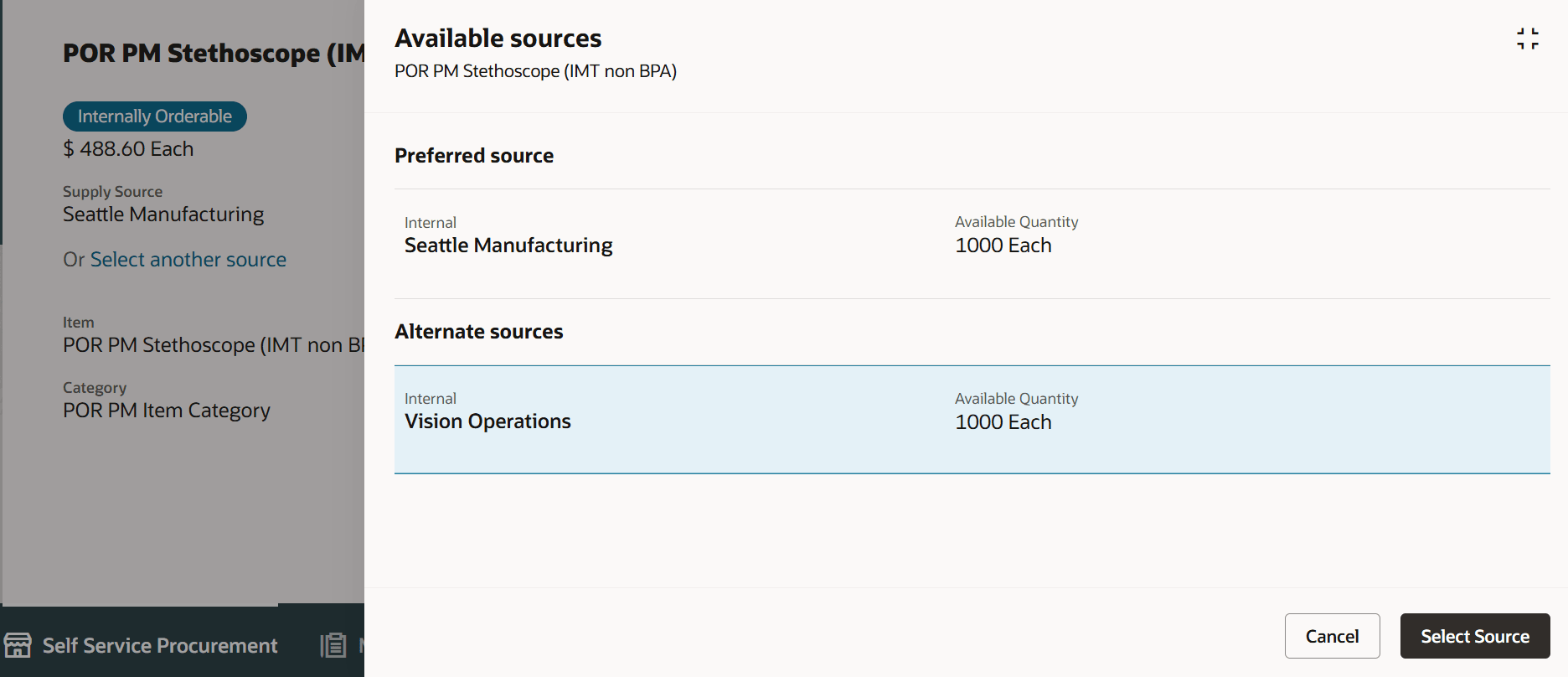
Destination organization as an additional source
Similarly, you can drill down to the product details for an item available in your shopping list (either a personal or public shopping list) and select the destination organization as your preferred source and add to cart.
Note: In order to submit requisitions created using the guided buying flows, you must edit the requisition line and provide a destination subinventory. If you don't provide this, you can't submit the requisition.
Note: You could set up a default destination subinventory in your preferences which may be useful in case you share these subinventories across inventory organizations.
You can create a requisition line using the Enter Requisition Line action where the source organization list will now include the destination organization as a value. If you select the destination organization, you must select a destination subinventory to continue the process.
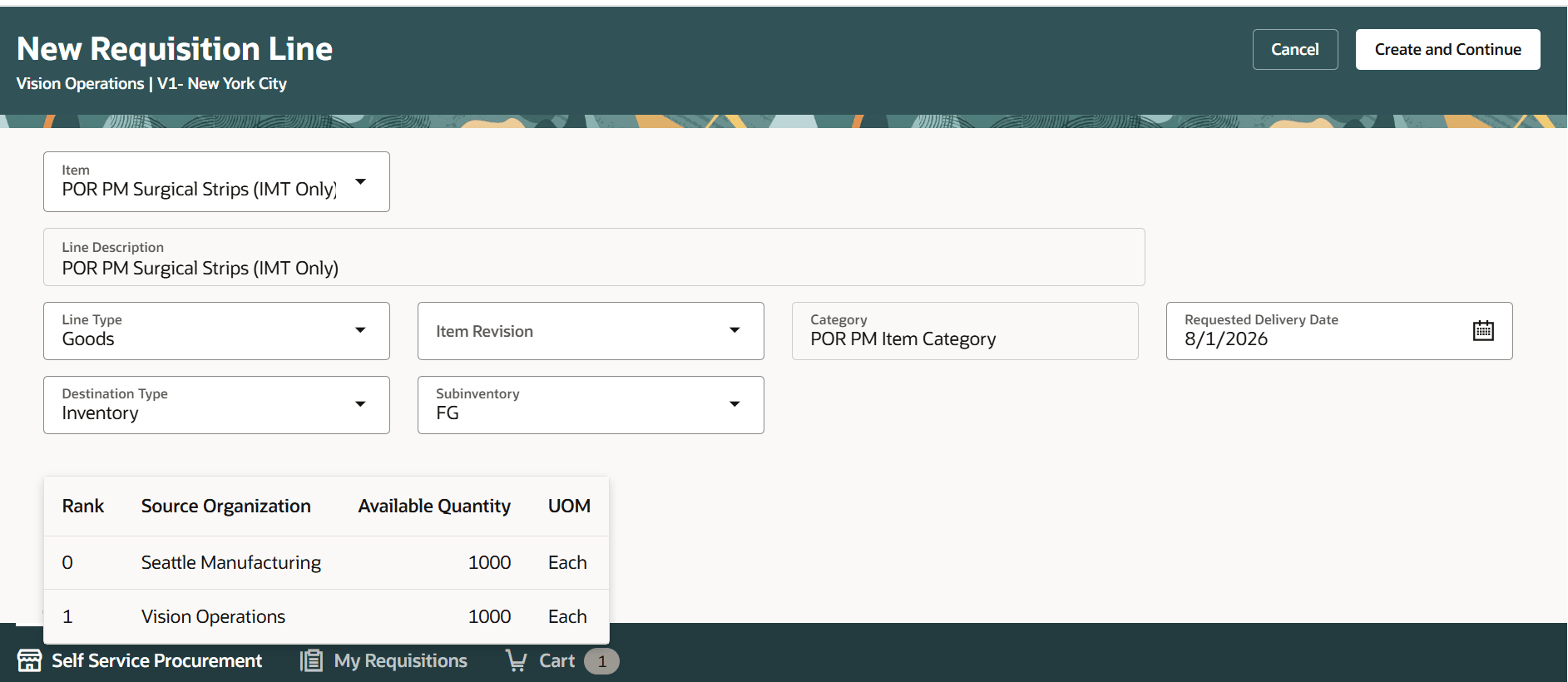
Select the destination organization using Enter Requisition Line
Note: The destination organization will be available as the lowest ranked source in the list. The default source selection won't include the destination organization.
If you select a source other than the destination organization, the destination subinventory isn't required.
If you change the destination type to Expense, the existing behavior of defaulting the destination organization as the source will continue as in prior updates.
Steps to enable and configure
Use the Opt In UI to enable this feature. For instructions, refer to the Optional Uptake of New Features section of this document.
Offering: Procurement
Tips and considerations
- This feature is also available to approvers when they edit requisitions pending approval.
- Creating internal transfer lines using shopping flows that don't use guided buying isn't supported for intra-organization transfers.
- If you duplicate a requisition, the source organization is automatically derived again, and the best available source organization other than the destination organization is selected by default.
- After opting into the feature, you can edit existing requisitions for internal material transfers and update the source organization as needed. Only requisitions created using the Enter Requisition Line flow support editing the source organization.
- If you opt out of this feature, you can still submit previously created requisitions with intra-organization transfers. If you edit the source organization, you can't select the destination organization as the source.
- For REST-based requisitions:
- You can create intra-organization transfers using REST services.
- You must have the Create Requisition for Internal Material Transfers (POR_CREATE_REQUISITION_FOR_INTERNAL_MATERIAL_TRANSFERS_PRIV) privilege.
- You must provide a destination subinventory to create the requisitions.
Key resources
- For information about using Oracle Visual Builder Studio to extend your Redwood application pages, see Oracle Fusion Cloud HCM and SCM: Extending Redwood Applications for HCM and SCM Using Visual Builder Studio.
Access requirements
Users need all of the following privileges to access this feature. Privileges marked as new were introduced in this update.
| Privilege status | Privilege name and code |
|---|---|
| Previously delivered | Create Requisition for Internal Material Transfers (POR_CREATE_REQUISITION_FOR_INTERNAL_MATERIAL_TRANSFERS_PRIV). |
| Previously delivered |
Create Requisition with Inventory Destination Type (POR_CREATE_REQUISITION_ENTER_INVENTORY_DESTINATION_TYPE_PRIV). |