Use extensibility capabilities
You can now use the extensibility capabilities supported in the Self Service Procurement application using Visual Builder Studio. With this update, you can extend the application in the following areas:
- You can personalize table layouts and add guided journeys on manage, create, and edit pages of these setup tasks:
- Information Templates
- Smart Forms
- Catalogs
- Content Zones
- Enable the saved search feature on the My Requisitions page using the Enable Saved Search on My Requisitions constant.
- Configure Line Type as an attribute on the My Requisitions Lines view.
- Use the Enable Starts-With Supplier Search constant to control supplier search behavior.
- Use the Self Service Procurement AI Agent Input Context property to disable access to specific features when using Procurement Request Concierge.
Configure page properties
Before this update, page constants were listed under a section header on the same page, and you couldn't conditionally render page constants.
With this update, all pages for the Self Service Procurement application include a Configure Page Properties button, similar to the buttons available for Business Rules and Validations.
Clicking this button opens the Page Properties editor, where all page constants are listed. You can create new extension rules that override the default values. You can conditionally show or hide guided journeys or configure other page constants.
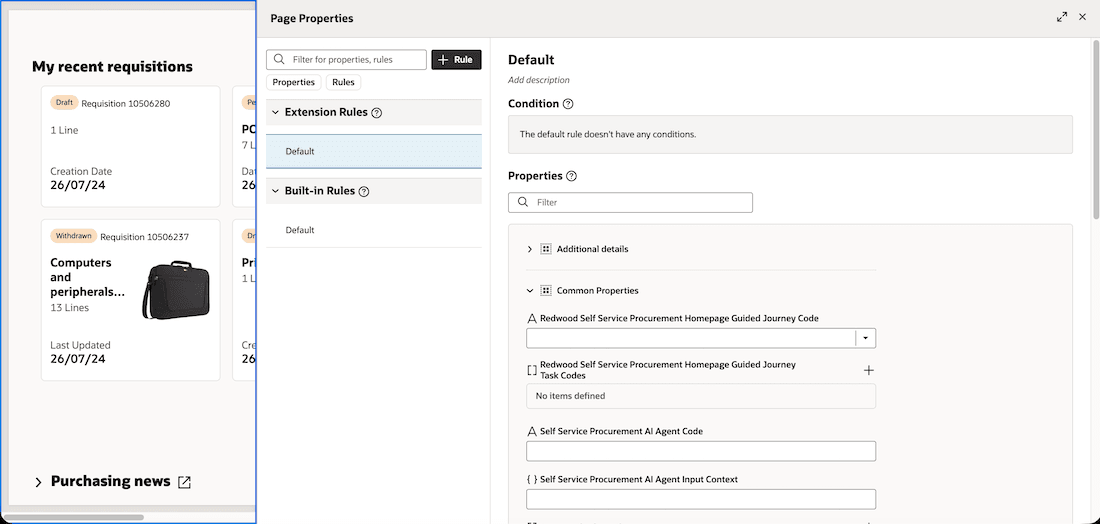
Configure page properties using Oracle Visual Builder Studio
Configure flow properties
Users also have additional controls to extend the application using flow constants. These changes are available:
- A Shared Properties section is available under the Configure Page Properties button, with a Shopping link.
- Clicking the Shopping link opens the Shopping section, which lists all pages included in the flow along with the Configure Flow Properties button.
- Clicking the Configure Flow Properties button opens the Flow Properties editor, where all flow constants are listed.
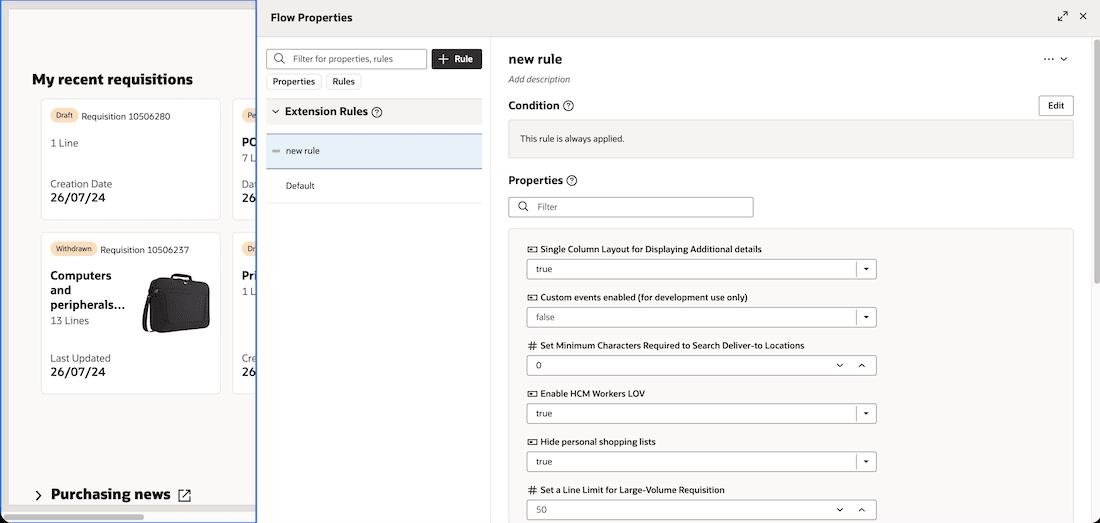
Configure flow properties using Oracle Visual Builder Studio
Note: Changing the values of supported flow-level constants affects all Self Service Procurement pages. Some constants are intended for development-only use or have been deprecated. Don't enable these constants because they aren't supported for your use. Conditional logic isn't supported for flow-level constants.
Steps to enable and configure
To learn more about extending your application using Visual Builder, visit Oracle Help Center > your apps service area of interest > Books > Configuration and Extension.
Tips and considerations
- Only use the extension features described in the Extending the Redwood Self Service Procurement Application document. Don't make other extension changes. They aren't compatible with future updates and might cause pages to render incorrectly.
Key resources
- To know more about the extensibility, refer to the Extending the Redwood Self Service Procurement Application document.
- For information about using Oracle Visual Builder Studio to extend your Redwood application pages, see Oracle Fusion Cloud HCM and SCM: Extending Redwood Applications for HCM and SCM Using Visual Builder Studio.
- For more information on extending the Self Service Procurement application, see Extending the Redwood Self Service Procurement Application.