Use keyboard navigation for public shopping list line updates
In update 26C, you could manage public shopping lists using a new user experience. In this update, you can use a click-to-edit feature to enable inline editing of shopping list lines.
The additional enhancements in this update include:
- New filter on shopping list lines to review lines with inactive agreements.
- Modified sort behavior on the Public Shopping Lists page.
Inline edit of shopping list lines
You can now click the Edit icon to enable inline editing of the sequence and suggested quantity values. After entering a value, press Enter to moves the focus to the corresponding field in the next line. For example, after updating the Sequence value for line 1 and press Enter, focus moves to the Sequence field for line 2. This provides a more controlled editing experience while supporting efficient keyboard-based updates across multiple lines.
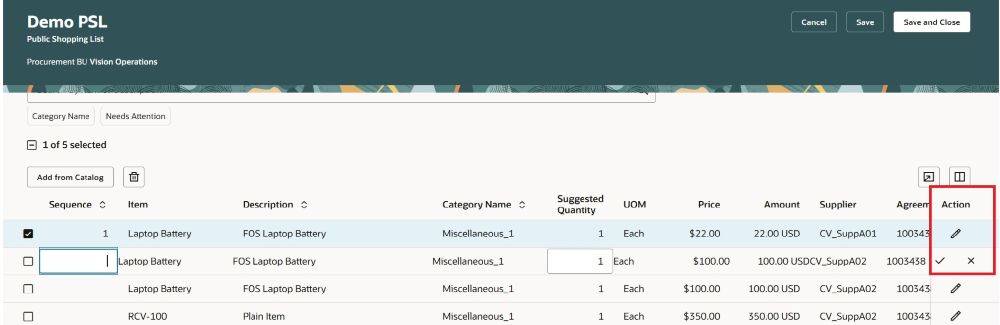
Inline edit of public shopping list lines
- Only 1 line can be placed in edit mode at a time.
- Confirm and save changes to the current line.
Filter shopping list lines that need attention
Shopping list lines that contain inactive agreements are now clearly identified for review. You can use the Needs Attention filter on shopping list lines to review them and take necessary remedial action. For example, you can replace an affected line with a line associated with the most recent agreement or review the issue with your procurement administrator.
Alerts appear in the Description column. On the Content Zones page, the alert appears at the end of the shopping list name instead of in a separate column.
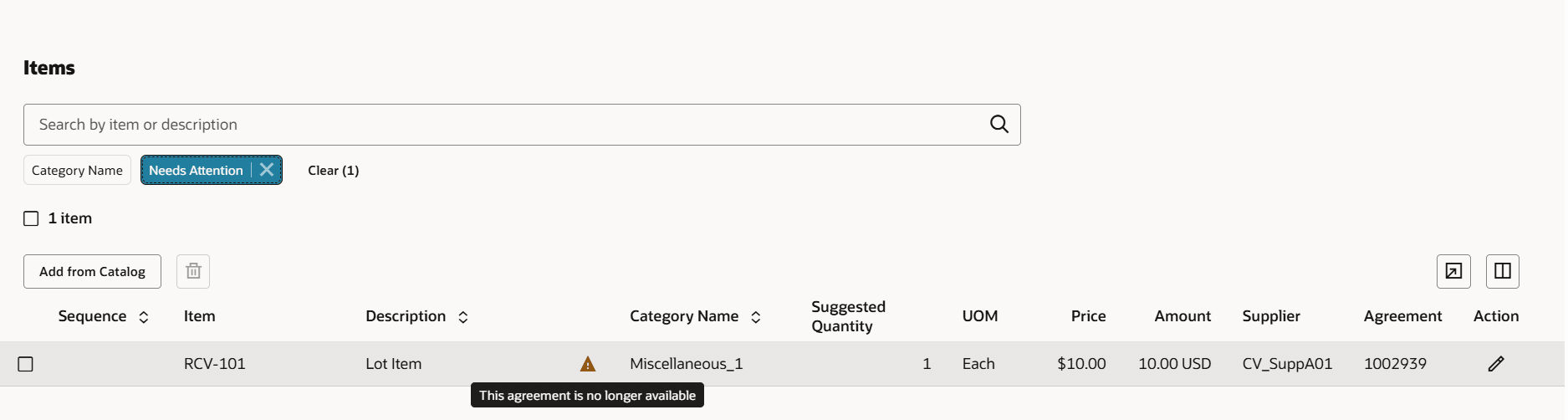
Inactive agreements alert
Public shopping lists search page enhancements
The page now uses an edge-to-edge layout. The page also retains your keyword and filter search criteria when you return to it after creating or editing a public shopping list.
Steps to enable and configure
You don't need to do anything to enable this feature.
Key resources
- For information about how to manage public shopping lists, refer to the Manage Public Shopping Lists feature, available in Oracle Fusion Cloud Self Service Procurement What's New, update 26C.