A single select menu to select Chat and Service Request availability
The Presence and Availability menu for Chat and Service Request is a single-select menu that allows Customer Service Representatives to set their status as either Available or Unavailable. This menu is located in the Global Header and has two icons:
- An icon to set availability for Chat and Service Requests.
-
A Phone Icon to set Phone availability separately.
The following ready-to-use statuses are included in the single-select menu:
-
Available: Active for Chat, Service Request, Chat and Service Request
-
Unavailable: Status set to "Away"
Note: The Phone availability is set separately
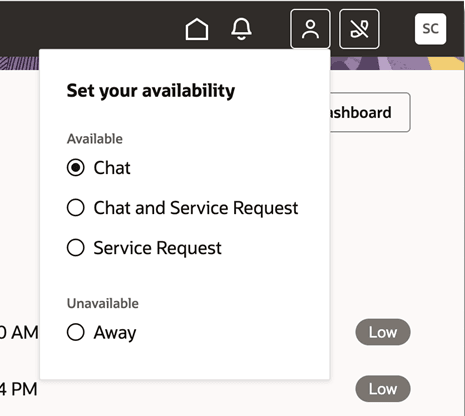
Single select menu to set Chat and Service Request availability
Better usability for customer service reps by simplifying the availability menu
Steps to enable and configure
You don't need to do anything to enable this feature.
Access requirements
The Customer Service representative must have the appropriate Chat and Phone access privileges.