Run Queue Assignment Smart Action
Help Desk Agents can now use the "Run Queue Assignment" smart action to re-run queue routing rules on a particular help desk request to ensure proper queue assignment when information changes that might impact the queue assignment (for instance, the product or category changes or when routing rules have changed). When the Run Queue Assignment action is taken, it will run through the routing rules as though the request is first being created and will assign the appropriate queue based on the rules.
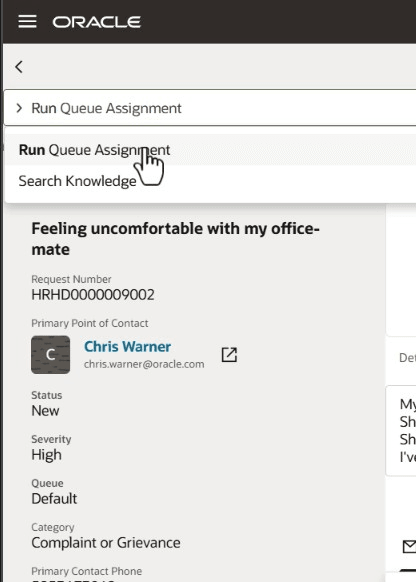
Run Queue Assignment Smart Action
This gives a way for agents to re-queue the request without having to inherently know the routing rules. It also allows assignment of the queue to be re-run if routing rules have changed since the request was created.
Steps to enable and configure
- Create or enter a Sandbox that has Application Composer as a chosen tool by going to Navigator -> Tools -> Sandboxes.
- From the Tools drop-down choose Application Composer.
- Click on the Smart Actions link.
- Type "Run Queue Assignment" and Enter to search.
- Change the value for Enabled to Yes for the Smart Action "Run Queue Assignment" for HR Help Desk Request and/or Internal Help Desk Request.
- Close the Tab and return focus to the Application Composer.
- Under the Sandbox Mode drop-down, choose Preview as if Published.
- Click Yes to continue to enter the preview mode.
- Navigate to Help Desk -> Help Desk Requests.
- Navigate to a Help Desk Request that is in a state where the queue does not currently match that which is expected.
- In the Action Bar type Run Queue Assignment to make certain the option is shown in the list.
- Return to Edit Mode in Application Composer.
- Publish the Sandbox.
Tips and considerations
Note that the AssignedTo is not changed automatically; only the queue is reassigned. If you want the AssignedTo to be re-evaluated, remove the AssignedTo value prior to re-running the queue assignment, or use the Transfer Help Desk Request smart action.
Key resources
After this feature is generally available, a video showing how to configure your environment and a demonstration of the functionality will be found on Oracle Video Hub: Fusion Help Desk.
If the new smart action does not appear during testing, you may need to sign out and sign in using a new browser window.
Access requirements
Every Help Desk Agent has the ability to re-run the queue assignment rules using this new smart action, Run Queue Assignment.