Service Execution Workspace
Service Execution Workspace brings together the service requests that need Customer Support Representative attention, the context needed to act, and tools to move each request forward.
On the Landing Page, review workload insights, priority SRs, and improvement opportunities. Open a Service Request in the Service Execution SR Details Workspace to review its summary, progress, communication history, and recommended next action. Use Ask Oracle to investigate the SR and find supporting information.
Review, accept, or modify AI-prepared resolutions before they are used in customer communication. After a Service Request is resolved, review the procedure generated in the Service Execution Feedback Workspace, validate it against the Evidence Locker, and submit it for Knowledge Article creation.
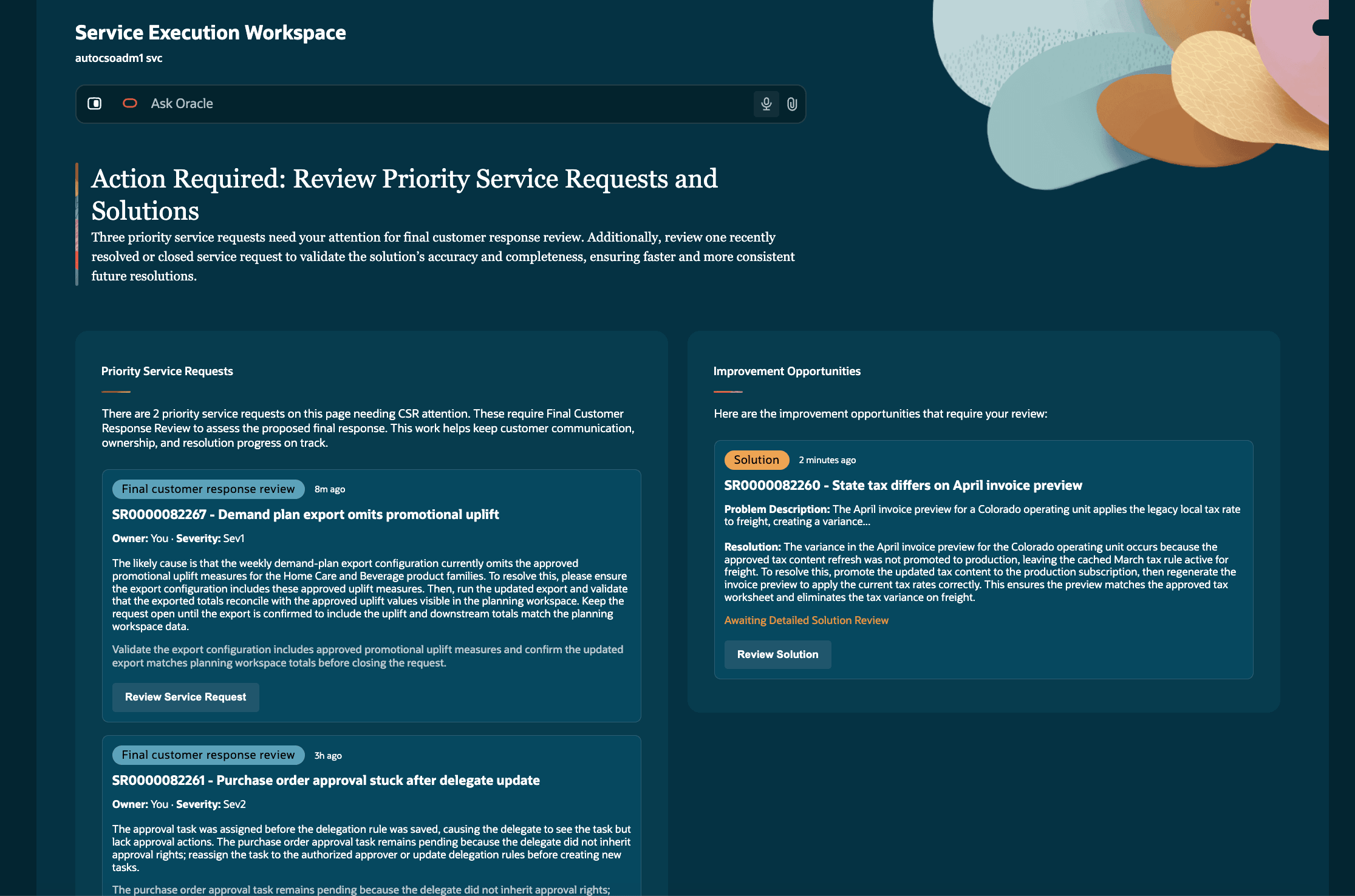
SEW
Service Execution Workspace brings relevant Service Request context, automation handoffs, and recommended next actions into one place. This helps Senior Representatives understand what needs attention sooner, use consistent guidance, and improve the quality of resolution information used by later automation and knowledge processes.
Steps to enable and configure
Provide the required access before using the feature. Details are in the Access #Requirements section.
- Assign the Customer Service Representative job role (ORA_SVC_CUSTOMER_SERVICE_REPRESENTATIVE_JOB) and the Service Super Rep job role (ORA_SVC_SERVICE_SUPER_REP_JOB) to each user who needs access.
- Ensure the Service Execution Workspace User privilege (ORA_SVC_SERVICE_EXECUTION_WORKSPACE_USER_PRIV) is available through the user's assigned role.
- After the roles are assigned, users can open Super Rep from the Service menu or the Service tab in Oracle Fusion Launchpad.
Role assignment controls access to the workspace. No separate Service Request data access is granted.
Tips and considerations
- Service Execution Workspace is designed for guided service work and doesn't replace the full Service Request transaction experience.
- The workspace focuses on automation-related service work. Knowledge authoring, SLA management, and stuck Service Request or service order management aren't included in this release.
- Users see only the Service Requests that they are authorized to view or work on.
Key resources
No additional customer-facing resources are available at this time.
Access requirements
Service Execution Workspace is a Senior Representative experience. To use it, assign both the Customer Service Representative job role (ORA_SVC_CUSTOMER_SERVICE_REPRESENTATIVE_JOB) and the Service Super Rep job role (ORA_SVC_SERVICE_SUPER_REP_JOB). The workspace launch is controlled by the Service Execution Workspace User privilege (ORA_SVC_SERVICE_EXECUTION_WORKSPACE_USER_PRIV). Existing Service Request access controls remain in effect; the workspace doesn't grant additional Service Request read, update, or edit access.