Service Health Check and Process Improvement for Service Operations Workspace
Service managers, executives, and operations leaders can use Fusion Claw to continuously identify emerging service performance problems, investigate their root causes, recommend owner-level interventions, and track whether those interventions improve business outcomes. Examples include:
Customer Health Review
Fusion Claw reviews service interactions for a given time interval and identifies customers that might be at risk of churn. It connects recurring problems with the same product or asset to critical issues, escalations, missed milestones, multiple work orders, and customer messages expressing frustration or intent to switch providers.
For each customer, it explains the trouble spots and puts the severity of the churn score in context of the customer's product utilization and ongoing business value. You can easily generate a presentation slide per customer as well as an interactive HTML report for deeper exploration. Follow-up actions include case management to track outcome results, lead generation for product replacement initiatives, and action plans for account satisfaction improvement.
Investigate SLA Breaches
Utilize Fusion Claw to deep-dive on areas where service fails to meet performance targets, surfacing recurring patterns across products, categories, queues, resolution codes, and assigned service representatives..
For each area of underperformance, Fusion Claw identifies root causes and recommends actions for AI agents or human managers to improve future performance, giving teams a focused path from missed milestones to measurable service improvement.
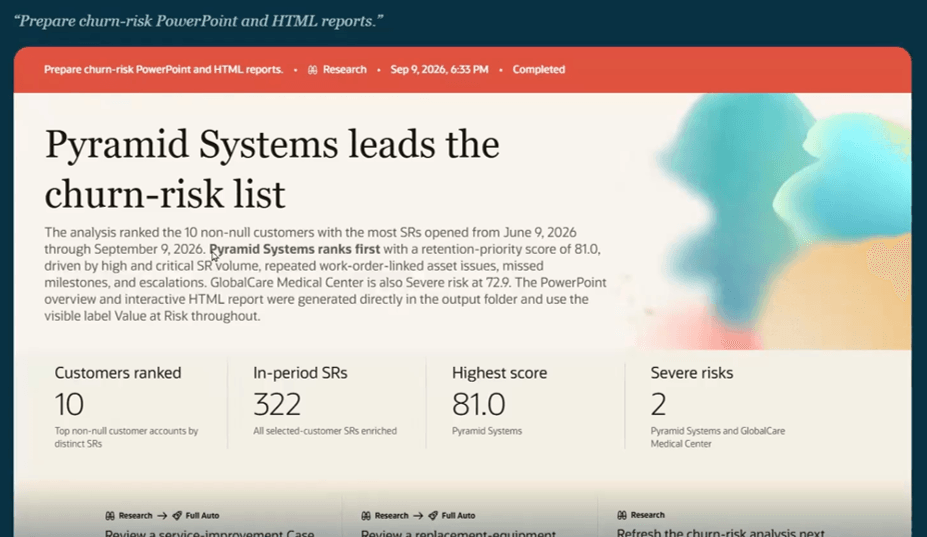
Customer Health Review Claw
Fusion Claw in the Service Operations Workspace helps service leaders improve operational performance and improve customer retention. It provides relevant signals, supporting evidence, and suggested next steps together so that leaders can confidently take action and track the effects over time.
Steps to enable and configure
Confirm that Fusion Agentic Applications have been enabled for your cloud environment.
Tips and considerations
The Service Health Check and Process Improvement analysis is an additional feature of the Service Operations Workspace agentic application. The examples can be found and launched when the user selects "Define an Outcome" from the Priority Actions region of the workspace.
Key resources
- This feature uses Oracle Fusion Claw, a governed and agentic runtime capability for enterprise execution. Learn more about Fusion Claw.
Access requirements
Intended for users with a Customer Service Manager role