Year-Over-Year View in Data Browser
Utilities can enable the Year-over-Year View in the Data Browser to help customers compare their energy usage or costs for the past 12 months against the same period from the previous year.
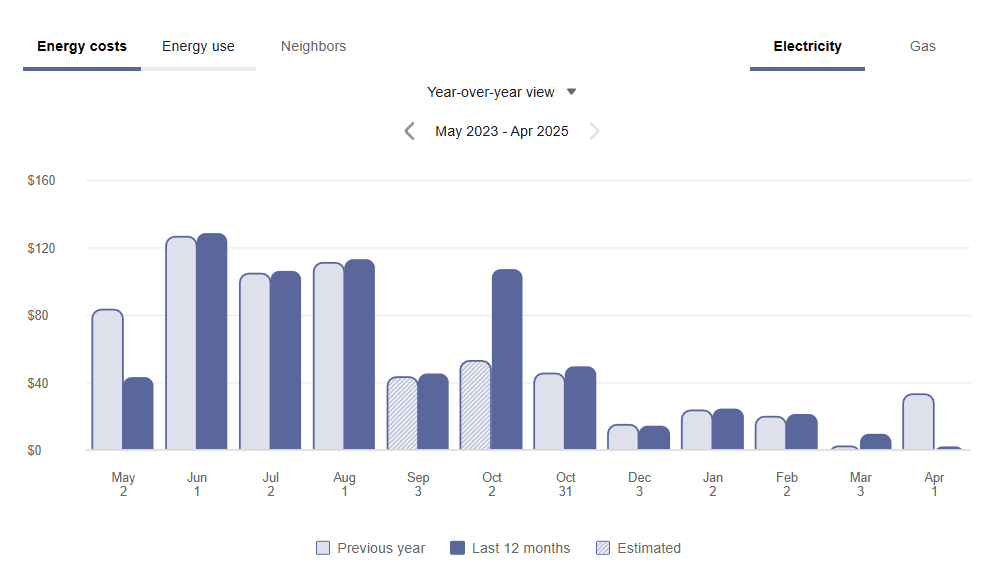
Year-over-Year Comparison
This view is available for both residential and non-residential customers and supports electricity and gas fuels. Grouped bars allow for direct comparisons on a month-by-month basis, with clear legends and indicators for estimated billing. The Year-over-Year View excludes weather data for clarity and only supports monthly billing at this time. The view is not available for solar customers.
This feature makes it easier for customers to spot trends, track savings progress, and understand changes in their energy use or spending over time.
Steps to enable and configure
Contact your Service Delivery Manager to coordinate configuration of the module.
- Log in to Inside Opower (https://inside.opower.com). This is your portal for questions and information related to your program.
- Go to the Community tab and contact the Service Delivery Manager using the information provided.
Tips and considerations
Solar customers can be provided with the Compare to Last Year View available through the Distributed Energy Resources Customer Engagement Cloud Service, which must be purchased separately.
Key resources
Refer to the Opower Business Customer Engagement Digital Self Service - Energy Management Overview Guide Data Browser.