Average Hourly Energy Use in Operating Hours Insight
Business customers can view average hourly energy use for both operating and non-operating hours within the operating-hours insight in the Data Browser. These values are displayed alongside total daily energy use in a single, consolidated view, providing additional context for understanding daily energy consumption patterns.
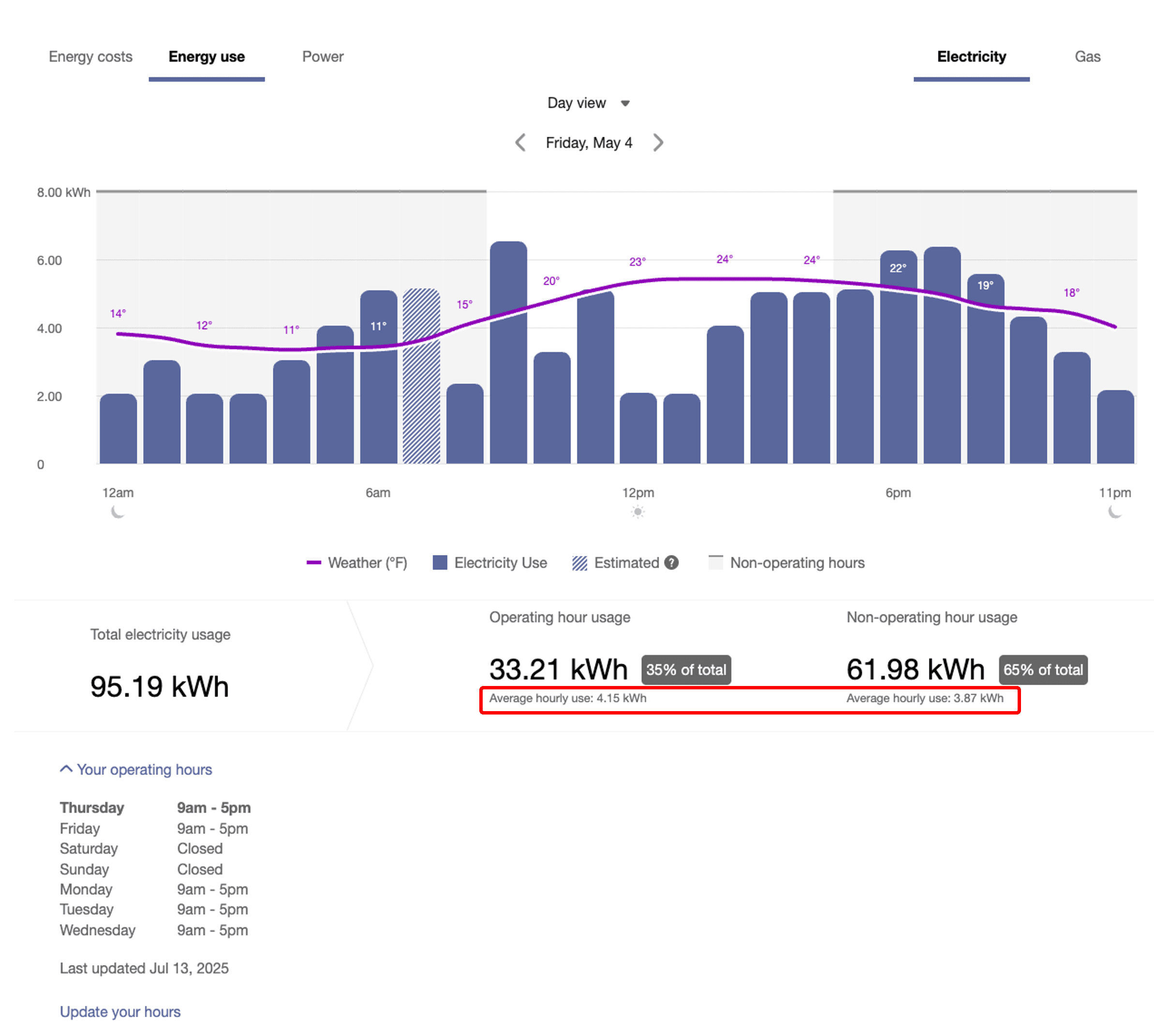
Hourly Energy Use for Operating and Non-Operating Hours within the Operating-Hours Insight
By highlighting average hourly energy use during operating and non-operating hours, this enhancement helps business customers identify unexpected energy use outside of business hours and make more informed energy management decisions.
This enhancement helps business customers identify unexpected after-hours energy use, enabling more informed energy management decisions and reducing energy waste.
Steps to enable and configure
Contact your Service Delivery Manager to coordinate configuration of the module.
- Log in to Inside Opower (https://inside.opower.com). This is your portal for questions and information related to your program.
- Go to the Community tab and contact the Service Delivery Manager using the information provided.