Clock Record View
Employee clock information can be viewed in Clock Record (module: ClockRecordsView).
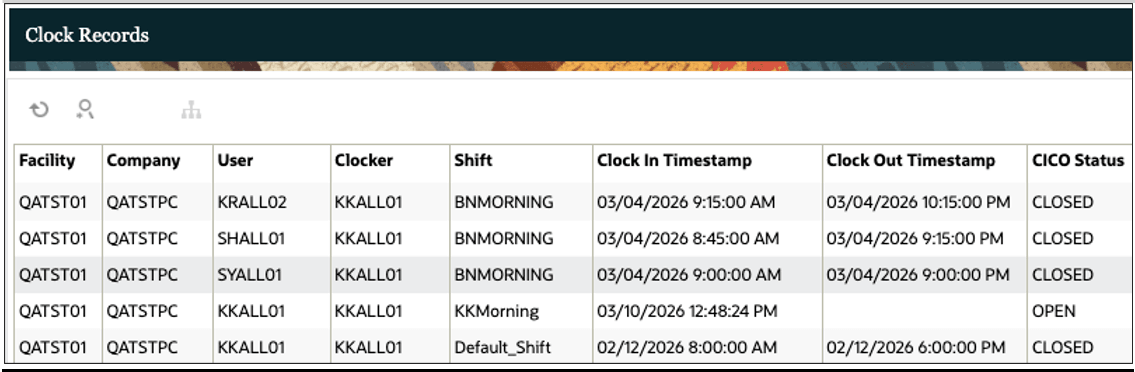
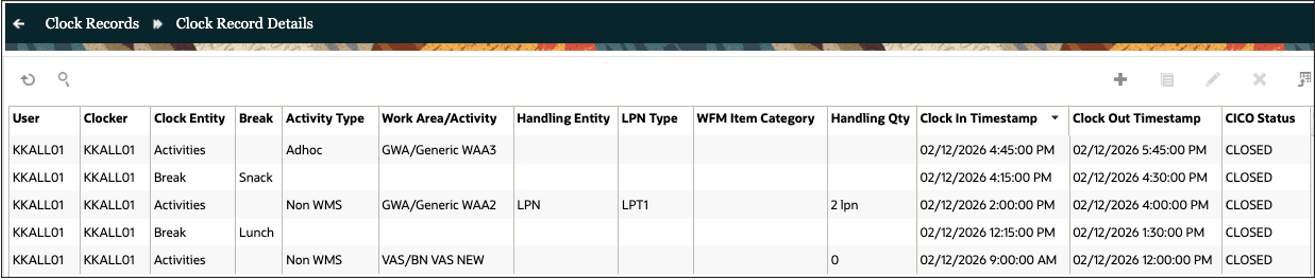
As of Release 26B, the following changes have been introduced in this view:
- Track Record UI has been redesigned and renamed as Clock Record.
- The redesigned view has header detail structure instead of a flat structure.
- Employee facility clock in/out records are at the header level, Break and activities at detail level.
- Shift appears only at the header level. The Dynamic Assignment of Shifts section describes how shifts are determined based on facility clock-in.
- Instead of two separate records for a clock in and clock out, a single record represents both clock in and out.
- A status field on each record indicates if the record is open or closed. Records with only clock in timestamp are marked as open and record with both clock in and clock out timestamp are marked as closed.
- Apart from the edit and delete icons, a permission controlled create icon has been introduced that can be used by supervisors to retroactively clock employees into past dates and times.
- Additional fields have been introduced to hold Handling Attributes for Non-WMS Activities
- Existing data from Track Records will be migrated to Clock Records. Facility Records will appear at the header level, Break and Activities at detail level. Work Area records will not be migrated.
- Since Team clock option is removed, there is no placeholder for team in the view.
- Since Work Area clock option is removed, there is no placeholder for Work Area in the view. However, Work Area name is included along with the Activities for visibility.
Managing Clock Records
Clock Records can be edited or deleted. As of release 26B, a create option has been introduced to allow supervisors to retroactively clock users into past dates and times. The create and edit icons are only enabled for users that have “Track Record / Edit Records” permission and the delete icon is enabled only for users that have “Track Record / Delete Records” permission. Users with ADMINISTRATOR role automatically get these permissions.
Header (Facility) Records
- When creating a new facility record in the header view using the Create icon,
the following should be noted:
- New facility records can be created in OPEN or CLOSED status.
- Clock-in Timestamp is mandatory, and Clock-out Timestamp is optional.
- If only Clock-in Timestamp is provided, the record will be created in OPEN status.
- If both Clock-in and Clock-out Timestamp are provided, the record will be created in CLOSED status.
- The record will not be saved and errors will be thrown.
- If an attempt is made to create an OPEN record while there is already an OPEN facility record for the user.
- If an attempt is made to create an OPEN record earlier than other facility records (even if the other records are CLOSED).
- If an attempt is made to create a record that overlaps with other facility records.
- If the Clock-out Timestamp is earlier than the Clock-in Timestamp.
- If the difference between Clock-in and Clock-out Timestamp is greater than 24 hours.
- When editing an existing facility record in the header view using the Edit icon,
the following should be noted:
- OPEN records can be CLOSED and CLOSED records can be OPENED.
- The record will not be saved and errors will be thrown:
- If an attempt is made to OPEN a record while there is already an OPEN facility record.
- If an attempt is made to OPEN a record that is earlier than other facility records (even if the other records are CLOSED).
- If the Clock-out Timestamp is earlier than the Clock-in Timestamp.
- If the difference between Clock-in and Clock-out Timestamp is greater than 24 hours.
- If the Clock-in Timestamp is later than the Clock-in Timestamp of the first detail record.
- If the Clock-out Timestamp is earlier than the Clock-out Timestamp of the last detail record.
- If an attempt is made to CLOSE a record while a detail is OPEN.
- When deleting an existing facility record in the header view using the Delete
icon, the following should be noted:
- Both OPEN and CLOSED records can be deleted.
- If an attempt is made to delete a facility record, the record is deleted along with its details (break and activity records). A warning message is displayed, and record will be deleted only upon supervisor confirmation.
Detail (Break and Activity) Records
- When creating a new break or activity record in the detail view using the Create
icon, the following should be noted:
- New detail record can be created in OPEN or CLOSED status.
- Clock-in Timestamp is mandatory, and Clock-out Timestamp is optional.
- If only Clock-in Timestamp is provided, the record will be created in OPEN status.
- If both Clock-in and Clock-out Timestamp are provided, the record will be created in CLOSED status.
- The record will not be saved and errors will be thrown:
- If an attempt is made to create an OPEN record while the header record is closed
- If an attempt is made to create an OPEN record while there is already an OPEN detail record
- If an attempt is made to create an OPEN record earlier than other detail records (even if the other detail records are CLOSED)
- If an attempt is made to create a CLOSED record that overlaps with other detail records
- If the Clock-out Timestamp is earlier than the Clock-in Timestamp
- If the Clock-in Timestamp is earlier than the Clock-in Timestamp of the header
- If the Clock-out Timestamp is later than the Clock-out Timestamp of the header
- When editing an existing break or activity record in the detail view using the
Edit icon, the following should be noted:
- OPEN records can be CLOSED and CLOSED records can be OPENED
- The record will not be saved and errors will be thrown:
- If an attempt is made to OPEN a record while the header record is CLOSED.
- If an attempt is made to OPEN a record that is earlier than other detail records (even if the other records are CLOSED).
- If the Clock-out Timestamp is earlier than the Clock-in Timestamp.
- If the Clock-in Timestamp is earlier than the Clock-in Timestamp of the header.
- If the Clock-out Timestamp is later than the Clock-out Timestamp of the header.
- When deleting an existing break or activity record in the detail view using the
Delete icon, the following should be noted:
- Both OPEN and CLOSED records can be deleted.