9.2 Cloud Object Storage Replication
This chapter describes Cloud Object Storage Replication Best Practices.
- Introduction
- Architecture Overview
- Configuration Considerations and Best Practices
- DDL Changes and Schema Propagation
- PK Updates
- DATE and TIMESTAMP Types
- Number Types
- Performance Considerations
Parent topic: Best Practices
9.2.1 Introduction
- OCI Object Storage
- Azure Data Lake Storage (ADLS)
- Amazon S3 (including S3 API-compatible services)
- Google Cloud Storage
- Microsoft Fabric OneLake
For the latest certified source/target compatibility, see the Oracle GoldenGate certification matrix.
To meet diverse downstream consumption requirements—ranging from data lakes to AI/ML pipelines—the Cloud Object Storage Replicat supports a wide array of industry-standard serialization formats:
- Parquet: Optimized for columnar storage and analytical queries.
- Avro: Supported in multiple flavors:
- Avro Row: Compact, row-based format
- Avro Op: Verbose format capturing full operation metadata
- Avro Object Container File (OCF): Encapsulated Avro data with embedded schemas
- Semi-Structured & Flat Files: Including JSON, XML, and DelimitedText
These format options, combined with configurable file size controls, allow users to align output with their downstream integration and storage standards.
Oracle GoldenGate provides granular control over how data is landed in the object storage to ensure alignment with organizational data standards:
- Efficient Data Streaming: Consolidates change data events from multiple source tables into designated buckets or containers through an efficient replication process.
- Dynamic Partitioning & Mapping: Automated mapping of database operations to target containers, supporting both row-level and table-level granularity for organized data layouts.
- Advanced File Lifecycle Management: Comprehensive features to control file rotation (by size or time), ensuring optimal file sizing for big data processing engines.
- Rich Data Formatting Options: An extensive configuration set to define how source database types are translated into target-specific formats, maintaining data integrity across the pipeline.
The following sections provide in-depth coverage of the Cloud Object Storage Replicat architecture, configuration best practices, and guidance for maximizing performance, durability, and data integrity.
Parent topic: Cloud Object Storage Replication
9.2.2 Architecture Overview
Figure 9-2 Oracle GoldenGate Cloud Object Storage Logical Architecture and Key Components
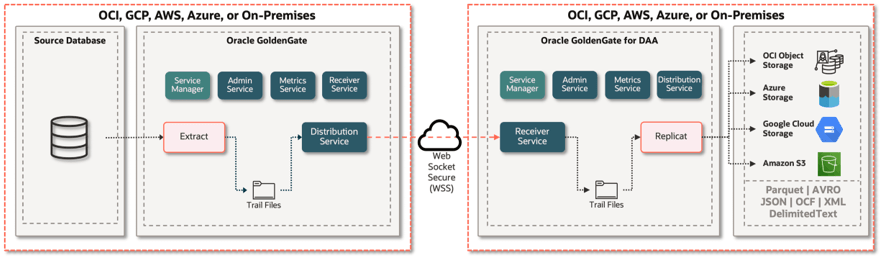
The core design principle is decoupling. The use of the persistent trail files physically separates the Extract process (capture) from the Replicat (delivery). This is a vital architectural advantage because:
- It enables backpressure tolerance: If the network to object storage becomes temporarily unavailable or overloaded, the Replicat process can stop and resume seamlessly, while the Extract continues writing new changes to the trail files.
- It minimizes latency risk: The high-speed Extract process completes quickly, pushing database responsibility out of the critical path, while the Replicat handles the asynchronous network traffic and serialization overhead independently.
The overall architecture consists of the following major components:
- Data Sources: Oracle GoldenGate supports a wide array of transactional systems, including Oracle databases (on-premises and cloud), Microsoft SQL Server, IBM DB2, MySQL, PostgreSQL, Cassandra, MongoDB, Amazon Aurora, JMS, and many more. This flexibility allows enterprises to centralize streaming ingestion from diverse operational systems. For the full list of supported source technologies, you can refer to Oracle GoldenGate certification matrix.
- Change Data Capture (extract) and Trails: As change data events are captured, Oracle GoldenGate standardizes all supported source changes into a unified, platform-independent Trail format. These Trails preserve transaction consistency and only emit committed events, enabling efficient, reliable, and consistent replication to downstream systems. Oracle GoldenGate provides a highly performant and feature-rich technology to detect change data events, especially from the Oracle Database. Oracle GoldenGate’s kernel-level integration with Oracle Database allows for the broadest level of feature support and at the highest volumes while at the same time providing the least overhead of Oracle’s CDC technologies. For further details, refer to Oracle GoldenGate certification matrix.
- Oracle GoldenGate Cloud Object Storage Replication: The Oracle
GoldenGate Cloud Object Storage Replication is a purpose-built pipeline to deliver
committed change data into target cloud object storage bucket/container with a
user-defined file format.
The Replicat reads committed change data from Oracle GoldenGate trail files, then maps each transaction to one or more files based on Replicat configuration.
- Replicat creates a local file and starts writing change data to it. When the configured rollover threshold—based on file size, elapsed time, or an inactivity period—is reached, Replicat closes the file.
- Once the file is closed, it is uploaded to the target object
storage. Bucket/container mapping can be dynamically assigned at runtime to
support custom partitioning strategies.
Files are uploaded only after they are closed (rolled over), so rollover settings directly influence end-to-end data availability latency.
This modular, decoupled architecture enables organizations to build real-time, cloud-native data pipelines with minimal impact on source systems.
Parent topic: Cloud Object Storage Replication
9.2.3 Configuration Considerations and Best Practices
- Configuration Properties: These are key-value settings that govern how data is formatted, mapped, and delivered from GoldenGate to your object storage buckets or containers. These properties manage file format, file roll rules, dynamic filename configurations, and dynamic directory mapping to meet specific operational requirements.
- Message Formatters: Oracle GoldenGate Formatters are modular formatting components that convert change-data operations captured in the GoldenGate trail files into structured messages for object storage targets. Formatters support multiple formats including JSON, Avro (also used as the schema definition format for Parquet targets), XML and DelimitedText.
9.2.3.1 File Rollover Configuration
The Cloud Object Storage Replicat creates a file in the local file system and keeps it open until a rollover condition is met or triggered by a metadata change event from the source (like DDL change).
- Max File Size: By default, file sizes are configured to 1 GB; but it can be configured as needed. When the max size is reached, file is closed, and a new file is generated.
- File Roll Interval: By default, roll interval is not active; but it can be configured as needed. When configured, it starts a timer when file is created. When the interval timing is reached, if the file is still open, it is closed and rolls over to a new one.
- Inactivity Roll Interval: By default, inactivity roll is not active; but it can be configured as needed. When configured, it starts a timer to track the inactivity period. Here, inactivity means there are no operations coming from the source system. In other words, there are no CDC data being written to the file. When set, it starts the countdown when the last operation is written to a file. At the end of the countdown, if there are no incoming operations, the file is closed and rolls over to a new one.
- Roll on Shutdown: By default, roll on shutdown is set to false; but can be configured as needed. When configured, it closes the open file when the Replicat process is stopped.
Add one or more configurations to Replicat properties file.
Implementation and Configuration
To implement the rollover configuration, set the required property as needed. If more than one rollover condition is configured, the file rolls over when the first condition is met. For example: You set max file size to 1 GB and file roll interval to 1 minute. 1 GB file size is reached in 45 seconds. In this case, Replicat does not wait for 1 minute and rolls over to a new one.
gg.handler.<gg.target value>.maxFileSize
gg.handler.<gg.target value>.fileRollInterval
gg.handler.<gg.target value>.inactivityRollInterval
gg.handler.<gg.target value>.rollOnShutdown
For example, if you are replicating to OCI Object Storage,
at the top of the Replicat properties file you, see
gg.target=oci.
gg.handler.oci.maxFileSize=1gb
gg.handler.oci.fileRollInterval=1m
gg.handler.oci.inactivityRollInterval=5s
gg.handler.oci.rollOnShutdown=true
For more information on the legal values that can be used with these properties, see Oracle GoldenGate for DAA documentation.
Considerations and Best Practices
- Always configure at least two rollover conditions —
typically
maxFileSizecombined with eitherfileRollIntervalorinactivityRollInterval— to handle both high and low volume scenarios. - Max File Size:
- Avoid very small file sizes, for example a few MBs as they generate excessive small files which degrade performance in big data engines, such as Spark, Hive, and Databricks — known as the small file problem.
- Avoid excessively large files, for example 10GB+ as they increase recovery time on failure and slow down downstream processing.
- Overall, set between 128MB and 1GB depending on downstream processing engine requirements. For Parquet/Avro targets feeding analytics engines, 256MB–512MB is a common sweet spot.
- File Roll Interval:
- Use when data volumes are low and max file size may never be reached — ensures files are closed and uploaded on a predictable schedule.
- Avoid very short intervals, for example interval in seconds in high-volume environments as it creates too many small files.
- For near-real-time pipelines, a roll interval of 5–15 minutes is typically recommended.
- Combine with
maxFileSizeto ensure files roll on whichever condition is met first.
- Inactivity Roll Interval:
- Always configure this in environments with intermittent or unpredictable data flows — without it, a file could remain open indefinitely during quiet periods.
- Set lower than
fileRollIntervalto ensure quiet periods are handled promptly.
- Roll on Shutdown:
Always set to true in production — this ensures no data is left stranded in an open local file when the Replicat is stopped for maintenance or restart.
Parent topic: Configuration Considerations and Best Practices
9.2.3.2 Partitioning
The Cloud Object Storage Replicat supports creating partitioned files in target object storage buckets. Partitioning improves downstream pruning and query performance, but over-partitioning increases directory/file counts and amplifies the small-file problem.
pathMappingTemplate property and it
should be set to the fully qualified table name. It will create directories within the
container/bucket based on the fully qualified source table name. For
example:gg.eventhandler.<gg.target value>.pathMappingTemplate=${fullyQualifiedTableName}At runtime, the path resolves to the fully qualified source table name.
For creating partitions, gg.handler.<gg.target
value>.partitioner.<fully_qualified_table_name> is used. This property
can be used with template keyword such as
${columnValue[column_name]} or constant string values to define the
partition path structure.
Implementation and Configuration
SALES.CUSTOMER, the following configuration partitions files by
the STATE column in the OCI Object
Storage:gg.eventhandler.oci.pathMappingTemplate=${fullyQualifiedTableName}
gg.handler.oci.partitioner.SALES.CUSTOMER=STATE=${columnValue[STATE]}SALES.CUSTOMER in the OCI Object Storage bucket, additional
directories within called STATE=<state_value> and within that
directory, files are created per
STATE.SALES.CUSTOMER/ STATE=<state_value>/ <files...>SALES.CUSTOMER, the following configuration partitions files
by the STATE and CITY column in the OCI Object
Storage:gg.eventhandler.oci.pathMappingTemplate=${fullyQualifiedTableName}
gg.handler.oci.partitioner.SALES.CUSTOMER=STATE=${columnValue[STATE]}/CITY=${columnValue[CITY]}This configuration will create a directory called
SALES.CUSTOMER in the OCI Object Storage bucket, additional
directories within called STATE=<state_value>, within each
STATE directory, sub-directories are created per
CITY value, and files are written within each
CITY directory.
SALES.CUSTOMER/
                STATE=<state_value>/ CITY=<city_value>/ <files...>
In a single Replicat, you can use multiple partitioning configurations for several tables.
Considerations and Best Practices
- Always partition by table at the top level before adding column-level partitions — skipping this will cause runtime errors.
- Choose partition columns with reasonable cardinality — high cardinality columns like customer ID or timestamp will create too many directories and small files.
- Align partition strategy with downstream query patterns — partition columns should match the most common filter predicates in your queries.
- Date/time-based partitioning (e.g. by year/month/day) is the most common and recommended pattern for analytics workloads.
- Avoid partitioning by columns with null values unless null handling is explicitly configured.
- In a single Replicat, multiple tables can have independent partitioning strategies — document each table's strategy for maintainability.
Parent topic: Configuration Considerations and Best Practices
9.2.4 DDL Changes and Schema Propagation
The Oracle GoldenGate Cloud Object Storage Replication propagates source DDL
changes automatically to the files generated. Alternatively,
EVENTACTIONS can be used to control the
Extract/Replicat behavior in case of a DDL operation in the source database.
Implementation and Configuration
- If Oracle GoldenGate extract captures a
Create
                                                  Table
event from the source database, the Replicat will create a new file with the table name from theCreate Tableevent in the target cloud object storage bucket/container. - If Oracle GoldenGate extract captures an
Alter Column/Drop Columnevent from the source database, the Replicat will create a new file reflecting the updated source table definition. - If Oracle GoldenGate extract captures a
Truncateevent from the source database, you can configure the Replicat to roll the data file on Truncate event by settinggg.eventhandler.<gg.target value>.rollOnTruncate=true.This property is set tofalseby default and the Replicat does not roll the file inTruncateevent. - If Oracle GoldenGate extract captures a
Drop Tableevent from the source database, this has no impact on the target file system.
If you do not want to propagate the schema changes
automatically, you can use EVENTACTIONS to control
the Extract/Replicat behavior. In this case,
EVENTACTIONS is used together with
DDL parameter. For example, if DDL
INCLUDE ALL EVENTACTIONS (LOG INFO, STOP)
is included in the Extract/Replicat parameter file, this includes
all the source DDL operations, stop the Extract/Replicat and logs
the event.
Considerations and Best Practices
- Always test DDL propagation behavior in a non-production environment before enabling in production - unexpected schema changes can corrupt downstream Parquet/Avro files
- Enable
rollOnTruncate=truein production — without it, truncated data and new data may coexist in the same file, causing data integrity issues downstream - Use
EVENTACTIONSwithDDLfor controlled pipelines — in analytics or data lake pipelines where schema changes require downstream coordination, for example Iceberg schema evolution, Databricks Delta table updates, stopping the Replicat on DDL and handling changes manually is safer than automatic propagation - Monitor for
Alter Columnevents - column type changes in the source can cause serialization failures in Avro/Parquet targets if schema registry or formatter configuration is not updated accordingly - Implement object storage lifecycle policies
(retention, archival, deletion) and naming
conventions that help consumers identify
activevs.historicalversions.
Parent topic: Cloud Object Storage Replication
9.2.5 PK Updates
In the Oracle GoldenGate Cloud Object Storage Replication, primary key update operations require special consideration and planning.
Implementation and Configuration
Based on the target file format, there can be some special
considerations; but the Replicat handles PK updates in there modes. This is
controlled by adding gg.handler.name.format.pkUpdateHandlingto the
Replicat properties. There are values that can be used with this property, such as
abend, update, and
delete-insert.
- Abend: Default behavior, the Replicat fails when there is a PK update and logs in the report file.
- Update: PK update is treated like any other update operation. Use this configuration only if you can guarantee that the primary key is not used as selection criteria.
- Delete-Insert: PK update is replicated in two different rows: one with the before image (marked as delete) and one with after image (marked as insert). To use delete-insert, extract process should capture uncompressed change data records meaning that all the columns are written to trail file. To generate uncompressed records in extract process, use LOGALLSUPCOLS for Oracle Databases and COMPRESSUPDATES | NOCOMPRESSUPDATES for Non Oracle Databases.
For example, while replicating to OCI Object Storage set
gg.handler.<gg.target
                    value>.format.pkUpdateHandling=delete-insert
for replicating PK
updates as one delete (before image) and one insert (after image) record.
Considerations and Best Practices
- Use delete-insert when replicating to file-based, analytics, or data lake targets. Formats such as Parquet, Avro, JSON, and other immutable file formats do not support in-place updates. Delete-Insert ensures that both the before and after images are written, allowing downstream processing engines such as Apache Iceberg and Delta Lake to correctly process primary key changes.
- When using
delete-insert, configure the Extract process to generate uncompressed update records. Use LOGALLSUPCOLS for Oracle databases and NONCOMPRESSEDUPDATES for non-Oracle databases to ensure that all column values are included in the trail file. - Evaluate the expected frequency of primary key updates before
selecting the handling mode. If primary key updates are not expected, the
default
abendbehavior can be used to detect unexpected changes. If primary key updates are expected,delete-insertis the recommended configuration. - Use
updatemode only when the target format supports update operations and the primary key is not used as a selection, merge, or partition key in downstream processing. Incorrect use of update mode may lead to inconsistent results.
Related Topics
Parent topic: Cloud Object Storage Replication
9.2.6 DATE and TIMESTAMP Types
Oracle DATE and TIMESTAMP columns are replicated as strings by default when no
explicit mapping is configured. Without proper mapping, downstream engines will not
recognize these columns as date/time types, making date arithmetic, range filtering, and
time-based partitioning impossible without explicit casting. The
enableTimestampLogicalType property enables mapping of Oracle DATE
and TIMESTAMP columns to the Avro timestamp-micros logical type, which
represents values as microseconds since epoch — the correct representation for
analytical and data lake workloads.
Implementation and Configuration
timestamp-micros logical type to Avro files (including Parquet,
Iceberg and Delta), set gg.handler.<gg.target
value>.format.enableTimestampLogicalType to true. When timestamp
logical type enabled, gg.format.timestamp is also required. For
example:gg.handler.oci.format.enableTimestampLogicalType= truegg.format.timestamp=yyyy-MM-dd HH:mm:ss.SSSSSSConsiderations and Best Practices
- Set
enableTimestampLogicalType=truewhen replicating to Parquet or Avro targets — without it, timestamps are written as plain strings, losing all temporal semantics and making date-based filtering and partitioning impossible downstream. - For Oracle source databases,
yyyy-MM-dd
                            HH:mm:ss.SSSSSS
is a common choice when you want microsecond precision. gg.format.timestampuses Java SimpleDateFormat patterns-ensure the pattern matches the timestamp representation produced/expected by the replication process to avoid parse errors at runtime.
Parent topic: Cloud Object Storage Replication
9.2.7 Number Types
Oracle NUMBER is a variable-precision decimal data type that
can represent integers and fixed-point decimal values with up to 38 digits of precision.
If a column is defined without explicit precision and scale (for example,
NUMBER), Oracle can store values with varying scale across rows,
and in some replication/schema-generation scenarios the formatter may not be able to
deterministically derive a single precision/scale for the target schema. As a result,
mappings to Avro/Parquet often use a conservative decimal representation unless you
explicitly configure precision and scale to match the source column definitions.
Implementation and Configuration
gg.handler.<gg.target value>.enableDecimalLogicalType
is the master switch for decimal logical type mapping. When set to
true, it instructs the Avro formatter to map Oracle
NUMBER columns to the Avro decimal logical type (bytes with
logicalType: decimal) instead of the default mapping which writes numbers as plain
Avro numeric primitives or strings.
When precision/scale can’t be deterministically inferred, the formatter
typically chooses a conservative Avro decimal definition (high precision and scale)
to avoid precision loss. This can lead to downstream consumers seeing values
expressed with an unnecessarily large scale (for example, apparent trailing
fractional digits). To align the target schema with known, consistent source
definitions—especially for financial data (balances, prices, amounts)—set
gg.handler.<gg.target value>.maxPrecision and
gg.handler.<gg.target value>.oracleNumberScale.
For example:
gg.handler.oci.enableDecimalLogicalType=true
gg.handler.oci.maxPrecision=38
gg.handler.oci.oracleNumberScale=12
For more information on configuration details, see Pluggable Formatters documentation.
Considerations and Best Practices
- Always set
gg.handler.<gg.target
                            value>.enableDecimalLogicalType=true
for Parquet/Avro-based analytical targets to preserve decimal semantics. - When source
NUMBERcolumns have known, consistent precision and scale — particularly for financial data such as balances, prices, and amounts — setgg.handler.<gg.target value>.maxPrecisionandgg.handler.<gg.target value>.oracleNumberScaleto prevent an overly conservative scale in downstream consumers. - Use
gg.handler.<gg.target value>.mapLargeNumbersAsStrings=truefor streams that mix small integers with very large/high-precision values—this preserves numeric types for typical values while avoiding overflow/compatibility issues for extreme cases. - Use caution with
gg.handler.<gg.target value>.maxPrecision: if a source value exceeds the configured maximum precision, Replicat can abend at runtime. Validate source column ranges and test in a non-production environment before rollout.
Parent topic: Cloud Object Storage Replication
9.2.8 Performance Considerations
The Oracle GoldenGate Cloud Object Storage Replication performance can be tuned using two key features: Replicat type and GROUPTRANSOPS parameter. In addition to the Replicat type and transaction grouping, the size of the files produced by the Replicat directly affects throughput and should be tuned in conjunction with the other settings.
Oracle GoldenGate Distributed Applications and Analytics provides two different replication modes: Classic Replicat and Coordinated Replicat. Classic Replicat is a single-threaded process that applies the messages to target cloud storage services. Coordinated Replicat is a multi-threaded process where multiple threads read the OGG trail file independently and apply transactions in parallel.
The Oracle GoldenGate Cloud Object Storage Replication process optimizes processing with transaction grouping. The GROUPTRANSOPS parameter groups multiple small transactions into a single larger transaction applied to cloud storage targets. The GROUPTRANSOPS parameter counts the database operations (inserts, updates, and deletes) and only commits the transaction group when the number of operations equals or exceeds the GROUPTRANSOPS configuration setting. GROUPTRANSOPS defers the transaction commit call until the larger transaction is completed. When a transaction is committed, the Replicat flushes the operations.
Implementation and Configuration
Replicat Type is selected at the first step of Replicat creation
process. In UI, select the Replicat type as Classic Replicat or
Coordinated Replicat.
GROUPTRANSOPSis configured in parameters file. By default, GROUPTRANSOPS is set to 1000. You can increase up to 20000 for better performance. For example:
GROUPTRANSOPS 20000
For more information on how you can configure the file sizes generated by the Replicat, see File Rollover Configuration section.
Different performance optimization configurations may have different impact on the server resources. Below chart compares the performance improvements and the impact on the resources. Note that the tests were executed using OCI GoldenGate and 1 OCPU equals to 16GB of memory.
Table 9-5 Performance Improvements and the Impact on the Resources
| Replicat Type | GROUPTRANSOPS Settings | Max OCPU* | Performance Improvement |
|---|---|---|---|
|
Classic Replicat |
1,000 | 4 | 1x |
|
Classic Replicat |
20,000 | 4 | 3x |
|
Coordinated Replicat with 20 threads |
1,000 | 8 | 5x |
|
Coordinated Replicat with 20 threads |
20,000 | 12 | 8x |
Note:
* 1 OCPU is equivalent to 16 GB of memory.Considerations and Best Practices
- Start with Classic Replicat for initial deployment. Classic Replicat is simpler to configure, monitor, and troubleshoot. Establish a performance baseline with Classic Replicat before moving to Coordinated Replicat, as the added complexity of multi-threading requires careful tuning to realise its benefits.
- Use Coordinated Replicat for high-volume workloads. Based on the
performance benchmarks, Coordinated Replicat with 20 threads and
GROUPTRANSOPS 20000delivers up to eight times performance improvement over the baseline Classic Replicat configuration. However, this comes at the cost of higher resource consumption — ensure your environment has sufficient capacity before enabling it. - Increase GROUPTRANSOPS from the default. The default value of 1,000 is conservative. Increasing to 20,000 delivers up to three times improvement on Classic Replicat with no change in thread count. This is the lowest-cost performance gain available and should be applied in all production deployments.
- Thread count for Coordinated Replicat should match workload characteristics. 20 threads is not a universal recommendation. For workloads with high table count and high parallelism, more threads improve throughput. For workloads with few large tables or strict transaction ordering requirements, fewer threads may be more appropriate. Start with a lower thread count and increase incrementally while monitoring performance.
- Monitor JVM heap alongside performance tuning. Higher GROUPTRANSOPS values and more
Coordinated Replicat threads both increase JVM memory consumption. Ensure
jvm.bootoptions heap settings (-Xmx and -Xms) are sized appropriately to
avoid
OutOfMemoryerrors under peak load. - Change one knob at a time and measure. Tune one variable per test cycle—for example GROUPTRANSOPS, Coordinated Replicat thread count, or file rollover sizing/intervals—and measure throughput, end-to-end latency, CPU, and JVM heap impact before making the next change. This avoids multi-variable tuning confusion and makes it easier to attribute performance gains or regressions. Validate changes in a representative non-production environment before applying to production.
- Test performance tuning changes in non-production first. Performance configurations interact with each other and with source transaction patterns. Always validate changes in a representative non-production environment before applying to production pipelines.
Parent topic: Cloud Object Storage Replication