9.1 Apache Kafka
The Kafka Handler is designed to stream change data from an Oracle GoldenGate trail to a Kafka topic.
This chapter describes Oracle GoldenGate for Apache Kafka Replication Best Practices.
- Configuration Considerations and Best Practices
- Oracle GoldenGate Kafka Replicat Topic Mapping
- Oracle GoldenGate Kafka Replicat Schema Registry and Schema Propagation
- Oracle GoldenGate Kafka Replicat Partition Selection and Order Consistency
- Propagating Additional Metadata with Oracle GoldenGate Kafka Replicat
- Oracle GoldenGate Kafka Replicat Message Modes and Maintaining Transactional Boundaries
Oracle GoldenGate Kafka Replicat supports two different message modes: - Oracle GoldenGate Kafka Replicat Message Formatting
- Security Considerations and Best Practices
- Performance Considerations
To improve overall performance, you should review your entire data pipeline, including the Extract processes.
Parent topic: Best Practices
9.1.1 Configuration Considerations and Best Practices
Oracle GoldenGate’s Replicat for Apache Kafka is configured using three core elements:
- Configuration Properties: Configuration properties for the Oracle GoldenGate Replicat for Apache Kafka are key-value settings that control how data is formatted, mapped, and delivered from GoldenGate to Apache Kafka topics. These properties control message format, topic mapping, schema propagation, and other integration behaviors to meet data-streaming requirements.
- Message Formatters: Oracle GoldenGate Pluggable Formatters are modular formatting components that convert change-data operations captured in the GoldenGate trail files into structured messages for Kafka targets. Formatters support multiple serialization formats (JSON, Avro, and others) and allow fine-grained control over how messages are represented in Kafka topics.
- Kafka Producer Properties: These are standard properties defined by Kafka that control the behavior of the Kafka Producer client. When configuring Oracle GoldenGate Replicat for Apache Kafka, these properties are passed through to the underlying Kafka producer to govern aspects such as broker connectivity, security, message delivery reliability, and throughput.
These three elements should be designed and tuned together to ensure optimal performance, consistency, and maintainability of Oracle GoldenGate replication for Apache Kafka.
Parent topic: Apache Kafka
9.1.2 Oracle GoldenGate Kafka Replicat Topic Mapping
- Table-per-Topic Pattern
The Table-per-Topic is a strategic Kafka design in which each source database table maps to its own dedicated Kafka topic. All CDC events from a given table are published exclusively to that topic. Oracle recommends Table-per-Topic pattern as it enhances downstream processing, simplifies troubleshooting, and aligns with strong schema management practices. - All-Tables-to-Single-Topic Pattern
The All-Tables-to-Single-Topic Pattern (also called the monotopic pattern) consolidates CDC events from multiple source database tables into a single Kafka topic.
Parent topic: Apache Kafka
9.1.2.1 Table-per-Topic Pattern
The Table-per-Topic is a strategic Kafka design in which each source database table maps to its own dedicated Kafka topic. All CDC events from a given table are published exclusively to that topic. Oracle recommends Table-per-Topic pattern as it enhances downstream processing, simplifies troubleshooting, and aligns with strong schema management practices.
Implementation and Configuration
Oracle GoldenGate Kafka Replicat controls topic assignment at runtime using the topicMappingTemplate property in Setting Up and Running the Kafka Connect Handler. This configuration supports both static topic assignments and dynamic mapping via Template Keywords for example ${tableName}).
gg.handler.kafkaconnect.topicMappingTemplate=${tableName}This dynamically assigns each table's data to a distinct Kafka topic named after the source table.
Considerations and Best Practices
- Topic Creation and Configuration:
If the Kafka broker property
auto.create.topics.enableis set to true inserver.properties, Oracle GoldenGate can automatically create target topics.Recommendation: For production environments, it is best practice to pre-create topics with appropriate configurations (specifically replication factor, partition count, and retention policy). This ensures performance, high availability, and data lifecycle management are explicitly controlled. Disabling auto topic creation after pre-creation is a typical operational best practice.
- Schema Registry Integration:
When using Oracle GoldenGate Kafka Replicat with a schema registry (such as Confluent Schema Registry) and an Avro formatter, the Table-per-Topic pattern is strongly recommended. Each source table is naturally associated with a unique Avro schema in the registry, simplifying schema evolution and enforcing data-contract compliance.
Example:
The source table HR.EMPLOYEES mapped to a Kafka topic named EMPLOYEES will, by default, result in the registration of its Avro schema under the subject name:
hr.employees-value.
Parent topic: Oracle GoldenGate Kafka Replicat Topic Mapping
9.1.2.2 All-Tables-to-Single-Topic Pattern
The All-Tables-to-Single-Topic Pattern (also called the monotopic pattern) consolidates CDC events from multiple source database tables into a single Kafka topic.
This approach significantly simplifies Kafka topic management and reduces the number of topics that must be created, monitored, and configured. However, this approach transfers the complexity to the consumer side, requiring downstream applications must inspect message metadata (such as schema name and table name) to filter and route records appropriately. The Oracle GoldenGate Replicate for Kafka supports the injection of metadata fields (such as table name and transaction id) into the message header, which reduces the complexity of downstream consumer applications.
When used with a schema registry, placing multiple disparate schemas into the same Kafka topic significantly complicates schema management. Although schema registry can technically support this pattern, it is not considered a best practice, as it often requires relaxing schema compatibility settings to accommodate heterogeneous message structures. This introduces additional complexity for schema evolution and increases the burden on consumers, which must implement flexible validation and handling logic for multiple schema versions.
Furthermore, because all events are routed to a single topic, consumer parallelism is inherently limited by the number of partitions on that one topic, which can create a bottleneck for high-throughput, multi-table workloads.
Implementation and Configuration
To implement the all-tables-to-single-topic pattern, set the topic mapping property as follows:
gg.handler.kafka.topicMappingTemplate=<target_topic_name>Considerations and Best Practices
Ensure that each message published to the topic includes metadata fields (such as schema name and table name) to facilitate correct identification and downstream processing.
metaHeadersTemplate property, you can include
Template Keywords (for example, ${tableName}) in Kafka message headers. This
allows the downstream consumer applications to easily read the key header metadata,
thereby reducing the amount of parsing and processing needed in the consumer. For
example:gg.handler.kafka.metaHeadersTemplate=${tableName}Parent topic: Oracle GoldenGate Kafka Replicat Topic Mapping
9.1.3 Oracle GoldenGate Kafka Replicat Schema Registry and Schema Propagation
Oracle GoldenGate Replicate for Kafka supports integration with Confluent Schema Registry when using Avro, Protobuf, or JSON converters. When Oracle GoldenGate publishes messages, it automatically registers the corresponding schemas in the schema registry, enabling consumer applications to retrieve and apply them during deserialization. When a change occurs in the source schema, Oracle GoldenGate Kafka Replicat registers the updated schema as a new version in the Schema Registry.
Implementation and Configuration
Schema registry connectivity and authentication can be configured
through the Kafka producer.properties file. Oracle GoldenGate
supports Basic Authentication, TLS, and, mTLS for secure communication with the
Confluent Schema Registry. Sample configuration files are provided in the Kafka Connect Handler Performance Considerations in the Oracle GoldenGate documentation.
Considerations and Best Practices
-
The Table-per-Topic pattern is recommended when using a schema registry. Each source table is naturally associated with a unique Avro schema in the registry, simplifying schema evolution and ensuring compliance with data-contract standards.
-
The Confluent Schema Registry enforces configurable compatibility modes to guarantee that newly registered schema versions remain compatible with previous ones. This is particularly important when Oracle GoldenGate Replicate for Kafka automatically registers new schema versions after source-side DDL changes, for example, an
ALTER TABLEstatement. -
Backward and
Fullcompatibility modes are the most suitable options for Oracle GoldenGate Replication for Kafka, as they ensure seamless schema evolution—allowing new schema versions to remain readable by consumers using older schemas, and thereby maintain uninterrupted data streaming and stable deserialization across CDC pipelines.
Parent topic: Apache Kafka
9.1.4 Oracle GoldenGate Kafka Replicat Partition Selection and Order Consistency
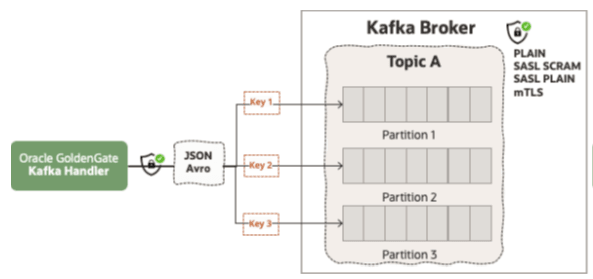
Partition selection is key to ensuring both balanced throughput and data consistency in Oracle GoldenGate Replicate for Kafka pipeline. The method Oracle GoldenGate uses to determine which Kafka partition each event is written to directly influences message ordering, transactional integrity, and downstream processing behavior.
Implementation and Configuration
keyMappingTemplate property in Oracle
GoldenGate defines how the message key is constructed, influencing Kafka’s partition
assignment. If the configuration produces a static key, all messages are routed to
the same partition; if the key changes infrequently, partition assignments also
shifts minimally. For optimal performance, the keyMappingTemplate
should be configured to ensure an even key distribution among partitions, while also
maintaining source-order consistency for individual logical records relating to the
same row.
Figure 9-1 Oracle GoldenGate Kafka Replicate Partition Selection
Considerations and Best Practices
Oracle recommends using source primary keys for partition selection, if
table per topic pattern is implemented. This can be achieved by using
${primaryKeys}
Template Keywords with keyMappingTemplate property.
For example:
gg.handler.kafkaconnect.keyMappingTemplate=${primaryKeys}When source primary keys are used as the Kafka message key, operations for the same source primary key are sent to the same target partition, because the Kafka producer uses the hash of the key to calculate the partition ID. In this way, throughput is balanced as messages are evenly distributed between partitions and source order is maintained for the operations having the same message key value.
In some cases, customers may have large transactions spread over to multiple tables.
For such cases, Oracle recommends using all-tables-to-single topic pattern and
assigning ${xid} (source transaction id) as the message key.
For example:
gg.handler.kafkaconnect.keyMappingTemplate=${xid}This ensures that all source operations from the same transaction (XID) are written to the same partition, guaranteeing that the entire transaction's life cycle is processed in sequential source order by a single consumer thread.
Parent topic: Apache Kafka
9.1.5 Propagating Additional Metadata with Oracle GoldenGate Kafka Replicat
The need to enrich CDC events with contextual information requires injecting additional metadata fields into the Kafka messages. The Oracle GoldenGate Kafka Replicat can inject this context-based metadata at runtime.
Implementation and Configuration
Oracle GoldenGate Replicate for Kafka leverages the
metaColumnsTemplate property and a rich library of Metacolumn Keywords to inject contextual key-value pairs into the Kafka messages. This
critical best practice separates operational context (such as source table name,
timestamp, and operation type) from the core data payload. This separation ensures
the core data schema remains clean and simple, while still providing necessary
metadata for downstream consumers to audit, filter, or route events.
For example, to inject the source table name and the operation type into the payload, you would set the property as follows:
gg.handler.kafkaconnect.metaColumnsTemplate=${objectname},${optype}Considerations and Best Practices
To avoid conflicts with default header names or to improve clarity, you can define a custom name for the injected field using the square bracket syntax. If a custom name is not provided, the default metacolumn name is used.
For example:
gg.handler.kafkahandler.format.metaColumnsTemplate=${objectname[table]},${optype}In this example, ${objectname} is injected with the field name
table andoptype is injected with default
field name.
Parent topic: Apache Kafka
9.1.6 Oracle GoldenGate Kafka Replicat Message Modes and Maintaining Transactional Boundaries
Oracle GoldenGate Kafka Replicat supports two different message modes:
Parent topic: Apache Kafka
9.1.6.1 Operation Mode (OP)
In Operation Mode (OP) mode, Oracle GoldenGate Kafka Replicat processes each source record (insert, update, delete) as an individual operation and produces a corresponding Kafka record for each. This establishes a one-to-one relationship between the number of incoming source operations and the number of Kafka messages produced, resulting in a high-frequency, non-batched delivery mechanism.
Performance in Operation Mode mode can be optimized using the GROUPTRANSOPS parameter. This parameter controls how many messages are grouped and flushed together, improving throughput by reducing the number of write operations to Kafka. For more details, see Kafka Connect Handler Performance Considerations .
9.1.6.2 Transaction Mode (TX)
In Transaction Mode (TX) mode, Oracle GoldenGate Kafka Replicat treats each source database transaction as a single, atomic Kafka record. All operations within a transaction are concatenated and serialized into the value of a single Kafka record. This means that each Kafka message can represent one or multiple database operations (up to the total count within the transaction), preserving transactional atomicity. TX mode is particularly useful where maintaining transactional boundaries and atomic delivery in Kafka is required.
Implementation and Configuration
Oracle GoldenGate Kafka Replicat leverages the Template Keywords
mode property to assign the message mode.
For example:
gg.handler.kafkaconnect.mode=opConsiderations and Best Practices
Operation Mode (OP)
Consider increasing the GROUPTRANSOPS parameter (default: 1,000) to improve throughput by batching more records prior to flushing. Values up to 20,000 can be configured, but optimal settings may vary based on workload and infrastructure.
When using the table-per-topic pattern, it is recommended to map the Kafka message key to the source operation’s primary key.
gg.handler.kafkaconnect.keyMappingTemplate=${primaryKeys}Transaction Mode (TX)
- TX mode groups all source operations within the same transaction into a single Kafka message, ensuring transactional atomicity. However, this may result in very large messages, potentially exceeding the maximum allowed message size in Kafka.
- Because TX mode inherently groups operations, the impact of GROUPTRANSOPS is lessened. However, if the goal is
absolute transactional atomicity, the
GROUPTRANSOPSsetting should be reviewed, although keeping the default or a high value may still be necessary to optimize the flush frequency. - For handling rare, large source transactions-often due to batch processing-use the MAXTRANSOPS parameter to split these transactions into smaller Kafka messages. This way, you can handle very large source transactions while replicating to Kafka.
- To ensure all messages from a transaction are written to the same
Kafka partition, configure the key mapping to use the source transaction ID by
using
keyMappingTemplateproperty. - For example:
gg.handler.kafkaconnect.keyMappingTemplate=${xid}
9.1.7 Oracle GoldenGate Kafka Replicat Message Formatting
The Oracle GoldenGate Kafka Replicat offers a comprehensive suite of message formatting options to align with diverse streaming and consumption requirements. JSON and Avro are the most preferred formats for high-volume Kafka replication, with support also extending to the CloudEvents Format.
- Operation-Based Formatting
- Row-Based Formatting
The key difference between these two methods is how they include a row’s before-and-after images in the message payload for each source DML operation (INSERT, UPDATE, DELETE) and for TRUNCATE.
Table 9-1 Operation vs Row Formatting
| Source Operation | Operation Based Formatting | Row Based Formatting |
|---|---|---|
|
Inserts |
Before image is null; After image is output. | Only the After image is output. |
|
Updates |
Both Before and After images are output. | Only the After image is output. |
|
Deletes |
Before image is output; After image is null. | Only the Before image is output. |
|
Truncates |
Both Before and After images are null. | Table name is provided, but both Before and After images are null. |
Oracle GoldenGate Kafka Replicat also provides granular configuration properties to manage format-specific settings and transformations, so users can tailor the output payload, headers, and metadata to meet specific consumer needs.
For more information on the message formatting definitions, configurations, and sample messages see Pluggable Formatters documentation.
Implementation and Configuration
The initial setup of the Oracle GoldenGate Kafka Replicat is streamlined. For versions 23.7 and later, the desired output format, for example, JSON and Avro can be selected directly from the format selector drop-down list during the replicat creation process. Further, granular control over message characteristics and behavior is achieved by adding specific configurations within the replicat properties file.
Considerations and Best Practices
Handling PK Updates
A key configuration area involves managing Primary Key (PK) updates. While PK updates are generally discouraged in high-volume replication sources, their occurrence must be carefully managed to ensure accurate data propagation to Kafka.
The Oracle GoldenGate Kafka Replicat leverages the format.pkUpdateHandling property to control how these operations are processed. For more information, see Pluggable Formatters
Table 9-2 Oracle GoldenGate Kafka Replicat PK Update Handling
| Setting | Description | Message Output | Behavior |
|---|---|---|---|
|
abend |
The Replicat process halts and reports an error upon encountering a PK update. | No records produced. | Default |
| delete-insert | The operation is split into two distinct events. | Two Kafka records are produced: one
DELETE record (for the old PK) followed by one
INSERT record (for the new PK).
|
Optional.
Supported by the
|
| update | The PK update operation is treated as a normal update. | A single Kafka record is produced, containing the after image (including the new PK). | Optional.
Supported by all formatters. |
Example:
gg.handler.kafkaconnect.format.pkUpdateHandling=delete-insertThe decision to use update or delete-insert must be driven by the design of the downstream consumer applications. Consumers that rely on the message key (the PK) to maintain state in a target data store, for example, a database or data lake) will typically require the delete-insert method to correctly handle the key change and maintain data integrity.
Handling Oracle Number and Date Type Mappings to Avro Types
Oracle GoldenGate Kafka Replicat maps source DATE and
NUMBER types as strings by default. While this preserves the
data value, it prevents consumers from treating the data as native numeric or
timestamp types.
You can leverage logical types to ensure proper mapping:
enableTimestampLogicalType( see, Using the Avro Formatter): Used for mapping source DATE,
TIMESTAMP, and TIMESTAMP
WITH TIME ZONE types as the Avro TimestampMicros
logical type (a 64-bit long).
This property must be used together with
gg.format.timestamp, which defines the exact format mask used
by Oracle GoldenGate to read the timestamp data from the trail file.
For example, for a microsecond-level timestamp:
gg.handler.kafkahandler.format.enableTimestampLogicalType=true
gg.format.timestamp=YYYY-MM-DD HH:MI:ss.SSSenableDecimalLogicalType( see, Using the Avro Formatter): Used for mapping sourceNUMBERtypes as theAvro decimallogical type (a highly-precise bytes primitive).- The Oracle
NUMBERdata type is a proprietary numeric data type that supports numbers with up to 38 significant digits of precision. It offers variable precision and scale, precision can range from 1 to 38 and scale up to 164. Precision and scale are required parameters when generating the Avro decimal logical type. This creates a challenge for deterministic schema generation, as Oracle GoldenGate cannot always automatically determine the column’s precision and scale, especially whenNUMBERis declared without explicit parameters such as, (NUMBERorNUMBER(*,*)), which defaults to the maximum precision (38). - To explicitly enforce precision and prevent data loss, this property
is typically used alongside
gg.handler.kafkaconnect.format.oracleNumberScale, forcing the Avro decimal type to match the expected scale of your source column.
Related Topics
Parent topic: Apache Kafka
9.1.8 Security Considerations and Best Practices
Securing the CDC stream from a source database via Oracle GoldenGate to Kafka requires a comprehensive, multi-layered security strategy. This approach integrates Oracle GoldenGate’s internal security features for data at rest and in transit with the robust security protocols inherent to the Kafka ecosystem (such as SSL/TLS and SASL).The security architecture can be segregated into three critical phases: Securing Oracle GoldenGate, Network Transport Security, and Client Authorization.
- Securing Oracle GoldenGate
- Network Transport Security (Oracle GoldenGate to Kafka) and Client Authorization
Parent topic: Apache Kafka
9.1.8.1 Securing Oracle GoldenGate
Oracle GoldenGate employs a multi-layered security model to protect sensitive data throughout the real-time replication lifecycle, securing data at rest, in transit, and during administrative access.
- Data at Rest: After capture, change records are written to local trail files. For data stored at rest, Oracle GoldenGate supports robust trail file encryption, using strong AES algorithms (AES 128, AES 192, or AES 256), to prevent unauthorized access to persisted change data.
- Data in Transit: Protecting data in transit is addressed by securing network communication between Oracle GoldenGate components. The Distribution Path utilizes the Secure WebSocket Protocol (WSS), which can be further enhanced with Mutual TLS (mTLS).
- Administrative Operations: All administrative operations—such as configuring and monitoring replication—are securely conducted via REST API calls, protected by TLS 1.3 by default. For authentication, Oracle GoldenGate supports enterprise-grade methods, including client certificates, token-based authentication, and Single Sign-On (SSO) integration with external Identity Providers (IdPs), such as Oracle Identity Cloud Service (IDCS) or Oracle Access Manager (OAM).
For more information on Oracle GoldenGate security details, see Oracle GoldenGate Secure Standards document.
Parent topic: Security Considerations and Best Practices
9.1.8.2 Network Transport Security (Oracle GoldenGate to Kafka) and Client Authorization
The security of the replication stream from Oracle GoldenGate to Apache Kafka is governed by the Oracle GoldenGate Kafka Replicat's role as a standard Kafka Producer client. It must conform to the cluster’s security requirements, which are defined by the mandatory security protocol configuration setting.
This protocol dictates the combination of transport encryption and client authentication
used for the network connection. Kafka supports four primary protocol modes, summarized
in the table below, which range from completely unsecured (PLAINTEXT)
to the most robust (SASL_SSL).
Table 9-3 Kafka Transport Security and Client Authentication Protocols
| Protocol | Encryption | Authentication |
|---|---|---|
|
|
No | No |
|
|
Yes (TLS). | Yes (always, via certificate); optional client authentication (via mTLS). |
|
|
No. | Yes (SASL)
|
|
|
Yes (TLS) | Yes (SASL).
|
For production environments, Oracle recommends only the TLS-encrypted
protocols (SSL and SASL_SSL). The SSL protocol enforces transport encryption (TLS) and
can be used for Mutual TLS (mTLS) authentication if the client presents a certificate.
Conversely, SASL_SSL is the enterprise standard combining the
confidentiality of TLS encryption with the strong, centralized authentication provided
by SASL mechanisms, such as PLAIN, Kerberos or SCRAM.
Troubleshooting Connection Issues
Oracle recommends testing the connection with a different producer, for example the native Java producer) from the same OGG instance. During this test, the client should be able to write to the target Kafka cluster successfully. Once the external producer is successful, the same configuration parameters can be readily adapted for the Oracle GoldenGate Kafka Replicat, significantly narrowing the scope of potential configuration errors.
For more information and configuration samples, see Apache Kafka in Oracle GoldenGate documentation.
Parent topic: Security Considerations and Best Practices
9.1.9 Performance Considerations
To improve overall performance, you should review your entire data pipeline, including the Extract processes.
Parent topic: Apache Kafka
9.1.9.1 Oracle GoldenGate Extract Performance
For best practices and tuning techniques related to Oracle GoldenGate Extract, refer to these resources:
Parent topic: Performance Considerations
9.1.9.2 Oracle GoldenGate Kafka Replicat Performance
The performance of the Oracle GoldenGate Kafka Replicat is influenced by configuration settings at two primary points: Producer properties and Oracle GoldenGate Kafka Replicat Configuration.
Parent topic: Performance Considerations
9.1.9.2.1 Producer Properties
linger.msbatch.sizeacksbuffer.memorycompression.type
Considerations and Best Practices
Oracle recommends that you begin by deploying the Oracle GoldenGate Kafka Replicat with the default values for these Kafka producer parameters to establish a performance baseline.
Once the baseline is set, consult the official Kafka documentation to fully understand the role of each parameter. Adjust these settings individually and conduct targeted performance testing to precisely determine the effect of each modification on the end-to-end replication throughput and latency.
Parent topic: Oracle GoldenGate Kafka Replicat Performance
9.1.9.2.2 Oracle GoldenGate Kafka Replicat Configuration
The Replicat's configuration settings are critical for optimizing Oracle GoldenGate Kafka Replicat performance.
GROUPTRANSOPS
GROUPTRANSOPS parameter has the single greatest impact on Oracle GoldenGate Kafka Replicat throughput. This parameter controls the number of source operations the replicat buffers and groups together into a larger batch before processing and flushing them. The flush operation, which the Oracle GoldenGate Kafka Replicat calls on the Kafka producer to ensure write durability and subsequently update the checkpoint, is computationally expensive. By increasing the GROUPTRANSOPS setting, the Replicat executes the expensive flush operation less frequently, thus significantly enhancing performance.
Considerations and Best Practices
The default setting for GROUPTRANSOPS is 1,000. Significant performance improvements are often realized by increasing this value, with Oracle recommending up to 20,000 as an optimal starting point for many environments.
Message Modes
The Replicat's message mode, defined by using Transaction Mode (TX) or Operation Mode (OP), also affects performance and data presentation in Kafka. For more details about message modes, see Oracle GoldenGate Kafka Replicat Message Modes and Maintaining Transactional Boundaries.
Considerations and Best Practices
For optimal performance and the most balanced distribution across Kafka partitions, Oracle recommends adopting a table-per-topic pattern, utilizing OP mode, and setting the GROUPTRANSOPS value to 20,000.
The use of TX mode must be carefully evaluated. Since it
groups entire source transactions into a single Kafka message, it
can frequently lead to larger payloads that may exceed the default
Kafka broker limit of 1 MB (message.max.bytes).
Parent topic: Oracle GoldenGate Kafka Replicat Performance
9.1.9.3 Network Latency
Another critical factor for stable, high-performance replication is ensuring proper network latency between the Oracle GoldenGate processes. If low latency replication is a priority, Oracle recommends implementing a Mesh deployment topology where Extract process runs close to source database and Oracle GoldenGate Kafka Replicat runs close to target Kafka cluster.
General latency guidelines are presented in the following table:
Table 9-4 Oracle GoldenGate Round-Trip Ping Requirements
| Oracle GoldenGate Process | Round-Trip Ping Latency Requirement | Context |
|---|---|---|
|
Oracle GoldenGate Extract |
< 80 ms |
Most of the log parsing is done inside the database |
| MSFT SQL Server Extract | 1-2 ms (Ideal) |
SQL Server Extract relies on internal CDC inside the SQL Server databases which supplies one row at a time. |
|
Other RDBMS Extracts. For example, PostgreSQL. |
≤ 40 ms | Standard remote capture |
|
Oracle GoldenGate Kafka Replicat |
≤ 40ms |
Highly dependent on the configured batching frequency and the target system's commit mechanism. |
Note:
These latency figures are generic guidelines. You must evaluate and establish appropriate performance baselines based on their specific infrastructure, network topology, and workload characteristics.Parent topic: Performance Considerations