Authenticate Users and Deployments with Certificates
Authenticate Users with Certificates
When a client attempts to connect to a source or target database through a TCPS (Secure TCP) database connection service, Oracle GoldenGate uses TLS certificate-based authentication to verify the connection, as shown in the following diagram.
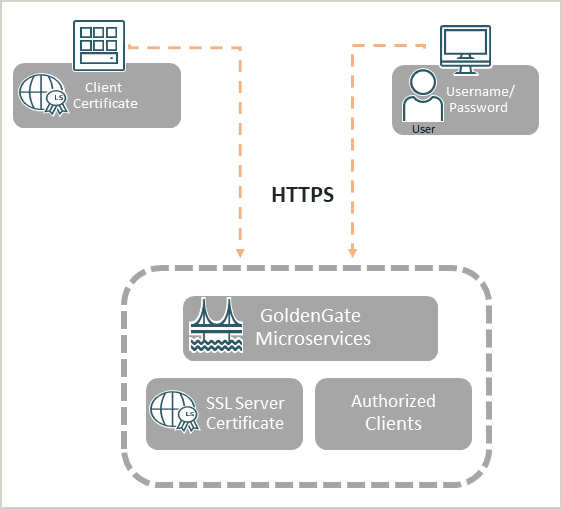
Notice that secure network communication within Oracle GoldenGate is done with TLS (HTTPS underneath REST-API calls and WSS for the Distribution Path).
Oracle GoldenGate supports mutual TLS (mTLS). See the Secure Communication Using TLS and mTLS Support to learn about how mTLS can be used as an additional layer of authentication during the client-server handshake.
You can create self-signed client and server certificates or you can install CA-signed server-side certificates for authentication. These certificates can be managed for checking certificate validity, expiry, and usage from Oracle GoldenGate Service Manager.
To learn about managing certificates from the Service Manager web interface, see Manage Certificates for Deployments.
For steps to create certificates, see Create Certificates for Secure Deployments.
Authenticate Deployments with Certificates
You can create certificates for a secure deployment in an Oracle GoldenGate hub or external certificate when transporting trail data across two different host deployments.
Each system (deployment) has its own set of root, server, and client certificates. The most common use case for generating certificates within the same organization is to create a single trusted root certificate (rootCA), which is used at different locations but within the same organization.
You can create trusted certificates (rootCA), server certificates, client certificates, and distribution client certificate for secure Oracle GoldenGate Microservices Architecture deployments, when setting up a secure deployment or authenticate connections between two separate deployments. See Secure Deployments Using Certificates for details.
The other use case is where a secure deployment must be provided between fully independent organizations in which even the trusted root certificates (rootCA01, rootCA02) are different. Such a case is more complex and is described in the Connecting Two Deployments Using External RootCA Certificate.
Note: The provided OpenSSL commands are using a self-signed certificate. This case is only used to demonstrate how to set up a secure environment with non-commercial certificates. For secure environments, it is recommended to use certificates provided by commercial providers.