Deep Research RAG Agent
Create a research agent that searches reusable ingestion content and returns cited answers in chat.
What Is a Deep Research RAG Agent?
A Deep Research RAG Agent is a pre-built agent that answers research questions from one or more completed ingestions. Ingestions prepare searchable content independently of a specific agent and preserve source references for citations.
Use a Deep Research RAG Agent to research enterprise content from supported data sources, including files, web content, cloud storage, and database tables or views.
Deep Research RAG Agents support the following capabilities:
- Research over reusable ingestion content
- Cited answers from one or more compatible ingestions
- LLM selection for answer generation
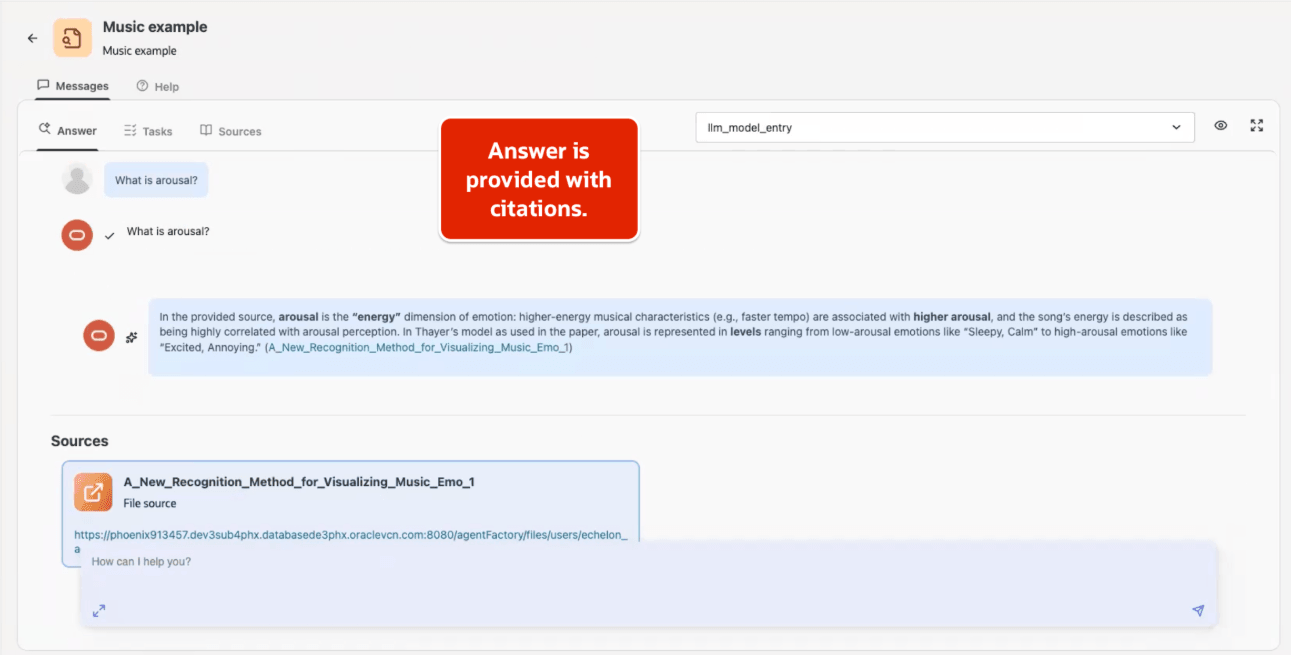
- Chat-based answers with source references and PDF page information when available
Before You Begin
Before you create a Deep Research RAG Agent, complete these tasks:
- Configure the LLM that the agent will use. See Configure LLM.
- Identify the data sources that contain the content for your research questions.
- Confirm that the content is appropriate for the agent’s users.
- If you plan to select multiple ingestions, confirm that they use the same embedding provider and model.
Create a Deep Research RAG Agent
-
Create or select the data sources that contain the content for your research. See the relevant source topics in Data Sources.
-
Create an ingestion from one or more data sources. Choose the preparation, chunking, and embedding settings, then review the configuration before you create it. See Create an Ingestion.
-
Monitor the ingestion until it has a published artifact. A first processing run is not available to consumers until its status is
COMPLETED. See Monitor Status and Availability if the ingestion fails or remains unavailable. -
Select Deep Research RAG Agent from the left navigation menu and select Create Agent.
-
Select one or more ingestions that have published content. If you select multiple ingestions, use the same embedding provider and model for each one.
-
Enter the agent details, review the configuration, and publish the agent.
-
Wait until the agent is available, then open it and ask research questions about the selected content. The agent returns answers with citations to source references and PDF page information when available.
If the agent is unavailable, review its status and diagnostics. If an ingestion is unavailable or processing failed, review its status and follow Monitor Status and Availability.
Share a Deep Research RAG Agent
You can share a Deep Research RAG Agent that you own or for which you have the Can manage access level.
- Open the Deep Research RAG Agent page.
- Select Share from the Actions menu for the agent.
- In the Share dialog, review the users and groups that have access and their current access levels.
- Search for and select users or groups to add, change an existing access level, or remove access. Click Save changes to apply the changes.
The Share dialog identifies the resource owner as Owner. You cannot change or remove the owner’s access. See Manage Identity and Access for access-level definitions.
Troubleshoot Deep Research RAG Agents
| Symptom | Check |
|---|---|
| Ingestion is not listed | Confirm that you have access to it and that it has a published artifact. |
| Multiple ingestions cannot be selected | Confirm that the ingestions use the same embedding provider and model. |
| Agent remains unavailable after publish | Wait for agent processing to finish, then review its status and diagnostics. |
| Answers lack citations | Confirm that the selected ingestions include supported, readable source content. |
| Ingestion processing fails | Review the ingestion failure details and source configuration. See Ingestion Service. |
Collect diagnostics after reproducing ingestion, agent, or chat failures. See Collect Diagnostics.