5.3.5 Using the Design Pane
Learn about how to use the Design pane.
Information on how to use how to use the Design pane includes the following topics:
- About Supported Column Types
Columns of all types available in Oracle Database 10g Release (10.2) or later display as objects in the Design pane. - Adding an Object to the Design Pane
You add an object to the Design pane by selecting it from the Object Selection pane. - Resizing the Design and Results Panes
As you select objects, you can resize Design and Results panes by selecting the Bottom Splitter in the center of the page. - Removing or Hiding Objects in the Design Pane
You remove or hide objects in the Design pane by selecting controls at the top of the object.
Parent topic: Using Query Builder
5.3.5.1 About Supported Column Types
Columns of all types available in Oracle Database 10g Release (10.2) or later display as objects in the Design pane.
Note the following column restrictions:
-
You may only select a maximum of 60 columns for each query.
-
The following column types are not selectable and cannot be included in a generated query:
-
BLOB -
NCLOB -
RAW -
LONG -
LONG RAW -
XMLType -
Any other nonscalar column types
-
Parent topic: Using the Design Pane
5.3.5.2 Adding an Object to the Design Pane
You add an object to the Design pane by selecting it from the Object Selection pane.
To add an object to the Design pane:
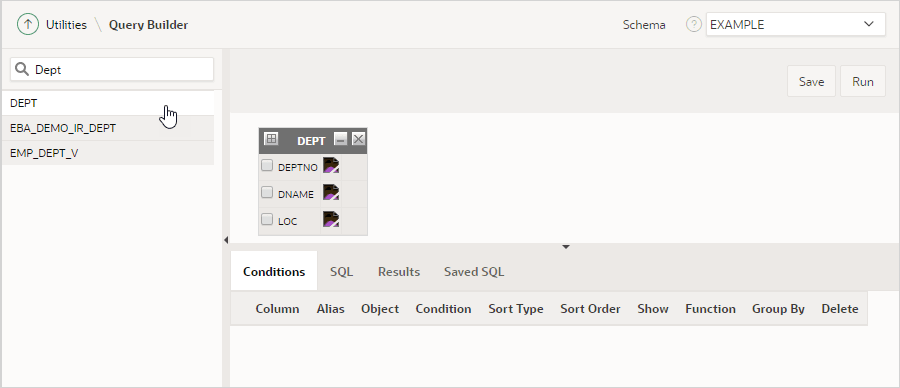
- Select an object from the Object Selection pane.
The selected object appears in the Design Pane. The icon next to the column name represents the type of the column.
See Also:
Parent topic: Using the Design Pane
5.3.5.3 Resizing the Design and Results Panes
As you select objects, you can resize Design and Results panes by selecting the Bottom Splitter in the center of the page.
The Bottom Splitter resembles a gray horizontal rule in the center of the page. Move the Bottom Splitter up and down to shrink and expand the Design pane.
Parent topic: Using the Design Pane
5.3.5.4 Removing or Hiding Objects in the Design Pane
You remove or hide objects in the Design pane by selecting controls at the top of the object.
To remove an object, select the Remove (X) icon in the upper right corner. To temporarily hide the columns within an object, click the Show/Hide Columns (-) icon.
Parent topic: Using the Design Pane