22.10 Centralizing Reusable UI Text
Centralize reusable UI text by converting it to Text Messages manually or in bulk.
Using Text Messages to centralize reusable UI text is useful, even if your
application does not require translation. Convert each reusable string as needed to a
Text Message SOMENAME. Then use
&{SOMENAME}. to replace the original text. In Page
Designer, you can also click the globe button. For more information, see Using the Text Messages Picker.
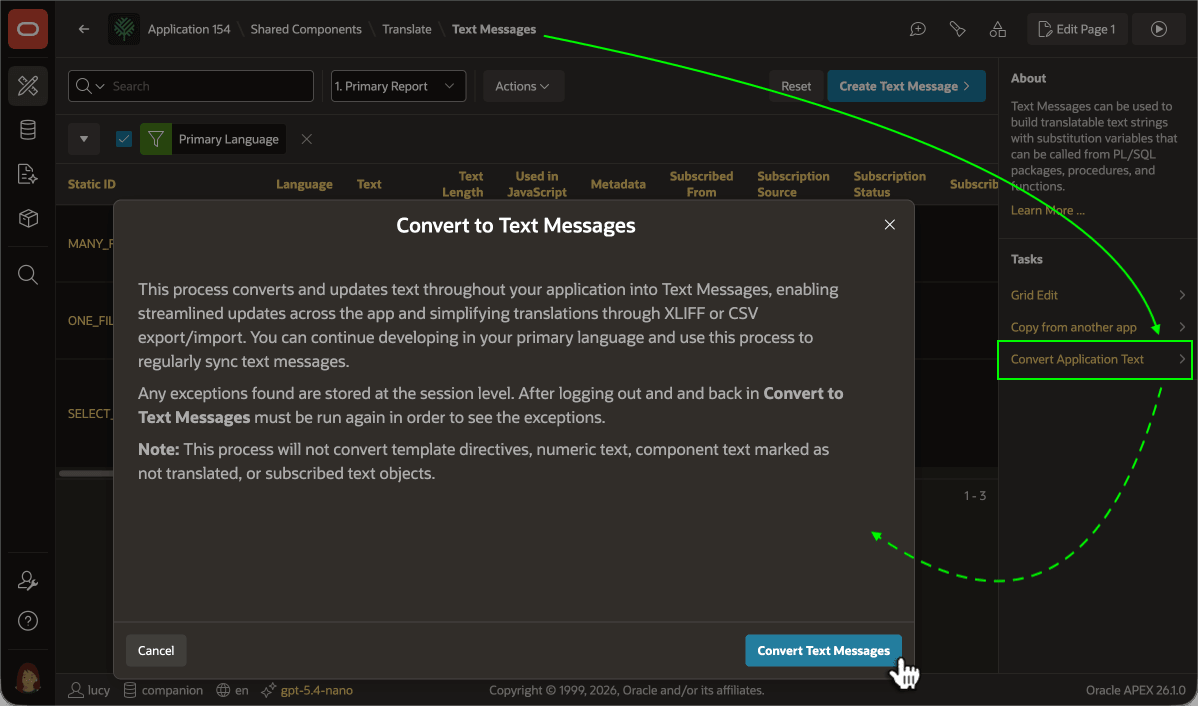
Alternatively, you can automatically convert all text values of translatable properties to Text Messages in bulk. On the Text Messages page in Shared Components, click the Convert Application Text link in the Tasks section as shown below. When you click (Convert Text Messages) in the Convert to Text Messages dialog, App Builder creates any new Text Messages required and replaces each original text with the appropriate substitution.
Tip:
You can repeat Convert Application Text any time to convert new strings added since the last time you ran it.
Figure 22-24 Converting Application Text to Text Messages
Parent topic: Translating Your Application