6.2.3 Configuring Suggestions
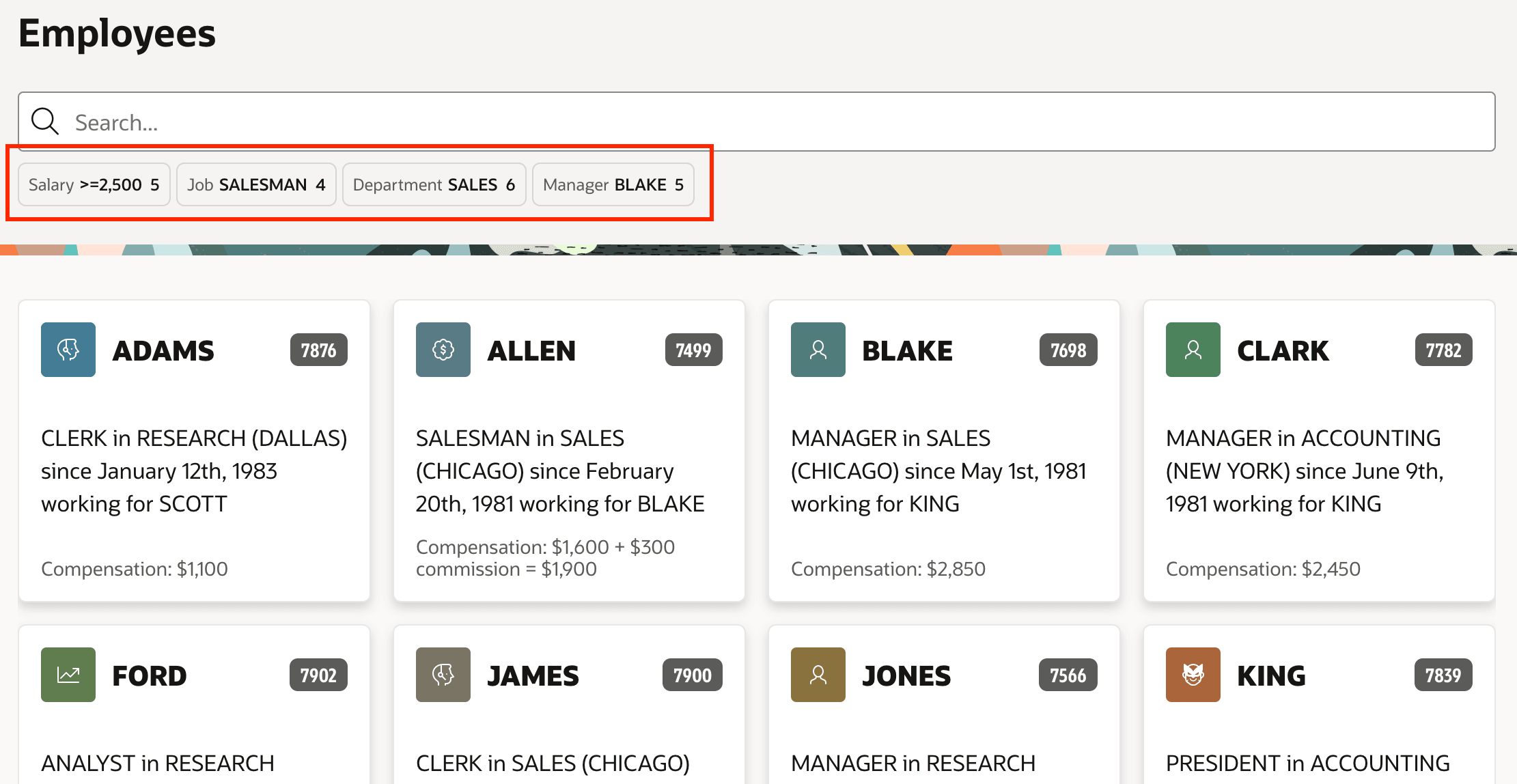
Sometimes end users appreciate a suggestion for common or popular filters to apply. When no other filters are applied, the Smart Filters region can display suggestion "chips" to help a user get started.
For each additional filter you add beyond the required Search one, you can configure its suggestion chip behavior with its Suggestions > Type property. Set to Dynamic to show the first visible filter value. If the filter computes counts, then it will be the most frequently occurring filter option. Otherwise, it's the first option in sorted order. Use a Type of Static Values to set a hard-coded value. The SQL Query option gives you a flexible way to configure the suggestion based on a custom scheme, perhaps involving the current username (:APP_USER) or any other data-driven approach. In all cases, the suggestion value must be one of the return values defined in the filter's list of values. To have no suggestion for a particular filter, its its Suggestions > Type to None.
You can limit the number of suggestion chips using the Maximum Suggestion Chips region property. If left unset, then up to five suggestions can appear, one per suggestion-enabled filter. To suppress suggestions if they don't add value to a particular Smart Filters usage, set this property to zero (0).
Figure 6-16 Suggestion Chips For Initial Filter to Apply
Parent topic: More Space for Results with Smart Filters