7.1.2 Custom Attributes for Data and Settings
The custom attributes you define are named placeholders developers configure in the Property Editor to provide the data the component displays and any settings it requires.
Your templates use directives referencing custom attribute names to conditionally
format data as required and #ATTRNAME# syntax to include an attribute's
value.
In addition to a static ID and name, each attribute definition has other details that inform the Property Editor experience in Page Designer. For example, attributes of type Session State Value show developers a select list to choose a data source column name. A Yes/No type attribute displays an on/off switch, and a Select List lets developers choose a pre-defined option from a set you specify. Use other attribute types to show an icon picker, a color picker, an HTML code editor, a link builder, and more. You can define help text and examples for each attribute that a developer can consult in the Help tab in Page Designer to better understand how each setting affects the component's output.
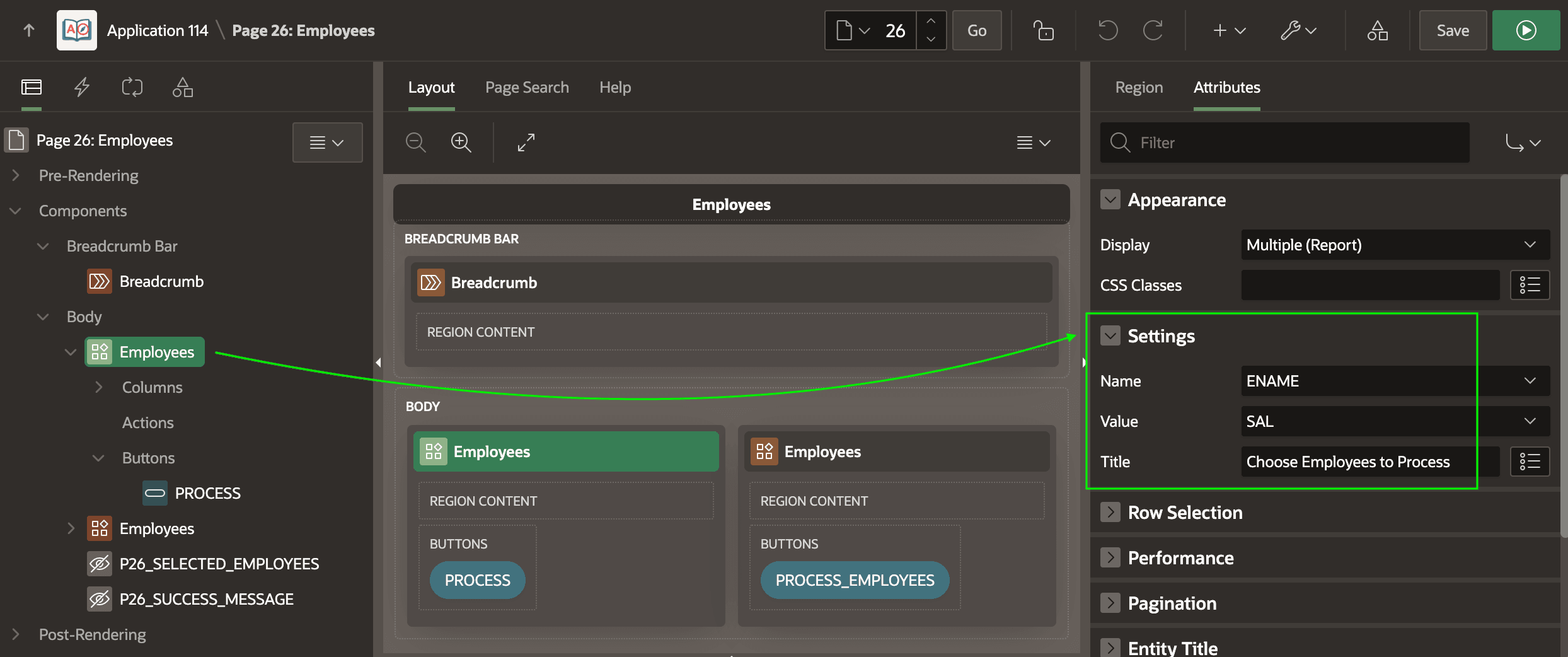
As shown below, by default, your custom attributes display in the Property Editor's Attributes tab in the general Settings section in the display sequence you configure. If multiple attributes contribute to a common purpose, create an attribute group and assign related attributes to that group. The Property Editor displays the grouped attributes in a titled section to clarify how multiple properties affect one aspect of a component's features.
Figure 7-2 Custom Attributes in the Settings Section
Parent topic: Reusable Components Using HTML Skills