8.6.3 Linking to the Edit Page
The wizard configures the Link Column feature to target the form page it creates. This sets up the drill down behavior to let the user view details or edit a row in the report.
After selecting the interactive report region in the Rendering tab and viewing its Property Editor Attributes tab, notice Link Column is set to Link to Custom Target. Clicking on the Target button labeled Page 4, the Link Builder dialog opens. You see the wizard configures a link targeting page 4: the number of the newly-created Form page. In the Set Items section, it adds the name of the target page's P4_EMPNO primary key page item, and the #EMPNO# substitution as the value to pass as a parameter. This expression references the value of the EMPNO column in the current row of the report.
Notice the Value \#EMPNO#\ expression includes surrounding backslashes. This annotation tells the APEX engine to use value verbatim, even if it contains delimiter characters like a colon (:). Strictly speaking, the backslashes are not required to pass a simple EMPNO value that contains no delimiters. However, the wizard does this to ensure the link parameter value is passed correctly for any column.
Figure 8-35 Examining Wizard-Configured Link Column Settings
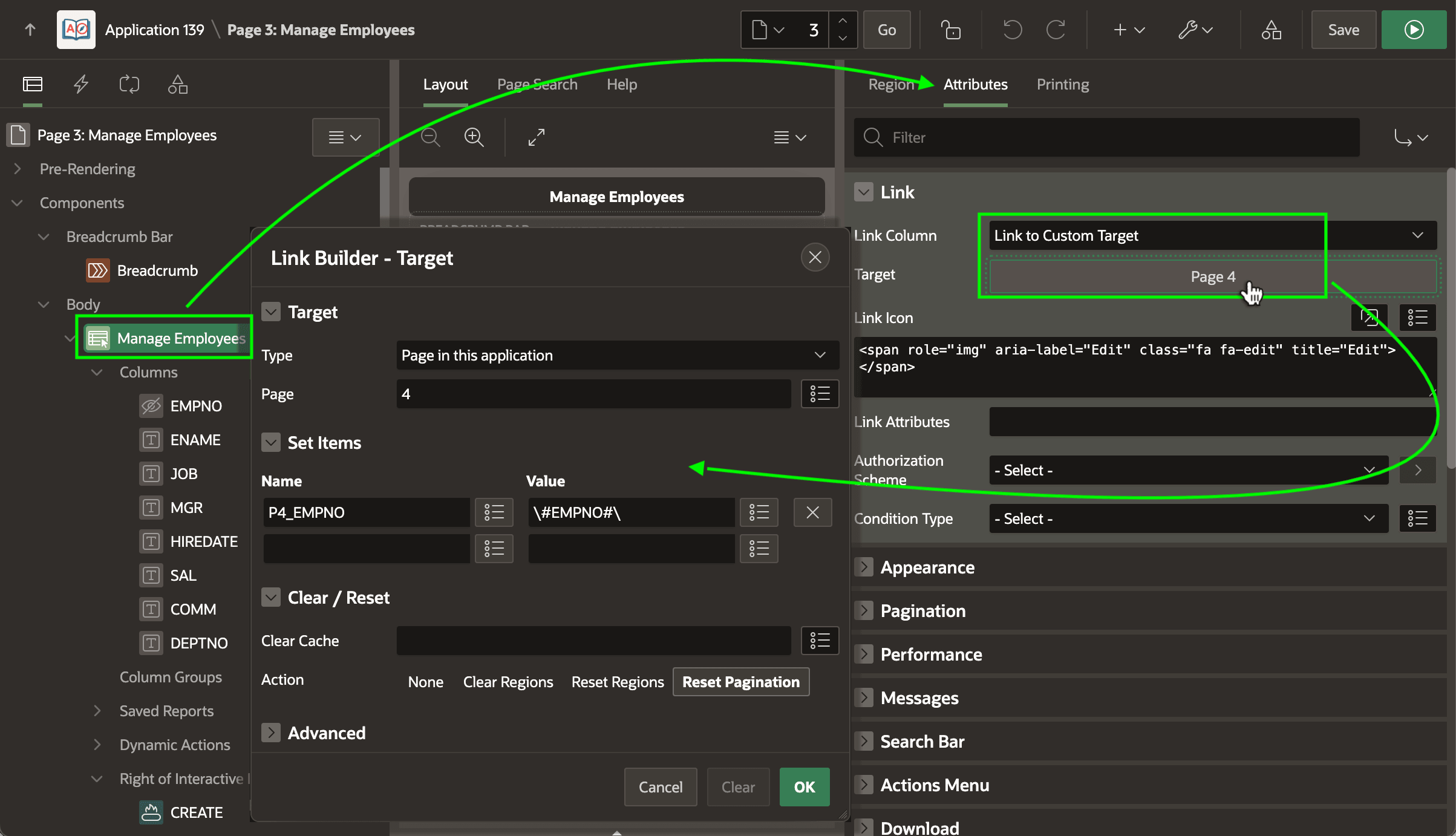
Notice the value of the Link Icon property is the following HTML markup:
<span role="img" aria-label="Edit" class="fa fa-edit" title="Edit"></span>The class attribute value indicates which icon to display. It uses a space-separated value containing fa to signal a Font APEX icon type and fa-edit, the native APEX icon name for a square with a pencil. The title attribute provides the text "Edit" an end user sees when hovering their mouse over the icon. The aria-label attribute ensures accessibility by specifying a label screen readers recognize.
The net result is that a native APEX fa-edit icon displays in the link column. When the user clicks it they are redirected to the modal drawer page 4, passing along the EMPNO primary key value of the clicked-on EMP row as the value of page 4's P4_EMPNO page item.
Parent topic: Studying a List and Edit Flow