8.3.2 Multi-Step Wizard in Page Designer
After the wizard creates the initial pages, use Page Designer to add step-specific content to each one.
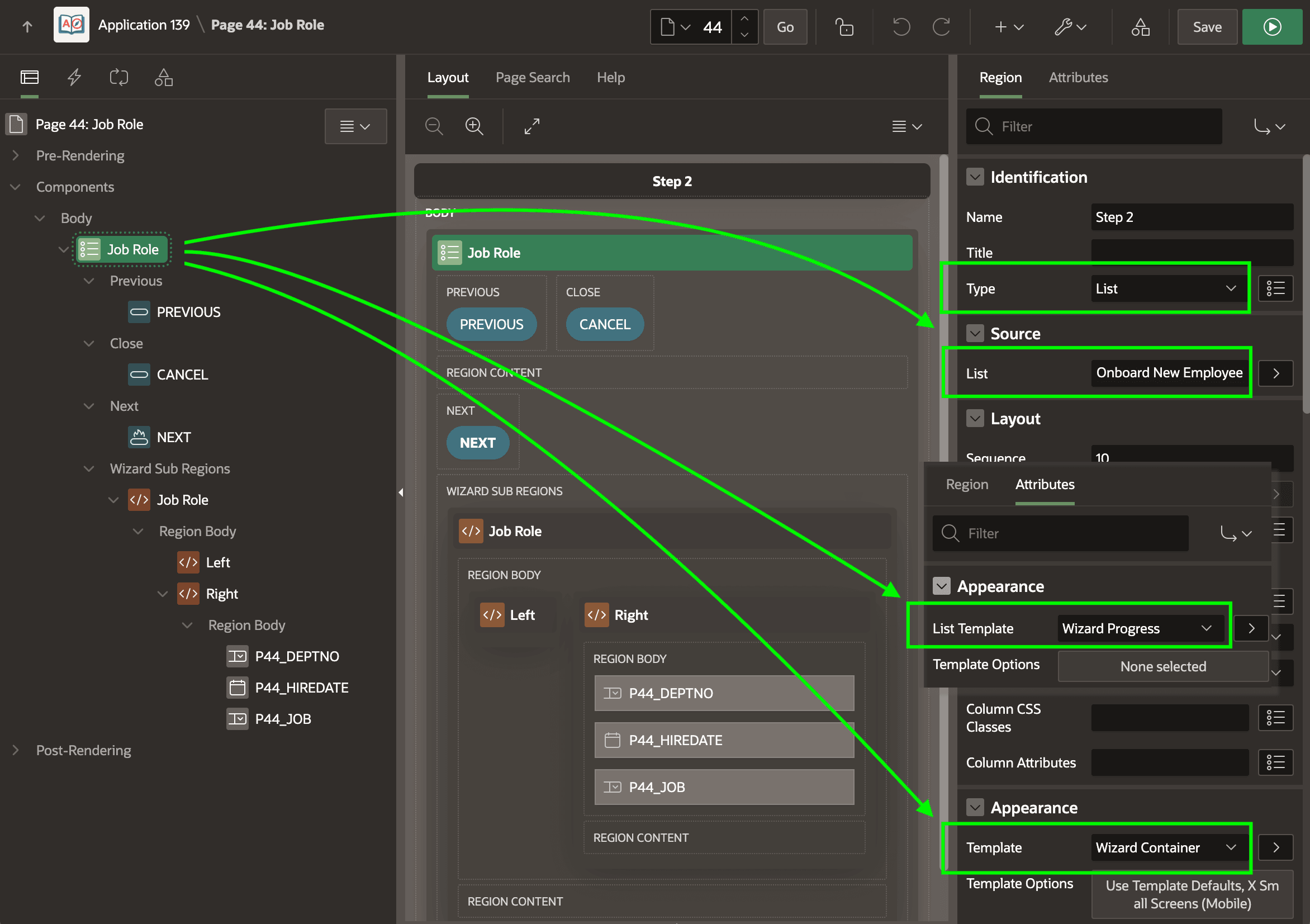
The figure below shows page 44 in Page Designer after adding the three page items into the Job Role region the wizard created. Notice this region is selected in the Rendering tab and that the Property Editor shows it's a List region. The Job Role list region uses the Wizard Container template option and the Wizard Progress list template. This choice renders the list as a sequence of "train" stops. It is one of 13 useful ways a list region can display a list of pages. In the example below, the shared List component named Onboard New Employee provides the page list. The list region's Previous, Close, and Next slots contain buttons that the Wizard Container template shows in line with the steps.
Figure 8-6 Wizard List Region Shows List of Pages as "Train" Stops
Parent topic: Configuring a Wizard Page Flow