25.1.9.2.7 Retrieving Title and Activity Labels
Retrieve workflow and activity labels to show context on the data entry page.
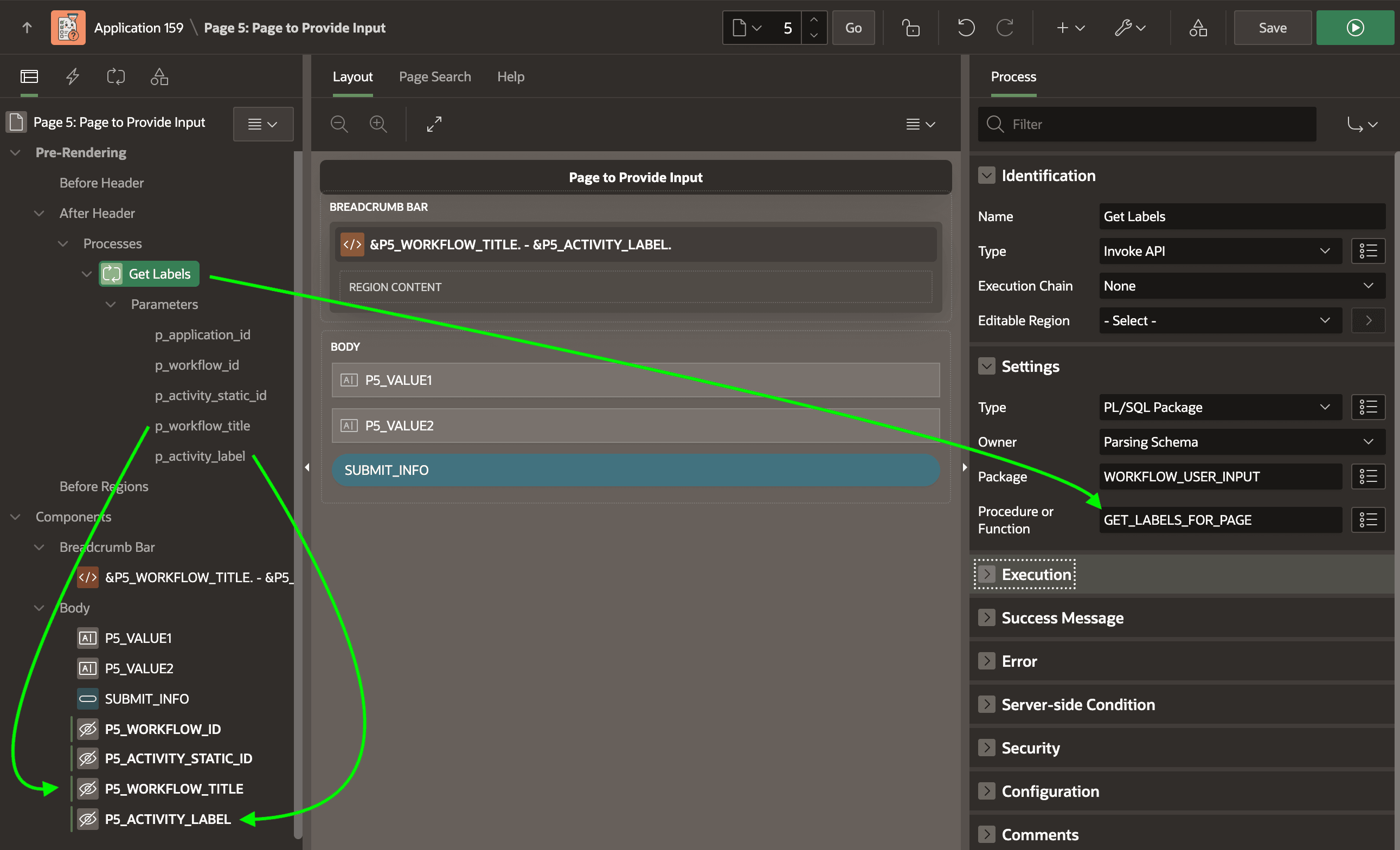
As shown below, the page to collect user input retrieves workflow title and activity
label dynamically. It uses an Invoke API page process in the Pre‑Rendering
section to call a
GET_LABELS_FOR_PAGE procedure. This function accepts
the workflow instance ID, the activity's static ID from hidden page items, and returns
the workflow title and activity label into two other hidden page items. Then the
Static Content region's title references the values of these hidden page
items
using:&P5_WORKFLOW_TITLE. - &P5_ACTIVITY_LABEL.Figure 25-68 Page Collecting Values from the User
The GET_LABELS_FOR_PAGE procedure looks like this. It retrieves the title and activity label by joining the APEX_WORKFLOWS and APEX_WORKFLOW_ACTIVITIES views.
procedure get_labels_for_page(
    p_application_id     in  number default null,
    p_workflow_id        in  number,
    p_activity_static_id in  varchar2,
    p_workflow_title     out varchar2,
    p_activity_label     out varchar2)
is
    l_application_id apex_applications.application_id%type;
begin
    l_application_id := coalesce(p_application_id,v('APP_ID'));
    select a.label as activity_label,
           w.title as workflow_title
     into p_activity_label,
          p_workflow_title
     from apex_workflow_activities a
     join apex_workflows w
       on w.workflow_id = a.workflow_id
    where a.application_id = l_application_id
      and w.workflow_id    =  p_workflow_id
      and a.type_code      = 'NATIVE_WORKFLOW_WAIT'
      and a.state          = 'WAITING'
      and a.static_id      = p_activity_static_id;
exception
    when no_data_found then
        null;
end get_labels_for_page;
Parent topic: Waiting for a Signal to Continue