5.8.2 Tracking and Remembering Selection
Tracking and remembering the tree selection requires configuring a hidden page item with its Value Protected property set to false. You'll use this to store the node value of the selected node. If this hidden page item's value is set during page rendering the tree uses it to restore the selected node.
Start by defining an item like P17_SELECTED_EMPNO and confirming that its Session State > Storage property is set to Per Session (Persistent). Then you can configure the tree region's Node Value to use the EMPNO column and set the Selected Node Page Item to P17_SELECTED_EMPNO. This takes care of restoring the selected node when the hidden page item is populated.
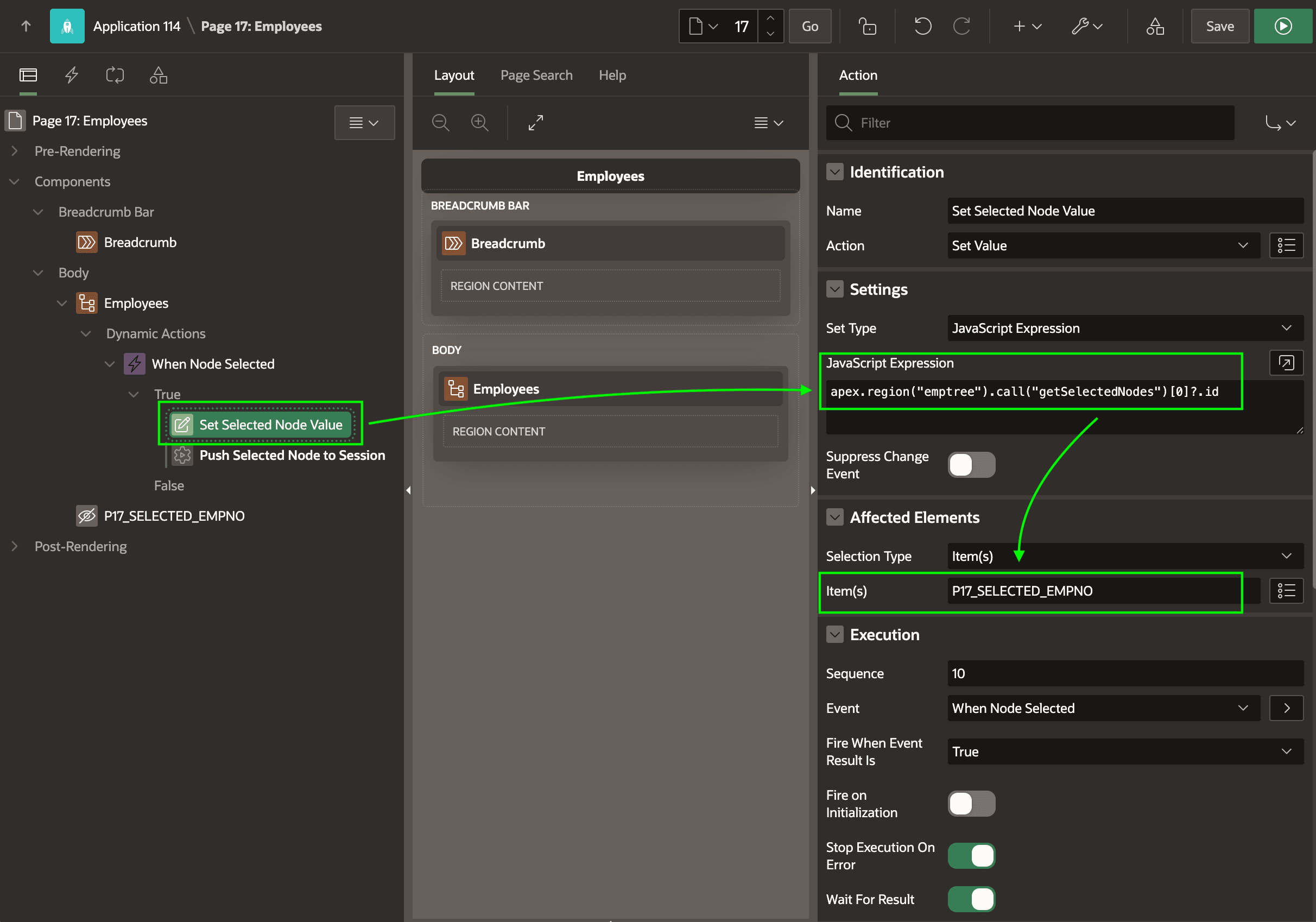
Completing the picture requires two additional steps. Begin by setting the Static ID property of the tree region, for example, to emptree. Next, define a dynamic action on the tree region to react to the Selection Changed [Tree] event. You can title it When Node Selected, and configure its first dynamic action step to be of type Set Value with Affected Elements of Item P17_SELECTED_EMPNO. Set the Fire on Initialization switch to false and configure the Set Type to be JavaScript Expression with the line below. It returns the node value of the first selected node in the region with Static ID emptree.
apex.region("emptree").call("getSelectedNodes")[0]?.idIf remembering the selected employee number when the user submits the page is
adequate, then this is the only additional step required. If instead you want the user's
tree selection to immediately be stored in the session, configure an additional
dynamic action step of type Execute Server-side Code with its Page Items to
Submit property set to P17_SELECTED_EMPNO. The PL/SQL code in
this action step can simply be:
null; -- Push Items to Submit into Session StateWith these settings in place as shown in the figure below, the tree tracks and remembers the user's selection throughout their session.
Figure 5-22 Configuring Dynamic Action Step to Set Selected Node Id Into Hidden Page Item
Parent topic: Exploring Hierarchical Data in a Tree