Overview: Administration Services UI
Key pages in Administration Services include the Administration Services, Manage Instance, and Manage Workspaces.
Administration Services Home Page
The Administration Services home page is the starting point for managing an entire Oracle APEX instance.
Note: To ensure the security and performance of your development environment, some administration functionality is not available in Oracle APEX instances running in Oracle Cloud.
The top of the Administration Services home page features the following:
-
Manage Requests. Approve and decline workspace service requests and change requests. See Managing Requests.
-
Manage Instance. Control and configure key features of the APEX instance. See Manage Instance Page.
-
Manage Workspaces. Create, remove and lock workspaces, manage workspace schema assignments, manage developers and users, view workspace reports, import and export workspaces, and manage application behaviors. See Manage Workspaces Page.
-
Monitor Activity. View various reports on applications, developers, and session activity. See Monitoring Activity Across an Instance.
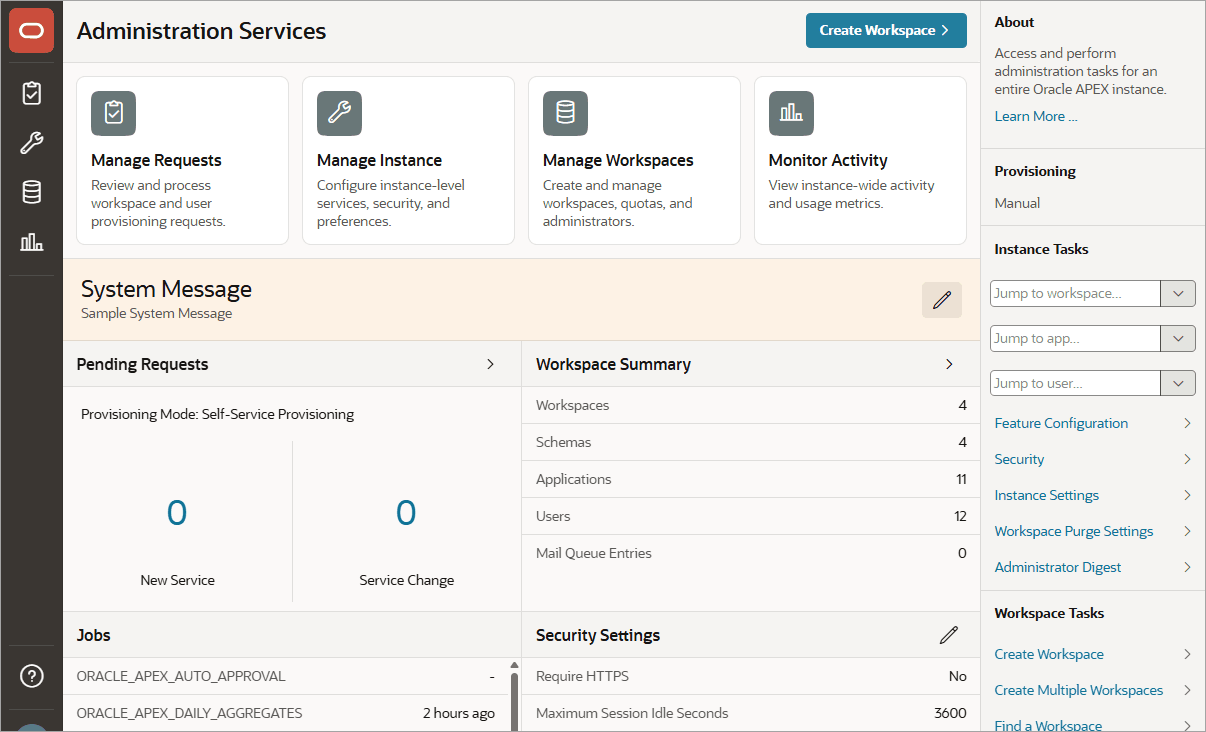
Description of the illustration home_pg.png
System Message Region
The System Message region displays at the center of the page. Administrators can create a system message to communicate with other users within an instance. See Defining a System Message.
Instance Tasks
The Instance Tasks region displays on the right side of the page and features the following links:
-
Jump to workspace. Enter a workspace name to quickly access the Edit Workspace Information page. See Managing Existing Workspaces.
-
Jump to app. Enter a app name or identification number (ID) to quickly access Manage Workspaces, Application Attributes. See Viewing the Application Attributes Report.
-
Jump to user. Enter a user name to quickly access Manage Workspaces, Manage Developers and Users. See Managing Users Across an Oracle APEX Instance.
-
Feature Configuration. Manage configuration settings that apply to an entire APEX instance. See Managing Feature Configuration.
-
Security. Manage security settings that apply to an entire APEX instance. See Configuring Security.
-
Instance Settings. Manage settings that apply to an entire APEX instance such as selecting the provisioning method for workspace creation, configuring storage, and configuring support for email, wallets, and report printing. See Configuring Instance Settings.
-
Workspace Purge Settings. Configure purge behavior for inactive workspaces. See Purging Inactive Workspaces.
Workspace Tasks
The Workspace Tasks region also displays on the right side of the page and features the following links:
-
Create Workspace. Links to the Create Workspace Wizard. See Creating Workspaces in Administration Services.
Note: You can also access the Create Workspace Wizard by clicking the Create Workspace button at the top of the page.
-
Create Multiple Workspaces. Links to the Create Multiple Workspace Wizard. See Creating Multiple Workspaces.
-
Find a Workspace. Displays a searchable report of all workspaces. See Performing a Workspace Search.
-
Manage Workspaces. Links to the Manage Workspaces page. See Managing Existing Workspaces.
-
Create User. Enables you to create a new user. See Creating New User Accounts in Administration Services.
-
Find a User. Displays a searchable report of all users in the current instance. See Managing Users Across an Oracle APEX Instance.
-
Reset User Password. Links to the Manage Developer and Users page. To reset a user, click the user, edit the attributes under Password, and click Apply Changes. See Editing an Existing User Account in Administration Services.
Available Updates
The Available Updates region indicates if updates are available for APEX and the Oracle REST Data Services. If your installation is current the following message displays:
System is up-to-dateTo configure updates, click Set Preferences for Available Updates icon which resembles a gear and displays to the right of the Available Updates region title. The Available Updates dialog appears. You can enable or disable updates by selecting Yes or No from Check for Available Updates. To learn more, see field-level Help.
Tip:
To perform this check, APEX transmits the version number of APEX and other system components to Oracle Corporation. To continuously improve our products, Oracle is interested in learning about product usage. To that end, statistics can occasionally be sent to Oracle describing the product features in use. No personally identifiable information is sent. To review Oracle’s privacy policy, see:
http://www.oracle.com/us/legal/privacy/overview/index.html
Manage Instance Page
Instance administrators use the Manage Instance page to control and configure key features of an APEX instance. Many of these links also display on the Administration Services home page.
Note: To ensure the security and performance of your development environment, some administration functionality is not available in Oracle APEX instances running in Oracle Cloud.
Instance Settings
Instance Settings contains the following links:
-
Feature Configuration. Manage configuration settings that apply to an entire APEX instance. See Managing Feature Configuration.
-
Security. Manage security settings that apply to an entire APEX instance. See Configuring Security.
-
Instance Settings. Manage settings that apply to an entire APEX instance such as selecting the provisioning method for workspace creation, configuring storage, and configuring support for email, wallets, and report printing. See Configuring Instance Settings.
-
Workspace Purge Settings. Configure purge behavior for inactive workspaces. See Purging Inactive Workspaces.
Manage Meta Data
Manage Meta Data contains the following links:
-
Session State. Monitor and manage the session state repository. See Managing Session State for an Instance.
-
Mail Queue. Monitor the email messages in the mail queue. See Managing the Mail Queue.
-
Installed Translations. Links to the Installed Translation report which indicates which translations have been loaded for the APEX instance. See Viewing Installed Translations.
-
Interactive Report Subscriptions. View and manage subscriptions created by end users using interactive reports in the instance. See Deleting Interactive Report Subscriptions.
Messages
Messages contains the following links:
-
Define Environment Banner. Configure a environment banner for an instance. See Configuring an Environment Banner in Administration Services.
-
Define Login Message. Enables an instance administrator to create and manage login message. See Defining a Login Message.
-
Define System Message. Enables an instance administrator to create and manage system message. See Defining a System Message.
-
Manage Site-Specific Resources. Create and manage a Site-Specific Resources lists. These links display on the Workspace home page and on the Workspace Login page. See Managing a Site-Specific Resources List.
Manage Logs and Files
Manage Logs and Files contains the following links:
-
Manage Log Interval. Use the Manage Log Interval page to set the minimum number of days to retain log information for log files. See Managing Log Intervals.
-
Archive Activity Log. takes the Oracle APEX Activity log, summarizes it, and writes the results to an archived activity log. See Archiving the Activity Log.
-
SQL Workshop Log. View SQL Workshop logs and delete log entries. See Deleting SQL Workshop Log Entries.
-
Page View Activity Log. View and delete User Activity log entries. See Deleting Page View Activity Log Entries.
-
Developer Activity Log. View and delete Developer Activity log entries. See Managing the Developer Activity Log.
-
External Click Counting Log. View and delete External Click Counting log entries. See Deleting Click Counting Log Entries.
-
Login Access Log. View and delete Login Access log entries. See Deleting the Login Access Log.
-
Web Service Activity Log. Create an archive of Web Service activity.
-
REST Synchronization Log. Configure when entries are purged or delete the REST Source Synchronization log. See Deleting REST Synchronization Log Entries.
-
Automation Log. Configure when entries are purged or delete the Automation log. See Deleting Automation Log Entries.
-
Install / Upgrade Logs. View a log of installation or upgrade phases and their corresponding metrics. See Viewing Install and Upgrade Logs.
Self Service Sign Up
Self Service Sign Up contains the following links:
-
Manage New Service Signup Wizard. Create and manage the New Service Signup Wizard. You can require users fill out a justification and accept an agreement and optionally respond to survey questions before the New Service Signup Wizard submits a request. See Creating a Service Signup Wizard.
-
Run New Service Signup Wizard. Run the New Service Signup Wizard. See Running a New Service Signup Wizard.
-
Configure Email Restrictions. Add restrictions for email patterns used to auto/self provision a workspace. See Configuring Service Signup Wizard Email Restrictions.
Manage Workspaces Page
Instance administrators use the Manage Workspaces page to manage workspaces for an APEX instance. A workspace is a shared work area where multiple developers can create applications. Each workspace has the privilege to parse as one or more database schemas.
Workspace Actions
Links displaying under Workspace Actions:
-
Create Workspace. Create a new workspace using the Create Workspace wizard. See Creating Workspaces in Administration Services.
-
Create Multiple Workspaces. Create multiple workspaces using the Create Multiple Workspaces wizard. See Creating Multiple Workspaces.
-
Remove Workspace. Remove a workspace. See Deleting a Workspace.
-
Lock Workspace. Lock a workspace. Locking a workspace disables all workspace administrator, developer, and user accounts in the workspace and makes all applications unavailable. See Locking a Workspace.
-
Manage Workspace to Schema Assignments. View a report that lists the schemas in which a given workspace can build. When developers create new applications they must choose a schema from the list of schemas assigned to the workspace. See Managing Workspace to Schema Assignments.
-
Manage Developers and Users. To access the APEX development environment, users sign in to a shared work area called a workspace. Use the Manage Developers and Users page to create, edit, and delete users. See Managing Users Across an Oracle APEX Instance.
-
Manage Component Availability. View a report of Workspace Settings by workspace. To override the current settings, click the workspace name and edit the setting on the Workspace Settings page. See Managing Component Availability for an Instance.
Workspace Reports
Links displaying under Workspace Reports:
-
Existing Workspaces. View a report of provisioned workspaces. Click the workspace name to view details about a specific workspace. Click Delete in the action column to start the Remove Workspace Wizard. See Managing Existing Workspaces.
-
Workspace Details. Select a workspace and click Edit, Schema Assignments, and Manage Users to view key attributes about the workspace. See Viewing the Workspace Details Report.
-
Workspace Database Privileges. View a report of workspace database privilege details. To edit a workspace, click the workspace name. See Viewing Workspace Database Privileges.
-
Manage File Utilization. View the File Utilization by Workspace report. This report lists the workspace name, total file size, file counts, and the relative age of the newest and oldest files. Use this report to gauge workspace activity. See Viewing File Size and File Count by Workspace.
-
Find and Email Workspace Summary. View the Workspace Search report. Click the workspace name to view workspace details and email the report. See Performing a Workspace Search.
-
Data Dictionary Cache. View the Data Dictionary Cache report to manually refresh the Data Dictionary Cache. Wizards use this information when creating new applications and pages. See Viewing or Refreshing the Data Dictionary Cache.
Export Import
Links displaying under Export Import:
-
Import Workspaces. Links to the Import Workspace Wizard. Use this wizard to import a workspace. See Importing a Workspace in Administration Services.
-
Export Workspaces. Links to the Export Workspace page. Use this page to select a workspace and access the Export Workspace Wizard. See Exporting a Workspace in Administration Services.
Manage Applications
Links displaying under Manage Applications:
-
Application Attributes. Links to the Application Attributes page key application attributes including the workspace name and ID, application ID, parsing schema, number of application pages, logging status, build status, application status, and application alias. See Viewing the Application Attributes Report.
-
Build Status. Displays the Build Status report. Use this report to review and change the Build Status attribute of any application in any workspace. See Changing Application Build Status in Administration Services.
-
Parsing Schema. Displays the Parsing Schema report. Use this report to identify the current parsing schema of each application in any workspace. See Viewing the Parsing Schemas Report.