14 Data Model
Oracle Backend with Firebase APIs supports multiple data models for your app data. This chapter explains the collection-document model and how relational data can be mapped into it (if needed). If you are new to Oracle Backend with Firebase APIs, start with the Document-Collection Model. It is the core SDK experience and works well for most app backends.
- Document-Collection Model
- Relational-to-Collection Mapping
- Standalone Duality Views (Advanced)
- Hierarchical Structure and Subcollections
- Supported Data Types
Parent topic: Database
14.1 Document-Collection Model
The Document-Collection Model stores data as JSON documents grouped into collections. A collection groups documents of the same type, like users or orders. Each document is a single record with fields, and documents can include nested objects or subcollections. You access data by its collection path and document ID.
Key features include:
-
Collections contain documents. Each document is a JSON object with key-value fields.
-
Documents can contain nested objects and subcollections for hierarchical data.
-
You can create, read, update, and delete documents.
-
Document-level access control is managed through security rules.
-
Real-time change notifications are available.
-
Indexing is supported to keep queries fast as data grows.
The following examples show the hierarchy used throughout this section.
The first example stores each user’s recipes (and each recipe’s notes/photos) nested
under users/{uuid} for a per-user hierarchy.
users (collection)
└── {uuid} (document)
    ├── displayName
    └── photoURL
    └── recipes (subcollection)
        └── {recipeId} (document)
            ├── title
            ├── ingredients
            ├── steps
            ├── category
            ├── difficulty
            ├── tags
            ├── avgRating
            ├── photoRefs
            ├── createdAt
            └── updatedAt
            ├── notes (subcollection)
            │   └── {noteId} (document)
            │       ├── content
            │       └── createdAt
            └── photos (subcollection)
                └── {photoId} (document)
                    ├── url
                    ├── storageRef
                    └── createdAt
The second example follows same nested structure, but records uuid on
recipe/note/photo documents to make ownership explicit and support easier querying:
users (collection)
└── {uuid} (document)
    ├── displayName
    └── photoURL
    └── recipes (subcollection)
        └── {recipeId} (document)
            ├── uuid (owner)
            ├── title
            ├── ingredients
            ├── steps
            ├── category
            ├── difficulty
            ├── tags
            ├── avgRating
            ├── photoRefs
            ├── createdAt
            └── updatedAt
            ├── notes (subcollection)
            │   └── {noteId} (document)
            │       ├── uuid
            │       ├── content
            │       └── createdAt
            └── photos (subcollection)
                └── {photoId} (document)
                    ├── uuid
                    ├── url
                    ├── storageRef
                    └── createdAt
This model is ideal for JSON-style, schema-less storage for applications that require agility in data modeling, such as flexible schemas and hierarchical data access - like user profiles, chat messages, or product catalogs.
Parent topic: Data Model
14.2 Relational-to-Collection Mapping
Oracle Backend with Firebase APIs is optimized for the collection-document model, but existing Oracle Database users often have data in relational tables. In that case, you can map relational tables into a hierarchical collection structure without copying data.
Relational-to-collection mapping publishes existing relational tables as a collection and, where foreign-key relationships exist, as subcollections. It provides the regular Oracle Backend with Firebase APIs collection experience without copying table data.
Create a mapping in the Console with Link to existing relational table:
-
Enter the root table in Parent table name.
-
Select the add-child button beside that table (the branching icon with a plus sign), then enter the related table in the nested Child table name field.
-
Select the add-child button beside a child table to add the next level in the hierarchy.
-
Select Add table to define another independent root-table hierarchy.
-
Select Preview to review the mapping, then select Save to publish it.
The Console uses the parent and child table names to build the hierarchy. The declared primary-key and foreign-key relationship between each pair supplies the relational link. The Console currently maps tables in the project owner schema through this workflow. A project-owned standalone duality view can read a table owned by another schema when the project owner has the required direct object privileges; that cross-schema design is created and managed as a standalone view rather than through the Console mapping interface.
The mapping has these characteristics:
-
Each mapped table is published as an addressable collection or subcollection path.
-
A primary-key and foreign-key relationship defines the parent-child path. A child table has one parent in the published hierarchy, so the hierarchy is linear and non-cyclic.
-
The Console creates and manages the duality views and collection metadata that implement the published paths.
-
Applications use the ordinary collection SDK API and collection-oriented tools, including the CLI, with the published collection paths.
The Console mapping performs two related tasks: it creates the duality views and it
registers the resulting collection paths in BAAS_COLLECTION_METADATA.
The registration is what allows the ordinary collection SDK API, the Console, and
collection-oriented CLI commands to resolve the path as a collection.
The generated mapping views use identifiers to represent these paths. Each
published document has an OID. A root-collection document has
parent_oid set to _docId, the Oracle Backend with
Firebase APIs document-path placeholder. A child-collection document has
parent_oid derived from its parent document's OID.
Oracle Backend with Firebase APIs uses these values to resolve the parent-child
collection path; applications use the published paths and document references supplied
by the collection APIs.
A developer-created duality view can also be made available through the ordinary
collection path by creating the matching BAAS_COLLECTION_METADATA
registration. The registration includes the collection path and a
PATH_HASH generated with ORA_HASH; the duality
view supplies the corresponding OID and, for collection hierarchies,
parent_oid values. This is distinct from direct standalone-view
access with dualityViewCollection(), which addresses the duality view
without a collection registration.
For example, mapping DEPT and EMP through
EMP.DEPTNO can publish a hierarchy such as:
departments/{departmentDocument}/employees/{employeeDocument}The department and employee records are separately addressable documents in this model. Oracle Backend with Firebase APIs uses document identifiers and parent relationship metadata to resolve those paths.
Figure 14-1 Relational Data Model
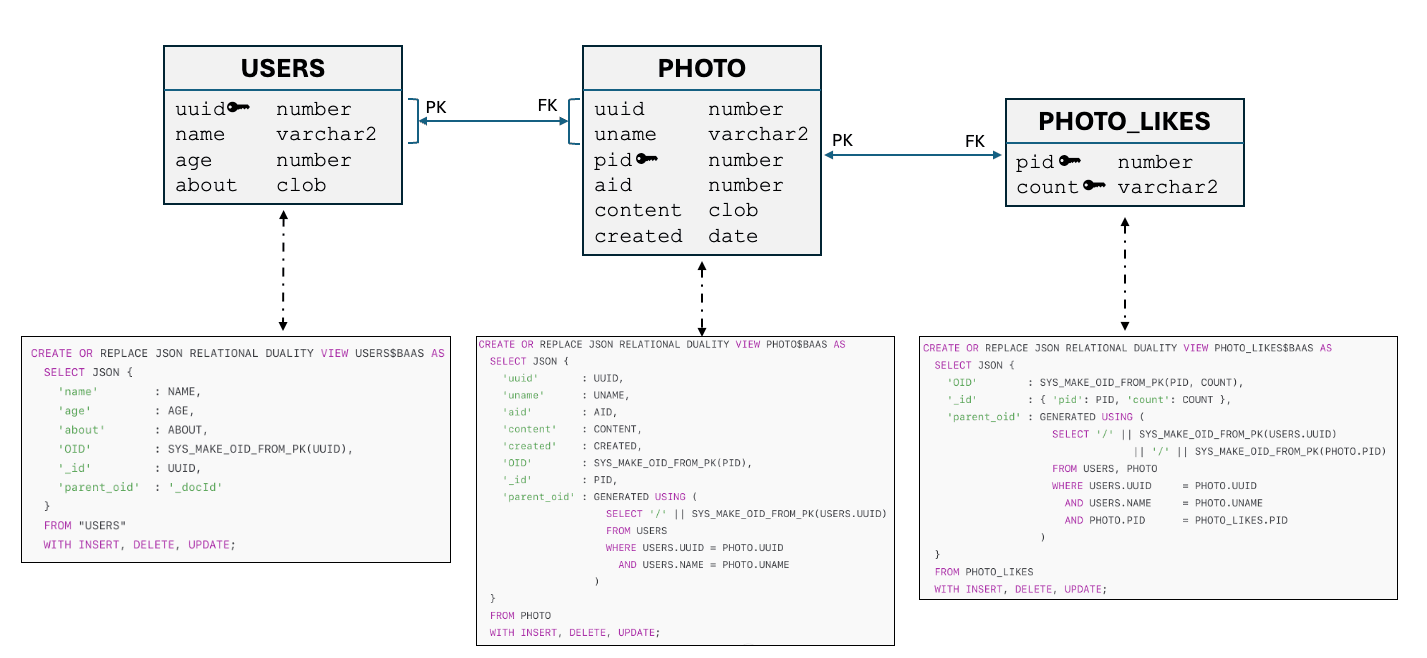
Use Standalone Duality View when the application needs a developer-defined nested JSON shape,
such as one department document containing an employees array. That
model is described in Advanced Features and is accessed through the SDK duality-view API.
Parent topic: Data Model
14.3 Standalone Duality Views (Advanced)
A standalone duality view is an Oracle JSON relational duality view created by an application developer in the project owner schema. It provides a developer-defined document shape over relational data and can reference objects in another schema when the project owner has the required direct object privileges. These views are created outside the Oracle Backend with Firebase APIs Console and are not generated by an Oracle Backend with Firebase APIs project.
A standalone view and a relational-to-collection mapping can represent the same underlying tables, but they publish different API shapes. The mapping publishes separately addressable table collections; a standalone view publishes the nested document shape defined by its DDL. See Standalone Duality View for standalone-view identifiers, security rules, and SDK access.
Requirements
-
The duality view must include an
OIDfield at the root level. -
OIDmust be unique and should be autogenerated if not provided in the document. -
The duality view must support inserts, updates, and deletes.
-
The view must be created in the project owner schema.
-
A security rule must exist for the view name and each supported operation.
Supported Operations
-
Add document
-
Update document
-
Read collection or document
Parent topic: Data Model
14.4 Hierarchical Structure and Subcollections
Oracle Backend with Firebase APIs documents can contain subcollections, which are nested collections within a parent document. This structure supports deeply nested data models.
Example 14-1 Hierarchy
Each level can contain documents with their own fields and subcollections, enabling rich data modeling.
users (collection)
  └── Scott (document)
        └── recipes (subcollection)
              └── Cookies (document)
                    └── notes (subcollection)
Parent topic: Data Model
14.5 Supported Data Types
Oracle Backend with Firebase APIs supports a wide range of data types for document fields:
| Data Type | Description |
|---|---|
|
|
Text values |
|
|
Integer or floating-point numbers |
|
|
|
|
|
Nested object |
|
|
List of values |
|
|
Server or client time |
Parent topic: Data Model