Select AI Object List Dialog
The Select AI Object List Dialog allows you to select which database objects will have their metadata provided to the model. The model requires this metadata to be able to construct SQL queries in response to natural language queries. This dialog is accessed through the Configure Select AI Profile Dialog.
See Also:
Opening the Select AI Object List Dialog
The AI Object List Dialog is opened using the Configure Select AI Profile Dialog.
Using the Select AI Object List Dialog
The Select AI Object List Dialog appears as follows:
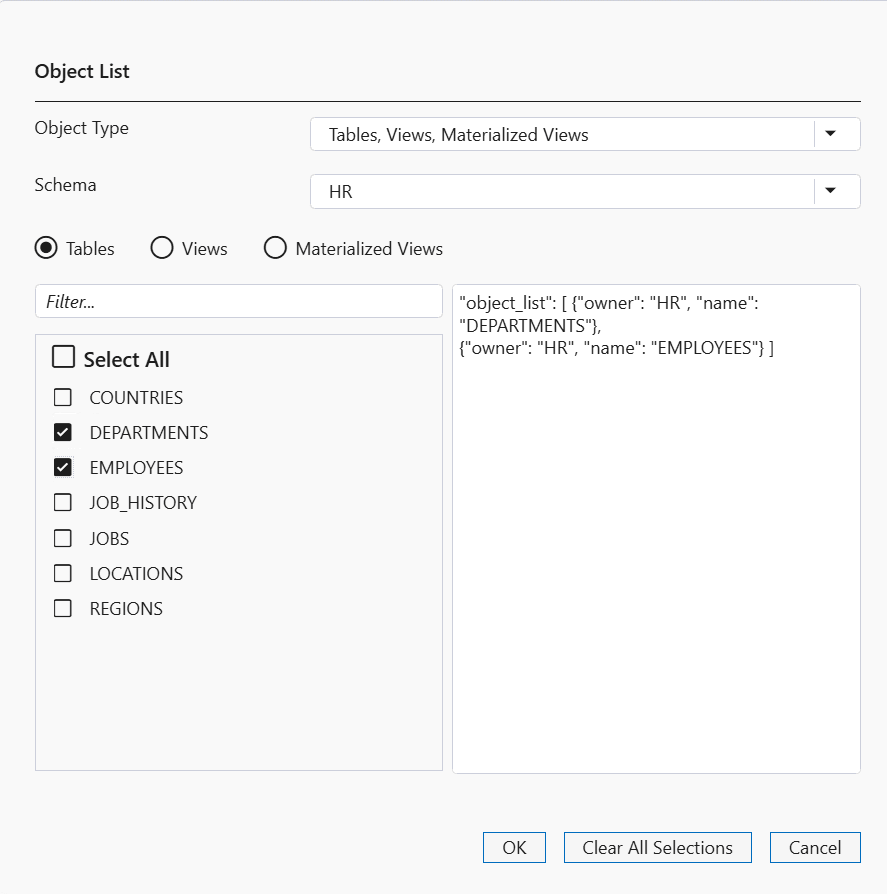
The Select AI Object List Dialog has the following controls:
| Control | Description |
|---|---|
|
Object Type |
Select Schemas if you wish the database to provide metadata for all tables, views or materialized views within one or more entire schemas. Select Tables, Views, Materialized Views if you wish to select specific Tables, Views, or Materialized Views. You may choose both types as you build up your list, for example you might choose all objects in the HR schema and selected objects in the SCOTT schema. |
|
Schema |
If you selected Object type of Tables, Views, Materialized Views, then select the schema you wish to choose objects from. |
|
Tables, Views, Materialized Views radio buttons |
Select which type of object you wish to view. |
|
Filter field |
Enter a text string that will filter the list of objects or schema names |
|
Select All checkbox |
Check this checkbox to select all displayed objects or schemas |
|
Ok |
Closes the dialog and populates the Configure Select AI Profile Dialog with your choices. |
|
Clear All Selections |
Erases those selections you have already made. |
|
Cancel |
Discards your selections and closes the dialog. |